
Development Windows
Bouffalo Labs ISP (BLISP)
Flash supported Bouffalo RISC-V microcontrollers from the Windows command line with BLISP, an open-source tool used for devices such as Pinecil V2.
- Operating system
- Windows; minimum version not specified in the consulted project documentation
- Architecture
- x86-64
- Download package
- ZIP archive (blisp-windows-x86_64.zip)
Command-line flasher for supported Bouffalo devices. Firmware and hardware preparation are separate requirements.
Link checked · Download guidance
What is Bouffalo Labs ISP (BLISP)?
BLISP is an in-system-programming tool and library for writing firmware to supported Bouffalo Labs RISC-V microcontrollers. On Windows, it runs from a terminal rather than a graphical flashing wizard. Its project documentation covers BL60x and BL70x chips and lists Pinecil V2 and Pinecone as supported devices. The selected download is the project's v0.0.5 Windows x86-64 ZIP package.
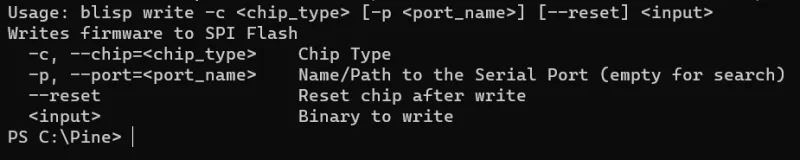
The Windows usage example writes a firmware file with a selected chip family and can reset the chip after writing. For the documented USB workflow, BLISP can search for a serial port; the Pinecil guide also shows an explicit COM-port argument when automatic discovery fails. You must supply firmware appropriate for the connected device: BLISP is the flasher, not the firmware itself.
Hardware preparation matters. The Pinecil V2 guide requires flashing mode and warns against connecting its DC barrel jack while updating because this can damage the computer and the iron. Follow the device-specific instructions before issuing a write command. The project also states that its library API and command-line arguments are not yet stable, so check the instructions for your chosen release rather than treating old commands as a permanent interface.
What it offers
- Write firmware to supported Bouffalo RISC-V MCUs using a command-line tool.
- Select a chip family and specify a serial port when needed.
- Search for the serial port in the documented Windows USB workflow.
- Reset the target chip after writing with the documented reset option.
- Use the project as a library as well as a standalone flashing tool.
Good to know
- The library API and command-line arguments are explicitly not stable yet.
- Requires compatible hardware, appropriate firmware and device-specific flashing preparation; it is not a general-purpose Windows updater.
- The Pinecil V2 guide warns that using its DC barrel jack during firmware updating can damage the PC and Pinecil.
- The selected package is Windows x86-64; the consulted documentation does not specify a minimum Windows version.
Product images
Sources
References used for this listing. Retrieval dates do not indicate hands-on testing.
- pine64/blisp — official project README ↗Retrieved
- Update Pinecil V2 — official BLISP project wiki ↗Retrieved
- Release blisp v0.0.5 — pine64/blisp ↗Retrieved
- BLISP v0.0.5 — official release asset list ↗Retrieved
- BLISP MIT License ↗Retrieved
More in development
View category ↗

010 Editor 17.0
Inspect and edit binary files on Mac with 010 Editor, a paid text and hex editor with Binary Templates, file comparison and a 30-day trial.
010 Editor 17.0
Inspect and edit binary files with 010 Editor for Windows, a text and hex editor with Binary Templates, file comparison and scripting. Includes a 30-day trial.
10x Editor
Edit and navigate C++ projects on Windows with a built-in parser, workspace search and Visual Studio project support. A paid license is required after the 30-day trial.