

Utilities Windows
Brave for Windows
Browse the web with Brave for Windows, a free Chromium-based browser with built-in Shields controls for third-party ads, trackers and cross-site cookies.
- Operating system
- Windows 10 or later
- Architecture
- x64 download endpoint; ARM64 also supported by the browser
- Download package
- EXE setup program (BraveBrowserSetup.exe)
Publisher requirements list ARM64 or a 64-bit Intel/AMD CPU. This link is the Windows x64 release endpoint; installer execution and installed version were not tested.
Link checked · Download guidance
What is Brave?
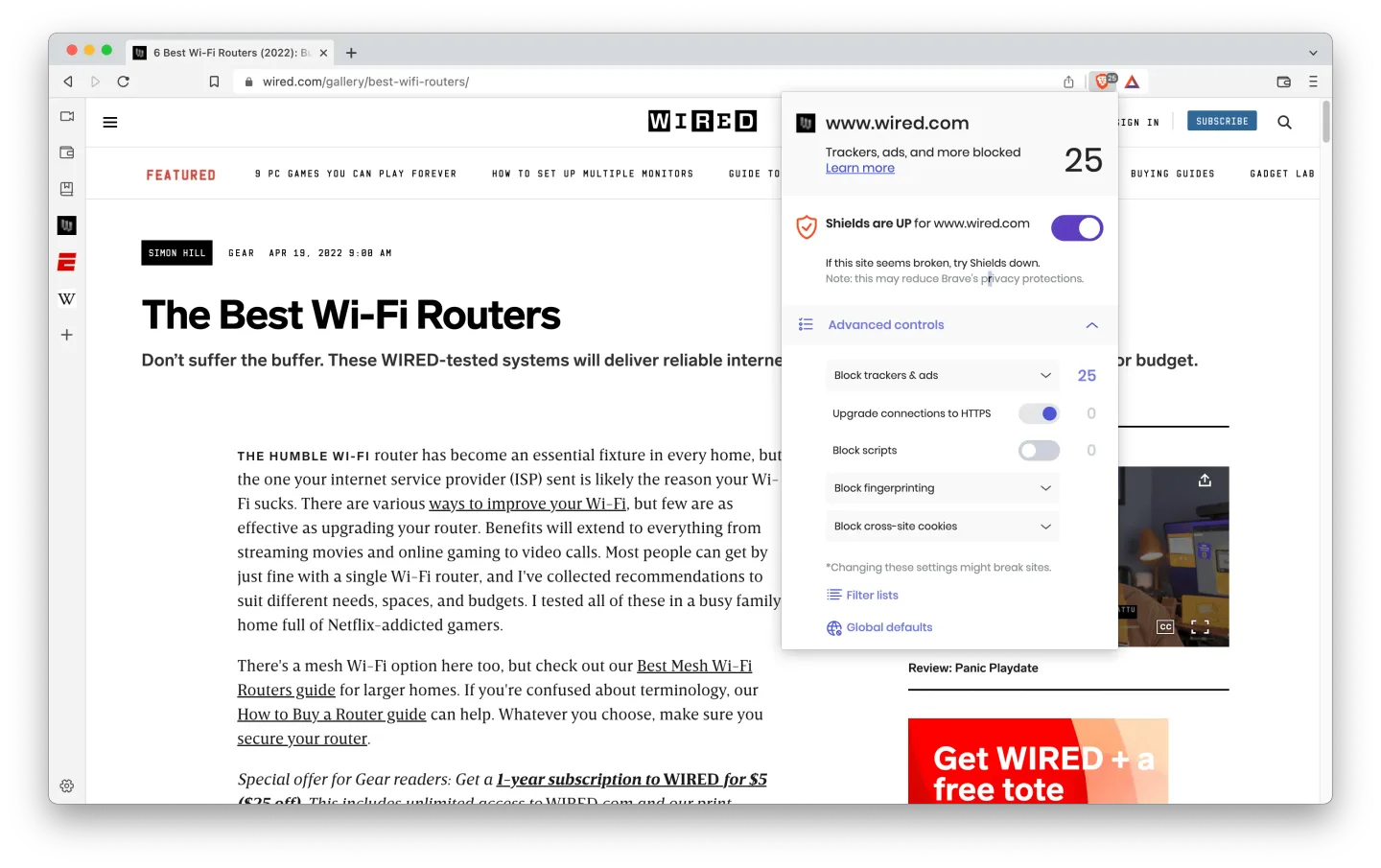
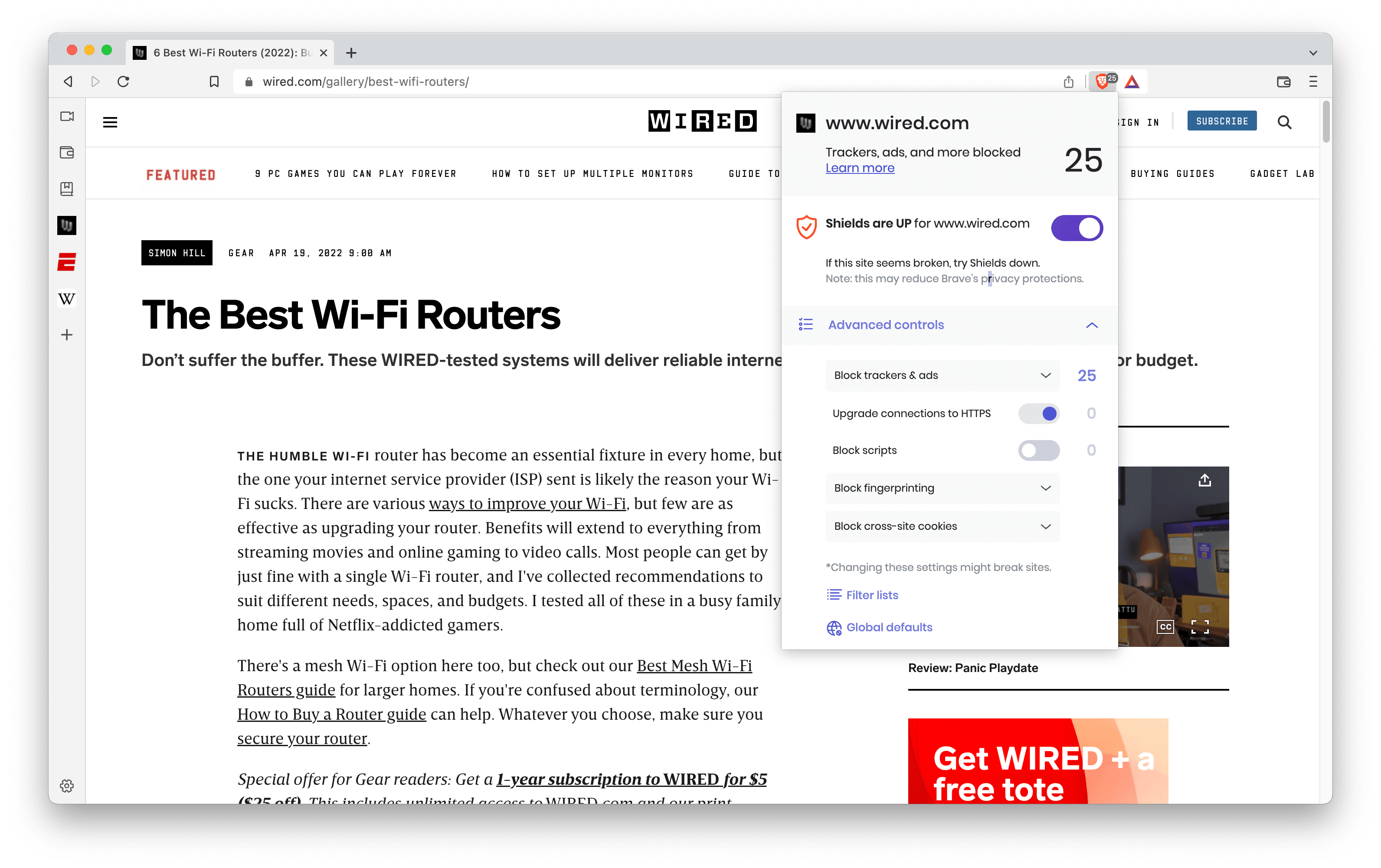
Brave is a web browser for everyday browsing with privacy controls built in. Its Shields feature blocks third-party ads and trackers by default, limits cross-site cookies and applies fingerprinting defenses. The address-bar Shields panel shows what was blocked and lets you adjust protection for the site you are visiting. You can also import favorites from another browser when switching.
The browser is free to use, but optional services such as Brave Firewall + VPN require a subscription. Shields can interfere with some websites, especially with Aggressive blocking enabled. Turning Shields off for an individual trusted site can restore functionality, but reduces protection on that site.
This entry links to the publisher's Windows x64 release download endpoint, which redirects to BraveBrowserSetup.exe. Brave's published requirements specify Windows 10 or later. The screenshot is a publisher-supplied desktop illustration with macOS-style window controls; it demonstrates Shields, not the exact appearance of a current Windows build.
What it offers
- Block third-party ads and trackers through built-in Brave Shields, without installing a separate blocking extension.
- Limit cross-site cookies and use fingerprint randomization to reduce cross-site tracking.
- Inspect blocked resources and change Shields settings for an individual website.
- Import favorites from another browser when switching to Brave.
Good to know
- Shields can break parts of some websites; Aggressive mode increases that risk. Disabling Shields for a site also disables some privacy protections there.
- Optional Brave Firewall + VPN is subscription-based; it is not included as a free VPN with the browser.
- The current publisher requirements specify Windows 10 or later; this entry is not a download for Windows 7 or 8.
Product images
Sources
References used for this listing. Retrieval dates do not indicate hands-on testing.
- Brave - Download — Windows discovery and gallery inspection ↗Retrieved
- The browser that puts you first | Brave ↗Retrieved
- Brave Shields - Blocking Ads, Trackers & more | Brave ↗Retrieved
- Brave Browser Download | Brave ↗Retrieved
- What are the system requirements to install Brave? – Brave Help Center ↗Retrieved
More in utilities
View category ↗
1.1.1.1 with WARP 2026.8.2115.0
Encrypt traffic from your Mac to Cloudflare’s network with WARP, or use DNS-only mode for encrypted DNS queries to the 1.1.1.1 resolver.
1.1.1.1 with WARP 2026.8.2115.0
Encrypt traffic between your Windows PC and Cloudflare, or use encrypted DNS only, with the free 1.1.1.1 with WARP app.

3uTools 9.12.005
Manage iPhone and iPad photos, music, apps and backups from Windows with 3uTools, a free utility that also includes device checks and firmware flashing tools.