

Utilities Windows
BrowserDownloadsView for Windows
View Chrome and Firefox download history on Windows, export download records, and calculate hashes for files that still exist on disk.
- Operating system
- Windows XP through Windows 11, as listed by the publisher
- Architecture
- x64 (selected package); separate 32-bit package available
- Download package
- Portable ZIP archive
Publisher states no installation or additional DLL files are required. Supports Chrome, Firefox and related browsers including Brave, Opera, Vivaldi and Chromium-based Edge.
Link checked · Download guidance
What is BrowserDownloadsView?
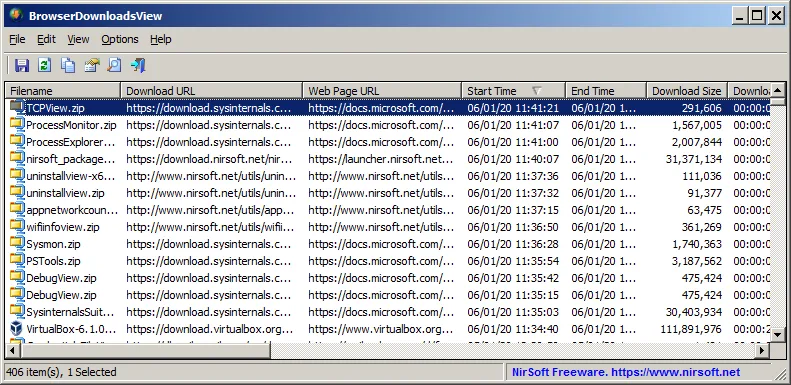
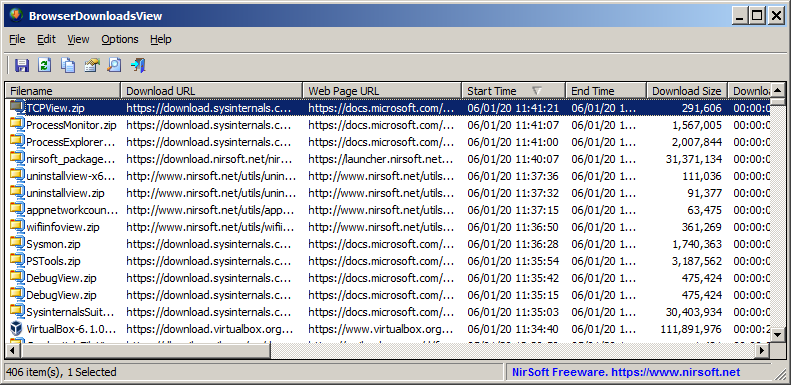
BrowserDownloadsView brings download records from Chrome, Firefox and supported related browsers into one Windows table. It shows filenames, download and source-page URLs, start and end times, duration and size. Use it to review previous downloads or export selected records to CSV, tab-delimited text, HTML, XML or JSON.
The portable utility can read the current user's browser profiles, other accessible profiles, an external drive or a remote computer. Reading all users' profiles requires permission to their folders; remote access requires the computer's administrative share. The selected download is the publisher's 64-bit ZIP package, with a separate 32-bit package available.
This is a download-history viewer, not a way to recover every download: private-mode downloads are absent because those records are not saved in the browser database. MD5, SHA-1, SHA-256 and SHA-512 calculations require the downloaded file to remain on the file system.
What it offers
- Inspect download filenames, URLs, timestamps, duration and size in a single table.
- Read download history from local profiles, external profiles or an accessible remote computer.
- Export selected download records to CSV, tab-delimited text, HTML, XML or JSON.
- Calculate MD5, SHA-1, SHA-256 or SHA-512 hashes for downloaded files still present on disk.
- Filter download records by a specified time range or recent interval.
Good to know
- Private-mode downloads are not shown because the browser does not save those download records to its database.
- Hash calculation requires the original downloaded file to still exist on the file system.
- Reading other profiles requires folder permissions; reading a remote computer requires access to its administrative share.
Product images
Sources
References used for this listing. Retrieval dates do not indicate hands-on testing.
More in utilities
View category ↗
1.1.1.1 with WARP 2026.8.2115.0
Encrypt traffic from your Mac to Cloudflare’s network with WARP, or use DNS-only mode for encrypted DNS queries to the 1.1.1.1 resolver.
1.1.1.1 with WARP 2026.8.2115.0
Encrypt traffic between your Windows PC and Cloudflare, or use encrypted DNS only, with the free 1.1.1.1 with WARP app.

3uTools 9.12.005
Manage iPhone and iPad photos, music, apps and backups from Windows with 3uTools, a free utility that also includes device checks and firmware flashing tools.