
Utilities Windows
Calc98
Use scientific functions, unit conversions and financial calculations in Calc98, a free Windows calculator with a customizable keypad and RPN mode.
- Operating system
- Windows 95/98/ME, NT, 2000, XP, Vista, 7, 8 and 10; Windows 11 listed in publisher FAQ
- Architecture
- Not specified for the selected desktop package
- Download package
- EXE self-extracting ZIP; standard desktop Windows package
Publisher claims, not independent compatibility testing. Unicode and Windows CE packages are separate. The publisher notes possible calculator-border adjustment on Vista and Windows 7/8/10.
Link checked · Download guidance
What is Calc98?
Calc98 is a pocket-calculator-style Windows application for scientific and engineering work. It combines scientific functions and unit conversions with statistics, financial calculations, physical constants and time functions, including a stopwatch. It also offers RPN and different number-base modes for users who need more than basic arithmetic.
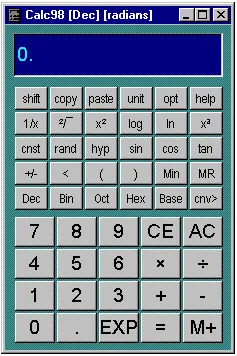
Enter values using the on-screen buttons or keyboard shortcuts. The Shift button changes the keypad legends to expose additional functions. The calculator window, button sizes, fonts and keypad arrangement can be customized; an always-on-top option lets it stay visible while you work in another application.
This entry links to the publisher's free version 5.3 standard desktop package, a self-extracting ZIP distributed as an EXE. It is separate from the Unicode and Windows CE downloads. Installation involves extracting the files and creating your own shortcut rather than using a conventional Windows installer. The publisher's FAQ lists Windows 11, although the download page's compatibility list stops at Windows 10; compatibility has not been independently tested here. Calc98 is proprietary freeware, not open source, and the publisher does not provide technical support for the free distribution.
What it offers
- Scientific functions, unit conversions and a database of physical properties and constants.
- Statistics, financial and time calculations, including a stopwatch.
- RPN operation and binary, octal, hexadecimal and other number-base modes.
- Keyboard input and a Shift button that exposes additional keypad functions.
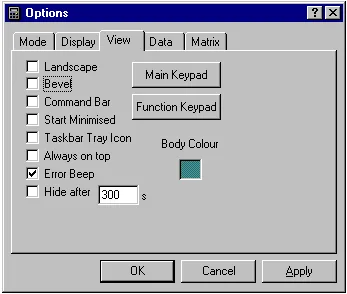
- Resizable calculator, configurable keypad layout and fonts, always-on-top and tray options.
Good to know
- Installation is manual: extract the self-extracting package and create a shortcut rather than expecting a conventional Windows installer.
- The publisher does not provide technical support for the free distribution version.
- The FAQ lists Windows 11, but the download page stops at Windows 10; this entry does not claim independently tested compatibility.
Product images
Sources
References used for this listing. Retrieval dates do not indicate hands-on testing.
- Download our Free Calculator Software — Calc98 ↗Retrieved
- About Calc98 ↗Retrieved
- Calc98 Frequently Asked Questions ↗Retrieved
- Calculator Basics — Calc98 keypad and input ↗Retrieved
- Calculator View — Calc98 layout options ↗Retrieved
- Calculator software and online resources — official overview ↗Retrieved
More in utilities
View category ↗
1.1.1.1 with WARP 2026.8.2115.0
Encrypt traffic from your Mac to Cloudflare’s network with WARP, or use DNS-only mode for encrypted DNS queries to the 1.1.1.1 resolver.
1.1.1.1 with WARP 2026.8.2115.0
Encrypt traffic between your Windows PC and Cloudflare, or use encrypted DNS only, with the free 1.1.1.1 with WARP app.

3uTools 9.12.005
Manage iPhone and iPad photos, music, apps and backups from Windows with 3uTools, a free utility that also includes device checks and firmware flashing tools.