

Utilities Windows
Carnac for Windows
Show your keystrokes during Windows presentations and screencasts with Carnac, an open-source keyboard presentation utility.
Version 2.3.13 · Direct publisher file
Link checked · Download guidance
What is Carnac?
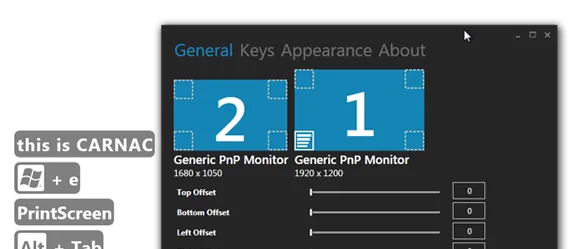
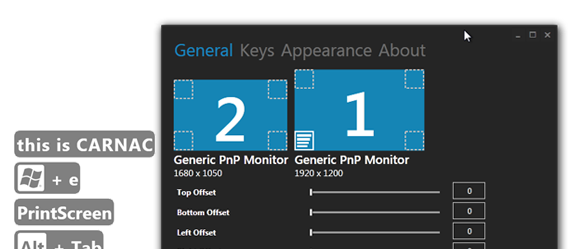
Carnac makes keyboard input visible during presentations and screencasts, helping viewers follow shortcuts that would otherwise be hard to see. It is a Windows keyboard logging and presentation utility from Code52. The publisher's example shows keystroke labels alongside a settings window with monitor selection and display offsets.
Press Ctrl+Alt+P to enter silent mode when you want Carnac to stop recording keystrokes; press it again to resume. Pause before typing sensitive information during a demonstration.
The linked download is the publisher's carnac.2.3.13.zip release archive. The repository instructs users to unpack the ZIP and run Setup.exe, and states that .NET Framework 4.5.2 is required. Release 2.3.13 dates to June 2020; this listing does not establish compatibility with every current Windows version. The screenshot is a historical publisher example, not a capture of the linked release running today.
What it offers
- Display keyboard input to help an audience follow presentations and screencasts.
- Toggle silent mode with Ctrl+Alt+P to stop and resume recording keystrokes.
- Choose a display and adjust overlay offsets in the settings shown in the publisher's example.
Good to know
- Requires .NET Framework 4.5.2 according to the publisher's README.
- The selected release is dated June 20, 2020; compatibility with current Windows releases has not been verified.
Product images
Sources
References used for this listing. Retrieval dates do not indicate hands-on testing.
More in utilities
View category ↗
1.1.1.1 with WARP 2026.8.2115.0
Encrypt traffic from your Mac to Cloudflare’s network with WARP, or use DNS-only mode for encrypted DNS queries to the 1.1.1.1 resolver.
1.1.1.1 with WARP 2026.8.2115.0
Encrypt traffic between your Windows PC and Cloudflare, or use encrypted DNS only, with the free 1.1.1.1 with WARP app.

3uTools 9.12.005
Manage iPhone and iPad photos, music, apps and backups from Windows with 3uTools, a free utility that also includes device checks and firmware flashing tools.