

Development Windows
CC Switch for Windows
Manage API providers, MCP servers and prompts for Claude Code, Codex and other AI coding tools from one desktop app on Windows.
Version 4.0.21 · Direct publisher file
Link checked · Download guidance
What is CC Switch?
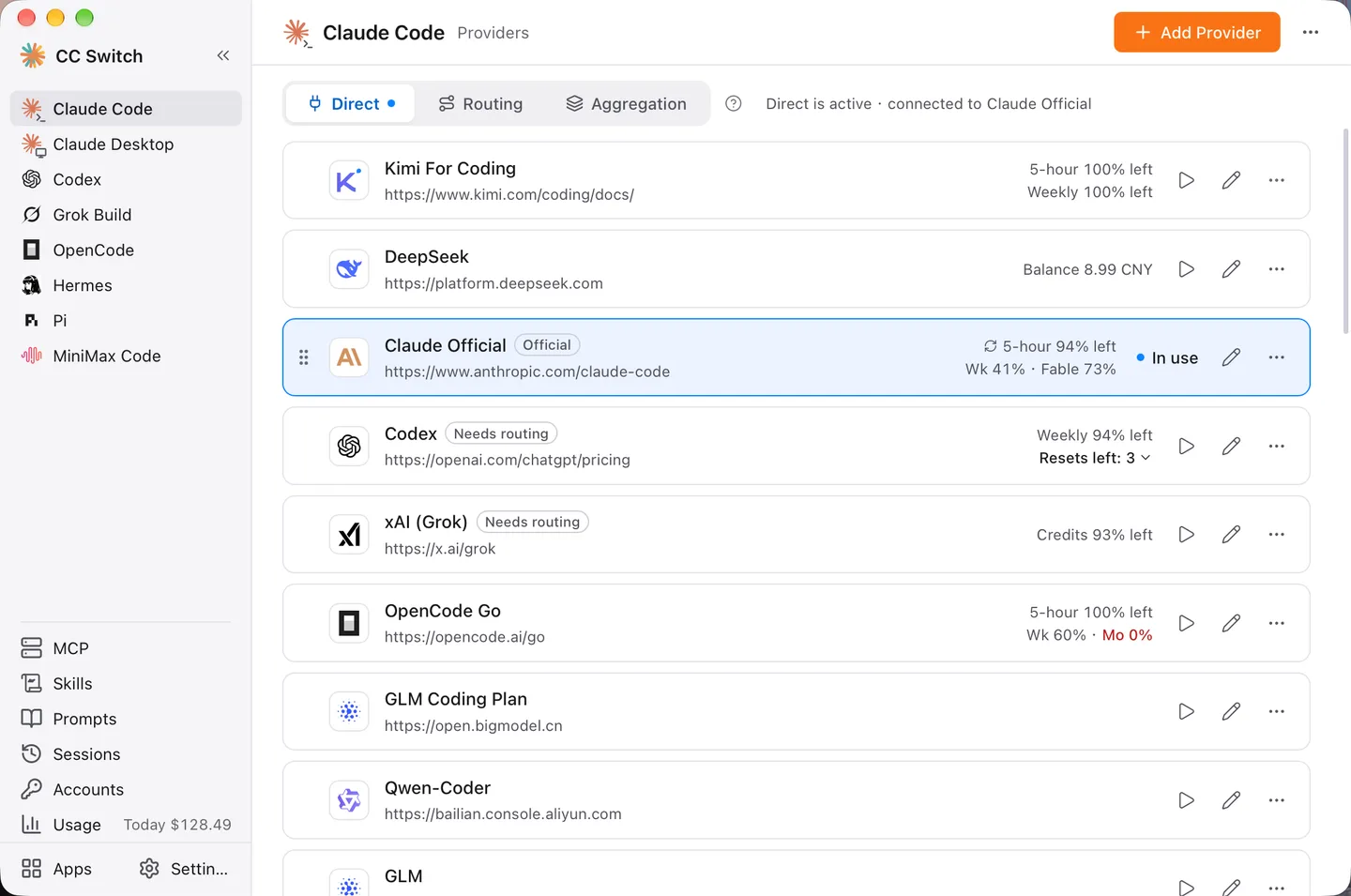
CC Switch puts AI coding-tool configuration in a desktop interface. It suits developers who switch between provider endpoints or maintain several coding assistants: select a tool, add a provider preset or custom connection, and choose the provider to use. The publisher documents Windows 10 and later and distributes MSI installers and portable ZIP packages. This entry links to the standard Windows MSI for version 4.0.21; Windows on ARM has a separate package.
Beyond provider switching, CC Switch can synchronize MCP servers and Skills to supported tools, maintain per-tool Markdown prompts, display session history and track usage from local logs. Optional local routing converts supported API formats and can fail over between configured providers. Aggregation instead combines models into a single list for supported clients.
These modes are not interchangeable: aggregation does not provide failover. Feature support also differs by client, and Codex, Gemini CLI and Grok Build generally require a terminal or client restart after direct provider changes. The gallery uses a publisher-supplied image with macOS window controls to illustrate the shared interface; it is not a capture of a Windows installation.
What it offers
- Switch provider endpoints, API keys and model settings from a graphical interface rather than editing configuration files by hand.
- Manage MCP servers, Skills and per-tool Markdown prompts for supported coding assistants.
- Use optional local routing for supported API-format conversion and configured provider failover.
- Browse session history and track request, token and spending information from supported tools’ local logs.
- Combine models from several providers in aggregation mode for supported clients.
Good to know
- Aggregation mode does not provide automatic failover; failover belongs to local routing.
- Client capabilities differ; Codex, Gemini CLI and Grok Build generally need a terminal or client restart after direct provider changes.
Product images
Sources
References used for this listing. Retrieval dates do not indicate hands-on testing.
- CC Switch - Download ↗Retrieved
- CC Switch v4.0.21 — publisher README ↗Retrieved
- CC Switch v4.0.21 — publisher release assets ↗Retrieved
- CC Switch — MIT License ↗Retrieved
- CC Switch — publisher main interface screenshot ↗Retrieved
More in development
View category ↗
010 Editor 17.0
Inspect and edit binary files on Mac with 010 Editor, a paid text and hex editor with Binary Templates, file comparison and a 30-day trial.
010 Editor 17.0
Inspect and edit binary files with 010 Editor for Windows, a text and hex editor with Binary Templates, file comparison and scripting. Includes a 30-day trial.
10x Editor
Edit and navigate C++ projects on Windows with a built-in parser, workspace search and Visual Studio project support. A paid license is required after the 30-day trial.