
Utilities Windows
Charrua WorkStation
View and manage DICOM studies on Windows with Charrua WorkStation, including printing, reporting and study-disc creation. A 15-day trial is available; it is not certified for primary diagnosis.
What is Charrua WorkStation?
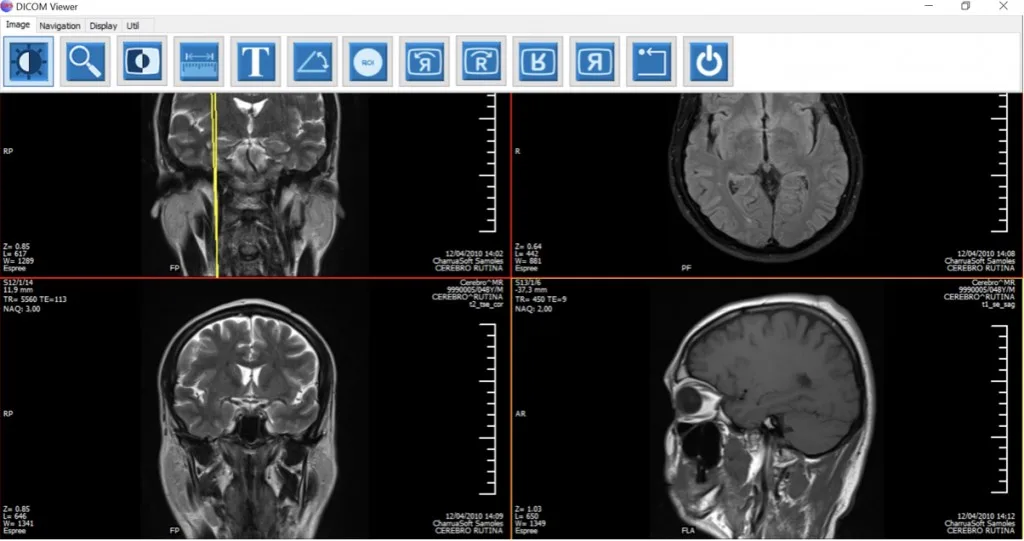
Charrua WorkStation is a Windows DICOM viewer for managing, viewing and processing medical images from modalities such as CT, MRI and digital radiography. It combines study viewing with a DICOM server, backup and restoration tools, printing and report storage. The publisher also lists support for up to three monitors.
Its output options cover DICOM and Windows printing on film or paper, plus DICOM CDs and DVDs with an integrated viewer. Reports can be drafted and stored as DICOM Structured Reports. Store SCP and Query/Retrieve SCP support are part of the listed server capabilities.
The publisher offers a 15-day trial and says supplying a work email allows it to contact you to extend the trial to 30 days. This is a trial, not an unrestricted free edition. The download linked here is the publisher's ZIP package; the inspected product page does not identify its release version, CPU architecture or exact supported Windows versions.
CharruaSoft explicitly warns that its products are not certified for primary diagnostic use and must not be the sole basis for a clinical diagnosis. This viewer is not a substitute for a diagnostic workstation that meets applicable hardware, calibration and validation requirements.
What it offers
- View, manage and process DICOM images, including CT, MRI and digital radiography studies.
- Use DICOM server capabilities with Store SCP and Query/Retrieve SCP support.
- Back up and restore studies, print through DICOM or Windows, and create DICOM CDs/DVDs with an integrated viewer.
- Draft and store DICOM Structured Reports.
- Use a viewing setup with up to three monitors, according to the publisher.
Good to know
- Not certified for primary diagnostic reading; do not use it as the sole basis for a clinical diagnosis.
- The standard trial lasts 15 days; the publisher offers contact to extend it to 30 days when an email is supplied.
- The inspected product page does not specify the current release, CPU architecture or supported Windows versions.
Product images
Sources
References used for this listing. Retrieval dates do not indicate hands-on testing.
More in utilities
View category ↗
1.1.1.1 with WARP 2026.8.2115.0
Encrypt traffic from your Mac to Cloudflare’s network with WARP, or use DNS-only mode for encrypted DNS queries to the 1.1.1.1 resolver.
1.1.1.1 with WARP 2026.8.2115.0
Encrypt traffic between your Windows PC and Cloudflare, or use encrypted DNS only, with the free 1.1.1.1 with WARP app.


3uTools 9.12.005
Manage iPhone and iPad photos, music, apps and backups from Windows with 3uTools, a free utility that also includes device checks and firmware flashing tools.