
Utilities Windows
Chatbox Community Edition
Chat with multiple AI providers from a Windows desktop client, reuse prompts and read formatted replies. AI service access is configured separately.
- Operating system
- Windows 10 or later (publisher minimum: Windows 10)
- Architecture
- x64
- Download package
- EXE installer
The official v1.23.5 release identifies this package as Windows (x64). AI provider configuration is required separately.
Link checked · Download guidance
What is Chatbox Community Edition?
Chatbox Community Edition is an open-source desktop client for conversations with AI models. Its publisher lists OpenAI, Claude, Gemini and other providers, plus Ollama for connecting to local models. The Windows download is an x64 EXE installer; the publisher lists Windows 10 as the minimum system.
After installing, configure your chosen AI provider in Settings before starting a conversation. A prompt library and message quoting help reuse instructions and preserve context, while Markdown, LaTeX and code highlighting make technical replies easier to read. The interface also offers streaming replies, keyboard shortcuts and a dark theme.
The client is not a bundle of unlimited AI service access. Remote providers need a working connection to their model server, and account quota or billing can prevent replies. Local conversation storage does not mean that requests to a remote AI provider remain on your computer. Ollama support is a connection option for local models, not evidence that this installer includes model weights.
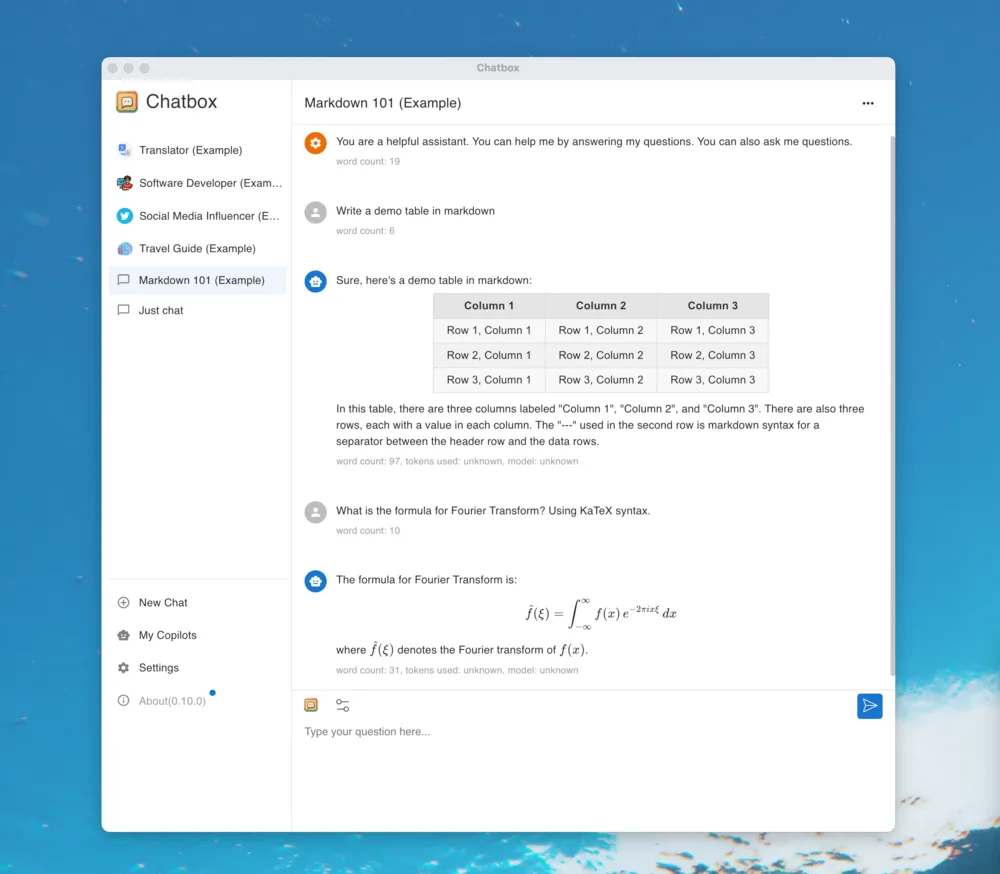
The screenshot is an older publisher-provided cross-platform illustration, showing a macOS-style window and version 0.10.0. It demonstrates the conversation layout and formatted replies, not the exact appearance of the linked Windows 1.23.5 release.
What it offers
- Connect to multiple AI providers, including OpenAI, Claude and Gemini, or to local models through Ollama.
- Save reusable prompts and quote messages for conversational context.
- Display Markdown, LaTeX mathematics and syntax-highlighted code in replies.
- Use streaming replies, keyboard shortcuts and a dark theme.
- Store conversation data locally while connecting to the configured AI provider.
Good to know
- Remote AI services require network access to the configured model server; provider account quota and billing can restrict use.
- Local data storage does not keep remote-model requests on-device; Ollama and local model setup are separate from this Windows installer.
- The supplied publisher screenshot shows an older macOS-style interface, not a verified capture of Windows version 1.23.5.
Product images
Sources
References used for this listing. Retrieval dates do not indicate hands-on testing.
More in utilities
View category ↗
1.1.1.1 with WARP 2026.8.2115.0
Encrypt traffic from your Mac to Cloudflare’s network with WARP, or use DNS-only mode for encrypted DNS queries to the 1.1.1.1 resolver.
1.1.1.1 with WARP 2026.8.2115.0
Encrypt traffic between your Windows PC and Cloudflare, or use encrypted DNS only, with the free 1.1.1.1 with WARP app.


3uTools 9.12.005
Manage iPhone and iPad photos, music, apps and backups from Windows with 3uTools, a free utility that also includes device checks and firmware flashing tools.