
Utilities Windows
CheckDrive
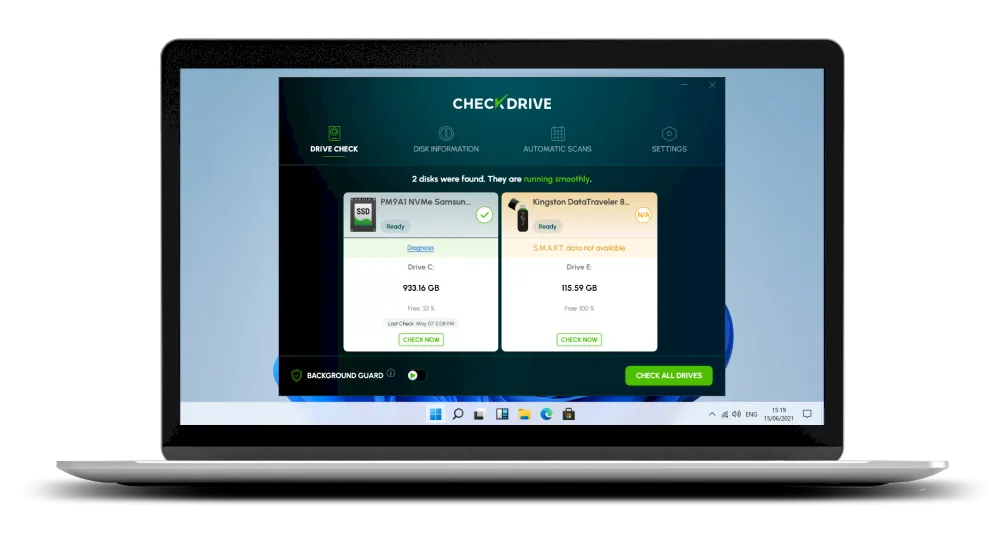
Check HDD and SSD health, inspect S.M.A.R.T. information and find file-system errors with CheckDrive for Windows. The free edition includes ads; background monitoring requires Plus.
- Operating system
- Windows 11, 10, 8.1, 8 and 7 (publisher-listed)
- Architecture
- Not specified on the publisher page
- Download package
- EXE installer
Publisher lists v2026.7; the generic installer was checked by HEAD only, not downloaded or inspected. RAID is unsupported.
Link checked · Download guidance
What is CheckDrive?
CheckDrive is Abelssoft's Windows utility for checking drive health and file-system errors. It uses S.M.A.R.T. and manufacturer data to assess supported HDDs and SSDs, display drive information and flag potential problems. The publisher also describes file-system checks that can correct smaller errors. It is intended for standard household drives and partitions, not RAID systems.
The free edition offers on-demand checking but contains advertisements and a purchase prompt when you close the program. Abelssoft lists Background Guard monitoring and scheduled scans as Plus features. Choose the free edition for manual checks; consider Plus if you need those automated checks.
Treat health assessments as warnings to investigate, not a promise that a drive will keep working. Abelssoft explicitly says its predictions are interpretations of drive data and recommends regular backups. CheckDrive is not a backup or a guaranteed recovery tool. The download below is the publisher's generic Windows EXE installer; its internal build and architecture were not inspected.
What it offers
- Assess supported HDD and SSD health using S.M.A.R.T. and manufacturer data.
- View drive information and health assessments in one application.
- Check for file-system errors; the publisher describes correction of smaller errors.
- Add background monitoring and scheduled scans with the paid Plus edition.
Good to know
- The free edition contains advertisements and a purchase prompt on exit; Background Guard and scheduled scans are listed as Plus features.
- Health assessments cannot guarantee a failure prediction or replace regular backups.
- RAID systems are unsupported; the publisher warns that use on already damaged RAID systems can cause further damage.
Product images
Sources
References used for this listing. Retrieval dates do not indicate hands-on testing.
More in utilities
View category ↗
1.1.1.1 with WARP 2026.8.2115.0
Encrypt traffic from your Mac to Cloudflare’s network with WARP, or use DNS-only mode for encrypted DNS queries to the 1.1.1.1 resolver.
1.1.1.1 with WARP 2026.8.2115.0
Encrypt traffic between your Windows PC and Cloudflare, or use encrypted DNS only, with the free 1.1.1.1 with WARP app.

3uTools 9.12.005
Manage iPhone and iPad photos, music, apps and backups from Windows with 3uTools, a free utility that also includes device checks and firmware flashing tools.