
Utilities Windows
ChoEazyCopy
Configure Windows RoboCopy jobs in a graphical interface, save reusable profiles and inspect the generated command with ChoEazyCopy, a free, open-source utility.
- Operating system
- Windows; .NET Framework 4.8 required for version 2.0.0.4
- Architecture
- Not specified in the selected release metadata
- Download package
- ZIP archive containing the application
Extract the archive and launch ChoEazyCopy.exe. RoboCopy.exe must be in the system path or its location configured in the tool. No exact Windows-version matrix was established.
Link checked · Download guidance
What is ChoEazyCopy?
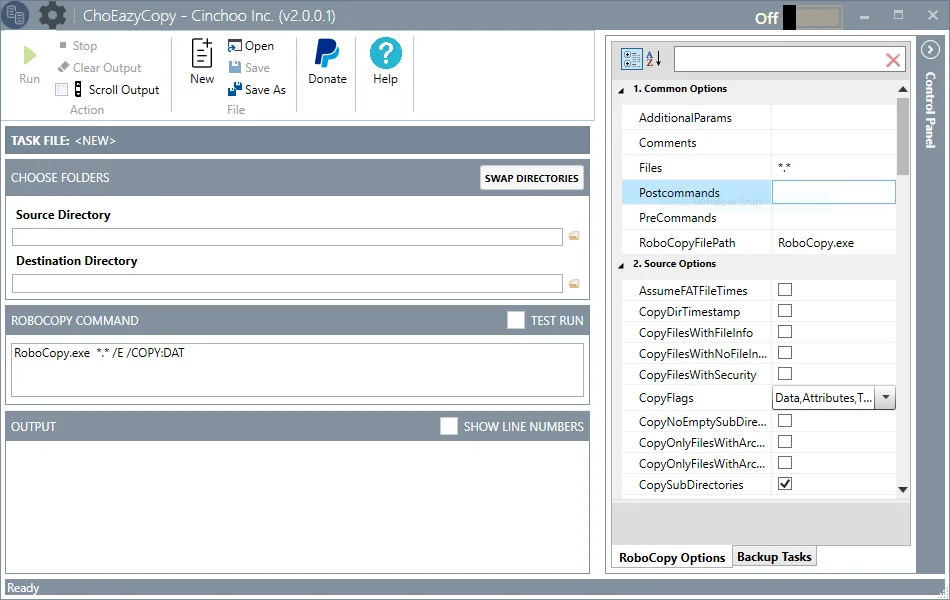
ChoEazyCopy is a Windows graphical front end for Microsoft RoboCopy. It suits repeatable folder-copy jobs where you want to choose options in a property grid rather than assemble every command-line switch yourself. The interface brings source and destination folders, the generated RoboCopy command and an output pane into one window.
You can save options as a profile, reopen that configuration for another job and run RoboCopy from within the application. The publisher also documents option hints, multiple application instances and Windows system-tray operation. Release 2.0.0.4 adds a Move command for switching from copying to moving files.
This download is the publisher's ChoEazyCopy.zip release archive. The documented setup is to extract it to a local folder and launch ChoEazyCopy.exe from that folder. Version 2.0.0.4 requires .NET Framework 4.8. RoboCopy.exe must be available in the system path or its location must be specified in the tool; ChoEazyCopy is an interface to RoboCopy, not a replacement copying engine.
The screenshot is a publisher-provided illustration labeled v2.0.0.1, not a capture of the selected v2.0.0.4 package. Package availability was checked with a HEAD request only; the application was not installed or run for this entry.
What it offers
- Configure RoboCopy options through a graphical property grid and view the generated command.
- Save and reopen option profiles for repeated copying jobs.
- Run RoboCopy from the application and read its output in the same window.
- Consult option hints and use multiple instances or Windows system-tray operation.
- Switch from copy to move with the Move command added in version 2.0.0.4.
Good to know
- Version 2.0.0.4 requires .NET Framework 4.8 and access to RoboCopy.exe; it is not a standalone copy engine.
- The selected release metadata does not specify CPU architecture or an exact supported Windows-version matrix. Compatibility and transfer performance were not tested.
Product images
Sources
References used for this listing. Retrieval dates do not indicate hands-on testing.
- ChoEazyCopy - Download — normally browsed Windows product page ↗Retrieved
- Cinchoo/ChoEazyCopy — official README, features and setup ↗Retrieved
- Release v2.0.0.4 — official requirements and changes ↗Retrieved
- GitHub release API — v2.0.0.4 publication and ZIP metadata ↗Retrieved
- ChoEazyCopy MIT License — Cinchoo Inc. ↗Retrieved
More in utilities
View category ↗
1.1.1.1 with WARP 2026.8.2115.0
Encrypt traffic from your Mac to Cloudflare’s network with WARP, or use DNS-only mode for encrypted DNS queries to the 1.1.1.1 resolver.
1.1.1.1 with WARP 2026.8.2115.0
Encrypt traffic between your Windows PC and Cloudflare, or use encrypted DNS only, with the free 1.1.1.1 with WARP app.

3uTools 9.12.005
Manage iPhone and iPad photos, music, apps and backups from Windows with 3uTools, a free utility that also includes device checks and firmware flashing tools.