

Utilities Windows
Classic FTP for Windows
Upload and download website files with Classic FTP for Windows, an FTP client with local and remote folder views, synchronization and FTP over SSL support.
Direct publisher file
Link checked · Download guidance
What is Classic FTP?
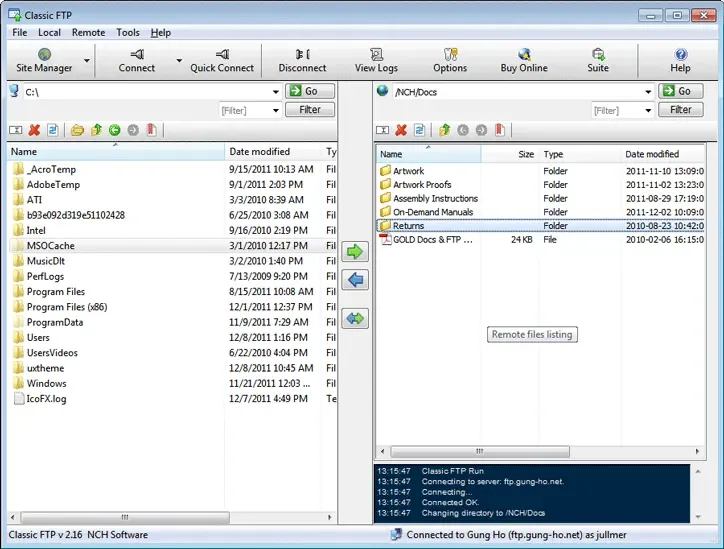
Classic FTP is NCH Software's file-transfer client for maintaining files on an FTP server. It provides local and remote folder views for choosing files to upload or download, drag-and-drop transfers and a setup wizard for site connections. Its synchronization tool checks local and remote folders for the most up-to-date copies, while FTP over SSL support provides an encrypted transfer option with a compatible server.
The linked Windows EXE is the publisher's free edition, which is available for non-commercial use only. NCH also offers a paid edition; do not treat the free download as a commercial-use license. The publisher lists Windows 7, 8, 8.1, 10 and 11. The screenshot is an older publisher-provided Windows interface example, not verification of the current installer version or appearance.
What it offers
- Upload and download files between a local computer and an FTP server.
- Use local and remote folder views with drag-and-drop file transfers.
- Check local and remote folders for up-to-date copies with the Synchronize tool.
- Connect through FTP over SSL when supported by the server.
- Configure FTP site connections with a setup wizard.
Good to know
- The free edition is restricted to non-commercial use; commercial use requires an appropriate paid license.
- The publisher's screenshot shows an older Windows interface; it does not establish the version or appearance of the current download.
Product images
Sources
References used for this listing. Retrieval dates do not indicate hands-on testing.
More in utilities
View category ↗
1.1.1.1 with WARP 2026.8.2115.0
Encrypt traffic from your Mac to Cloudflare’s network with WARP, or use DNS-only mode for encrypted DNS queries to the 1.1.1.1 resolver.
1.1.1.1 with WARP 2026.8.2115.0
Encrypt traffic between your Windows PC and Cloudflare, or use encrypted DNS only, with the free 1.1.1.1 with WARP app.

3uTools 9.12.005
Manage iPhone and iPad photos, music, apps and backups from Windows with 3uTools, a free utility that also includes device checks and firmware flashing tools.