
Utilities Windows
CLaunch
Launch programs from a tabbed button panel, hotkeys or mouse actions with CLaunch, a free Windows launcher with keyword search and portable ZIP options.
- Operating system
- Windows 11, 10, 8, 7 and Vista (64-bit), as listed in official help
- Architecture
- x64
- Download package
- EXE installer
This link is the 64-bit Unicode installer. Separate 32-bit and ZIP packages are available; no native ARM64 build is claimed. Installation and performance were not tested.
Link checked · Download guidance
What is CLaunch?
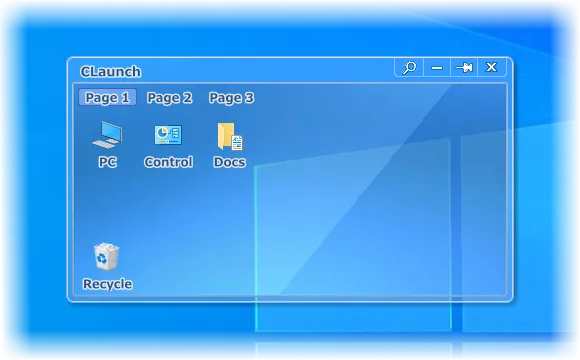
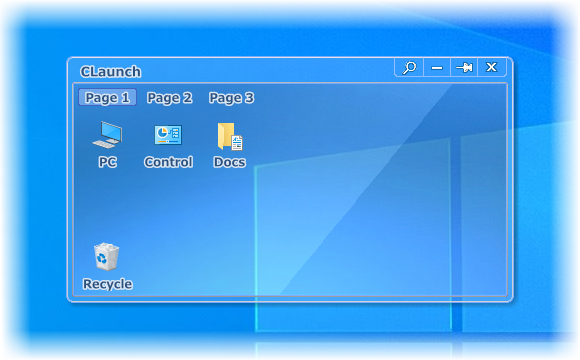
CLaunch puts registered programs and other items in a button-based launcher that you can summon from a screen corner, a desktop double-click or a hotkey. Group items across pages and submenus, switch pages with the mouse wheel, or search registered items by typing a keyword. It suits a collection of frequently used shortcuts that you want to reach without leaving a launcher panel permanently on screen. The panel can hide when the pointer leaves it, and assigned hotkeys or mouse actions can launch items without showing the panel at all.
The linked package is the publisher's 64-bit Windows installer for version 4.26. A separate ZIP package supports manual setup and removable-media use; relative paths help when moving that setup between computers. Skins provide another way to change the panel's appearance. These are documented capabilities, not results of a local installation or performance test.
Keep an existing configuration when upgrading: the publisher instructs users to overwrite the previous installation, because uninstalling it deletes registered items and resets settings. Installation and configuration paths also have a 260-character limit, even though registered item paths are not subject to that same limit. CLaunch is freeware, including for office use, but commercial redistribution is prohibited by its license.
What it offers
- Show the launcher with screen-corner actions, desktop clicks or hotkeys, and hide it when the pointer leaves.
- Organize registered items into pages and submenus; switch pages with the mouse wheel.
- Search registered items by keyword and launch them using keyboard shortcuts.
- Assign hotkeys or mouse actions that launch items without opening the launcher panel.
- Customize the appearance with skins, or use the separate ZIP package with relative paths for portable setups.
Good to know
- Uninstalling an older version deletes registered items and configuration data; the publisher instructs users to update by overwriting it.
- Installation data and configuration paths exceeding 260 characters can prevent correct operation; this is not the same restriction as the paths of registered items.
Product images
Sources
References used for this listing. Retrieval dates do not indicate hands-on testing.
- CLaunch — official downloads and license ↗Retrieved
- CLaunch - Change Log ↗Retrieved
- Overview of CLaunch ↗Retrieved
- Operating environment ↗Retrieved
- Installation and Uninstallation ↗Retrieved
- Copyright and Disclaimer ↗Retrieved
More in utilities
View category ↗
1.1.1.1 with WARP 2026.8.2115.0
Encrypt traffic from your Mac to Cloudflare’s network with WARP, or use DNS-only mode for encrypted DNS queries to the 1.1.1.1 resolver.
1.1.1.1 with WARP 2026.8.2115.0
Encrypt traffic between your Windows PC and Cloudflare, or use encrypted DNS only, with the free 1.1.1.1 with WARP app.

3uTools 9.12.005
Manage iPhone and iPad photos, music, apps and backups from Windows with 3uTools, a free utility that also includes device checks and firmware flashing tools.