
Utilities Windows
clawPDF
Create PDFs, OCR output and image files with clawPDF, an open-source virtual printer for Windows with reusable profiles and network printing.
- Operating system
- Windows 11 and 10; publisher also lists Windows 8, 7 and Windows Server 2022, 2019 and 2016 RDS
- Architecture
- Publisher lists x86, x64 and ARM64; supported combinations vary by Windows version
- Download package
- MSI installer
Publisher lists Windows 11 x64/ARM64 and Windows 10 x86/x64/ARM64. Requires .NET Framework 4.6.2+ and Visual C++ Redistributable 14. No installer inspection or independent Windows-build test performed.
Link checked · Download guidance
What is clawPDF?
clawPDF is a Windows virtual printer for turning print jobs into PDFs, text and image files. It is useful when the same document workflow needs more than a basic PDF output: the publisher lists PDF/A-1b, PDF/A-2b, PDF/A-3b, PDF/X, OCR, SVG, PNG, JPEG, TIF and TXT among its supported formats. Documents can also be merged, protected with a password and encrypted with up to 256-bit AES.
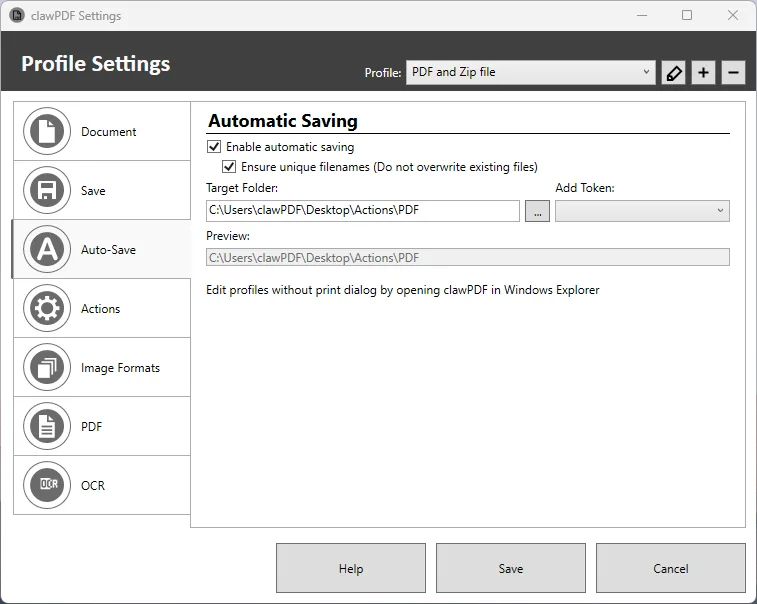
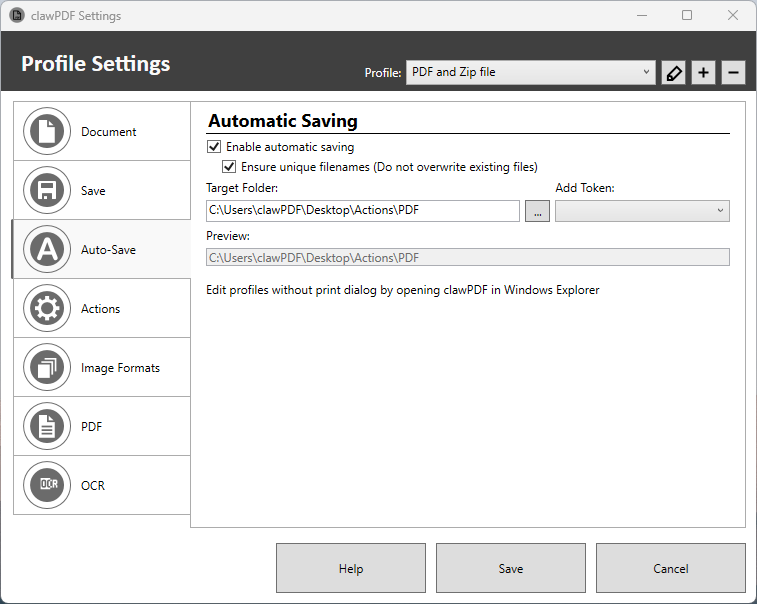
Reusable profiles let you keep different output settings. The publisher's Auto-Save screenshot shows a target-folder setting and an option to ensure unique filenames rather than overwrite existing files. For more involved workflows, clawPDF provides command-line controls and a scripting interface; it can also be installed on a print server for shared network printing.
The linked MSI is version 0.9.3, dated May 16, 2023 in the publisher's changelog. That date is not evidence of current maintenance. The publisher requires .NET Framework 4.6.2 or later and Visual C++ Redistributable 14. Windows compatibility and features here are publisher-documented, not results of an installation or software test by SoftGalaxy.
What it offers
- Create PDF, PDF/A and PDF/X documents, OCR output, SVG, PNG, JPEG, TIF and TXT files.
- Merge documents and apply password protection with up to 256-bit AES encryption.
- Reuse output profiles; configure automatic saving, a target folder and unique filenames.
- Automate workflows through command-line controls and a scripting interface.
- Use shared network printing and multi-user Windows environments.
Good to know
- Requires .NET Framework 4.6.2 or later and Visual C++ Redistributable 14, according to the publisher.
- The linked release is 0.9.3 from May 16, 2023; its availability does not establish current maintenance or compatibility with every newer Windows build.
Product images
Sources
References used for this listing. Retrieval dates do not indicate hands-on testing.
More in utilities
View category ↗
1.1.1.1 with WARP 2026.8.2115.0
Encrypt traffic from your Mac to Cloudflare’s network with WARP, or use DNS-only mode for encrypted DNS queries to the 1.1.1.1 resolver.
1.1.1.1 with WARP 2026.8.2115.0
Encrypt traffic between your Windows PC and Cloudflare, or use encrypted DNS only, with the free 1.1.1.1 with WARP app.

3uTools 9.12.005
Manage iPhone and iPad photos, music, apps and backups from Windows with 3uTools, a free utility that also includes device checks and firmware flashing tools.