
Utilities Windows
ClocX
Keep an analog clock on your Windows desktop with ClocX, a free utility with configurable clock faces, transparency, alarms and a simple calendar.
- Operating system
- Windows XP SP2 or later, Vista, 7, 8, 10 and 11, as listed in the publisher's version 1.6.0 notes
- Architecture
- x64 (64-bit)
- Download package
- EXE installer
This link selects the publisher's 64-bit package. A separate 32-bit package is available. Compatibility is publisher-listed, not independently tested.
Link checked · Download guidance
What is ClocX?
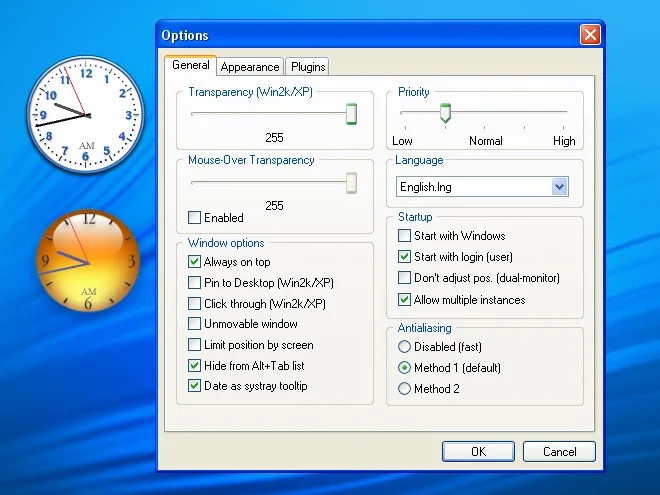
ClocX adds a customizable analog clock to the Windows desktop. Choose a clock face, resize it and adjust transparency to suit your workspace. Window options let you keep the clock above other applications, pin it to the desktop or allow clicks to pass through it. Time zone selection is available in the Options dialog.
For reminders, configurable alarms can display a message, play a sound, launch an application or shut down the computer. A simple calendar is also included. The publisher offers separate 32-bit and 64-bit packages; the download linked here is the Windows 64-bit EXE for version 1.6.0.
Visual settings can affect resource use. The publisher recommends reducing antialiasing, disabling the second hand or zoom, or choosing a smaller clock face to lower CPU usage. If click-through prevents access to the clock's options, open Options from the system-tray icon instead.
What it offers
- Choose from configurable clock faces and adjust clock size and transparency.
- Keep the clock always on top, pin it to the desktop or enable click-through.
- Set alarms to show a message, play sound, launch an application or shut down the PC.
- Open a simple built-in calendar and select a time zone in Options.
- Configure startup with Windows or with user login.
Good to know
- Clock appearance settings can increase CPU usage; the publisher recommends simpler rendering settings or a smaller clock face to reduce it.
- Click-through prevents direct interaction with the clock; use its system-tray icon to reopen Options.
Product images
Sources
References used for this listing. Retrieval dates do not indicate hands-on testing.
- About ClocX — official features and freeware description ↗Retrieved
- ClocX Download — official 1.6.0 packages ↗Retrieved
- ClocX — Frequently Asked Questions ↗Retrieved
- ClocX — Version history ↗Retrieved
- ClocX — Free analog clock for Windows desktop ↗Retrieved
- ClocX - Download — normal browser observation ↗Retrieved
More in utilities
View category ↗
1.1.1.1 with WARP 2026.8.2115.0
Encrypt traffic from your Mac to Cloudflare’s network with WARP, or use DNS-only mode for encrypted DNS queries to the 1.1.1.1 resolver.
1.1.1.1 with WARP 2026.8.2115.0
Encrypt traffic between your Windows PC and Cloudflare, or use encrypted DNS only, with the free 1.1.1.1 with WARP app.

3uTools 9.12.005
Manage iPhone and iPad photos, music, apps and backups from Windows with 3uTools, a free utility that also includes device checks and firmware flashing tools.