
Utilities Windows
Clover
Add Chrome-style folder tabs and a bookmarks bar to Windows Explorer with Clover. The linked 3.5.4 installer is hosted by SnapFiles, which warns of optional promotional software.
- Operating system
- Windows XP, 7, 8 and 10 listed by the publisher
- Architecture
- Selected installer architecture not independently identified
- Download package
- EXE installer hosted by SnapFiles
Publisher describes general 32-bit/64-bit support. SnapFiles lists Windows 11, but publisher confirmation and runtime verification are absent. Installer described as Chinese-language with optional third-party offers.
Link checked · Download guidance
What is Clover?
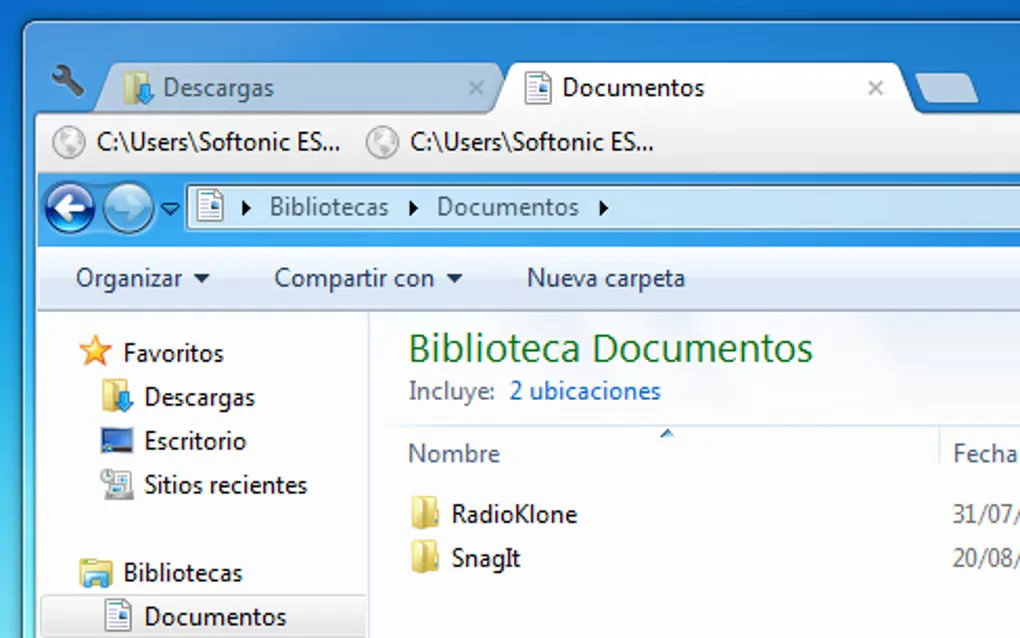
Clover adds tabs to Windows Explorer so you can keep several folders open in one window. It is an Explorer extension rather than a separate replacement file manager: the familiar folder navigation remains, with a browser-style tab strip and bookmarks bar added for switching between locations.
Use Ctrl+T to open a tab, Ctrl+W to close one and Ctrl+Tab to switch tabs. Frequently used folders can be bookmarked with Ctrl+D or dragged onto the bookmarks bar. The publisher also documents reopening closed tabs and importing or exporting bookmarks as HTML.
This entry links to the Clover 3.5.4 EXE hosted by SnapFiles, not an official publisher-hosted download. SnapFiles identifies the installer as Chinese-language and warns that it offers optional promotional or third-party software. Review the setup choices rather than assuming the package is free of additional offers. The publisher's English requirements list Windows XP, 7, 8 and 10; Windows 11 compatibility has not been verified here. The screenshot shows a legacy Explorer interface, not a current Windows 11 installation.
What it offers
- Keep multiple folders open as tabs within one Windows Explorer window.
- Save folder locations on a bookmarks bar with Ctrl+D or drag and drop.
- Open, close and switch tabs with Ctrl+T, Ctrl+W and Ctrl+Tab.
- Reopen the last closed tab with Ctrl+Shift+T.
- Import and export folder bookmarks as HTML files.
Good to know
- SnapFiles warns that the installer offers optional promotional or third-party software.
- SnapFiles describes the installer as Chinese-language, even though the application supports English and other interface languages.
- The publisher's English requirements stop at Windows 10; Windows 11 compatibility is unverified here.
Product images
Sources
References used for this listing. Retrieval dates do not indicate hands-on testing.
More in utilities
View category ↗
1.1.1.1 with WARP 2026.8.2115.0
Encrypt traffic from your Mac to Cloudflare’s network with WARP, or use DNS-only mode for encrypted DNS queries to the 1.1.1.1 resolver.
1.1.1.1 with WARP 2026.8.2115.0
Encrypt traffic between your Windows PC and Cloudflare, or use encrypted DNS only, with the free 1.1.1.1 with WARP app.

3uTools 9.12.005
Manage iPhone and iPad photos, music, apps and backups from Windows with 3uTools, a free utility that also includes device checks and firmware flashing tools.