

Development macOS
CMake for macOS
Configure C and C++ projects on macOS with CMake, an open-source build-system generator with command-line tools and a graphical configuration editor.
- Operating system
- macOS 12 or later
- Architecture
- Universal macOS binary (publisher designation)
- Download package
- DMG disk image
This link selects the macos-universal package, not the separate macos10.10-universal package or a release candidate.
Link checked · Download guidance
What is CMake?
CMake turns a project's CMakeLists.txt files into a build system for native tools. On a Mac, that can mean generating an Xcode project or a build tree for Ninja or Make. It is useful when a source project needs configurable dependencies, build options or separate builds from the same source tree.
Use the command line or CMake GUI to select source and build directories and configure project settings. Out-of-source builds keep generated files separate from the original code. The accompanying CTest and CPack tools support project testing and packaging.
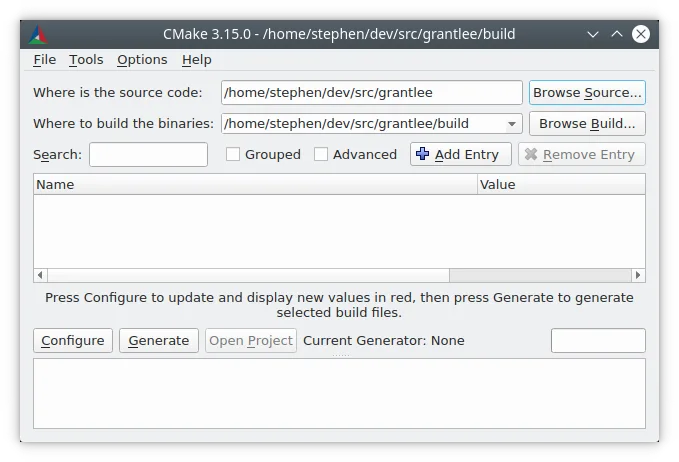
CMake is not a replacement for a compiler or the selected build tool. Those tools and any required project dependencies must be available, and configuration errors need to be resolved before a build can proceed. The linked 4.4.5 universal DMG is listed by the publisher for macOS 12 or later; a separate package is offered for older systems. The screenshot is a historical Linux example from the official documentation, illustrating the shared configuration workflow rather than the current Mac appearance.
What it offers
- Generate native build systems, including Xcode projects and Ninja or Make build files.
- Configure project options through the command line or CMake GUI.
- Keep multiple build trees separate from a single source tree.
- Use the included CTest and CPack tools for project testing and packaging.
Good to know
- Requires an appropriate compiler, build tool and project dependencies; CMake generates the build system rather than replacing those tools.
- The linked DMG requires macOS 12 or later; older systems need a different publisher package.
Product images
Sources
References used for this listing. Retrieval dates do not indicate hands-on testing.
More in development
View category ↗
010 Editor 17.0
Inspect and edit binary files on Mac with 010 Editor, a paid text and hex editor with Binary Templates, file comparison and a 30-day trial.
010 Editor 17.0
Inspect and edit binary files with 010 Editor for Windows, a text and hex editor with Binary Templates, file comparison and scripting. Includes a 30-day trial.
10x Editor
Edit and navigate C++ projects on Windows with a built-in parser, workspace search and Visual Studio project support. A paid license is required after the 30-day trial.