

Utilities Windows
CmapTools for Windows
Build concept maps that connect ideas, documents and web resources with CmapTools for Windows. Save maps locally or work with others through CmapServers.
- Operating system
- Windows 10 and Windows 11 (64-bit)
- Architecture
- x64 (Intel/AMD 64-bit); separate ARM64 packages available
- Download package
- MSI installer
Selected package is Windows Intel 64-bit. OpenJDK Eclipse Temurin 21 is bundled; no separate Java installation required. Publisher requests download registration.
Link checked · Download guidance
What is CmapTools?
CmapTools turns a set of ideas into a concept map: labeled concepts connected by phrases that explain their relationships. It is useful for outlining a subject, organizing research or making a shared knowledge model. The desktop application lets you keep maps and resources in folders, attach supporting material to concepts and link one map to another.
Maps can stay on your computer or be stored on CmapServers for sharing. Server-based maps support simultaneous editing, and CmapTools can generate web pages of maps for readers who do not have the desktop application. These online features depend on server access; a firewall or proxy can require additional configuration. Cmap Cloud sharing works at folder level rather than as an individual-map share.
This entry identifies the Windows x64 MSI for version 7.01.00. IHMC lists Windows 10 and 11, with a bundled Java 21 runtime; a separate Java installation is not required. ARM64 installers are separate. The publisher's download page asks users to register to activate its download controls. The direct package link was checked using HEAD only, not installed or tested, and does not waive the publisher's authorization requirements or license terms.
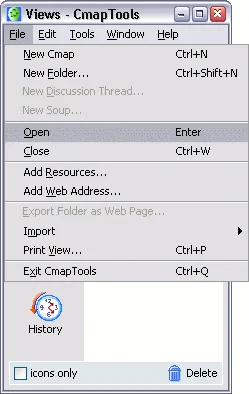
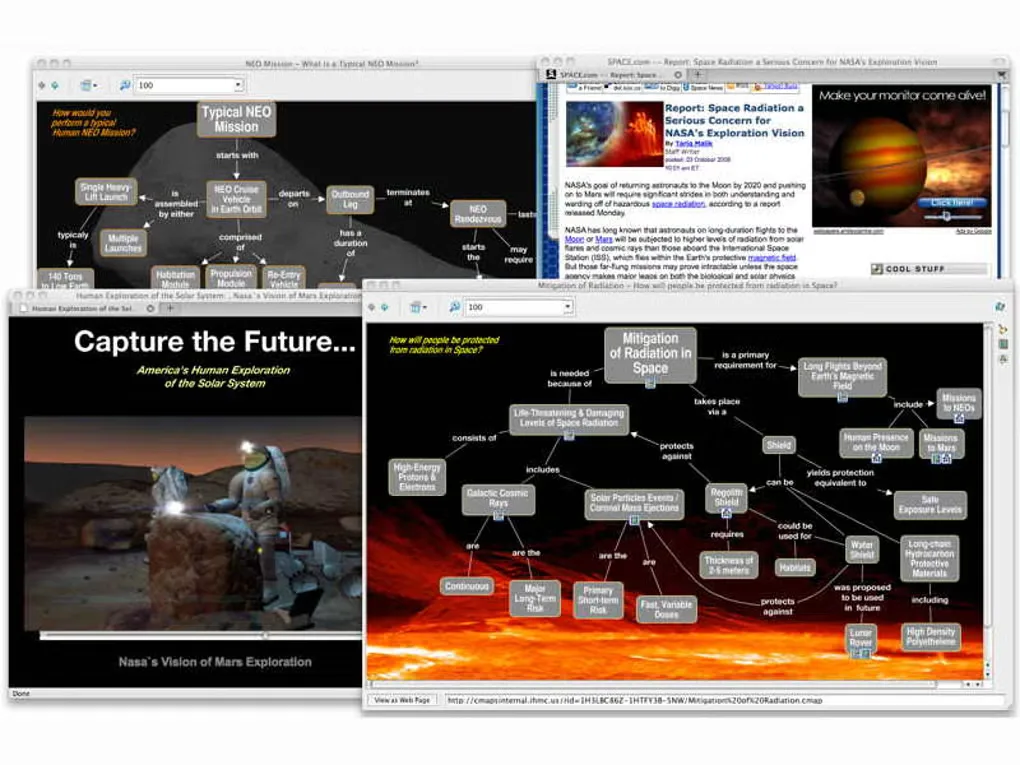
The screenshots are historical documentation and gallery images, not captures of version 7.01.00. They illustrate the Views window and concept maps with linked resources; the current interface may differ.
What it offers
- Create labeled concepts and linking phrases to express relationships between ideas.
- Organize concept maps and supporting resources in local folders.
- Attach documents, images or web resources to concepts and link related maps.
- Share maps on CmapServers and edit a server-hosted map with other users simultaneously.
- Generate web pages of server-hosted concept maps for browser viewing.
Good to know
- Online sharing and collaboration require reachable CmapServers; firewall or proxy settings can prevent access.
- Cmap Cloud shares folders, not individual maps.
- IHMC's download catalog requests registration and authorization before activating its download controls. The HEAD-verified package link is not evidence of permission or a completed installation.
Product images
Sources
References used for this listing. Retrieval dates do not indicate hands-on testing.
- CmapTools - Download — Windows product and gallery ↗Retrieved
- CmapTools | Cmap — official product overview ↗Retrieved
- CmapTools Download | Cmap — package and requirements ↗Retrieved
- CmapTools Release Notes ↗Retrieved
- CmapTools FAQs — sharing, network access and license ↗Retrieved
- CmapTools Help — desktop Views window and editing ↗Retrieved
- License Agreement for Public CmapTools Client Software ↗Retrieved
More in utilities
View category ↗
1.1.1.1 with WARP 2026.8.2115.0
Encrypt traffic from your Mac to Cloudflare’s network with WARP, or use DNS-only mode for encrypted DNS queries to the 1.1.1.1 resolver.
1.1.1.1 with WARP 2026.8.2115.0
Encrypt traffic between your Windows PC and Cloudflare, or use encrypted DNS only, with the free 1.1.1.1 with WARP app.

3uTools 9.12.005
Manage iPhone and iPad photos, music, apps and backups from Windows with 3uTools, a free utility that also includes device checks and firmware flashing tools.