
Development Windows
Codayak
Map a repository, request code changes and inspect build and test reports with Codayak, a free Windows AI workbench aimed at .NET teams.
- Operating system
- Windows 10 version 1809 or later; Windows 11
- Architecture
- 64-bit Windows (publisher requirement)
- Download package
- EXE installer
The publisher says the .NET runtime is included. Requires a supported LLM provider API key or an OpenAI-compatible endpoint.
Link checked · Download guidance
What is Codayak?
Codayak is a standalone AI coding workbench that works alongside your editor on Windows. Connect a repository and a supported AI provider or OpenAI-compatible endpoint to ask for changes, inspect dependencies and review proposed edits. It is designed around .NET development, with MSBuild and dotnet CLI integration, rather than replacing Visual Studio.
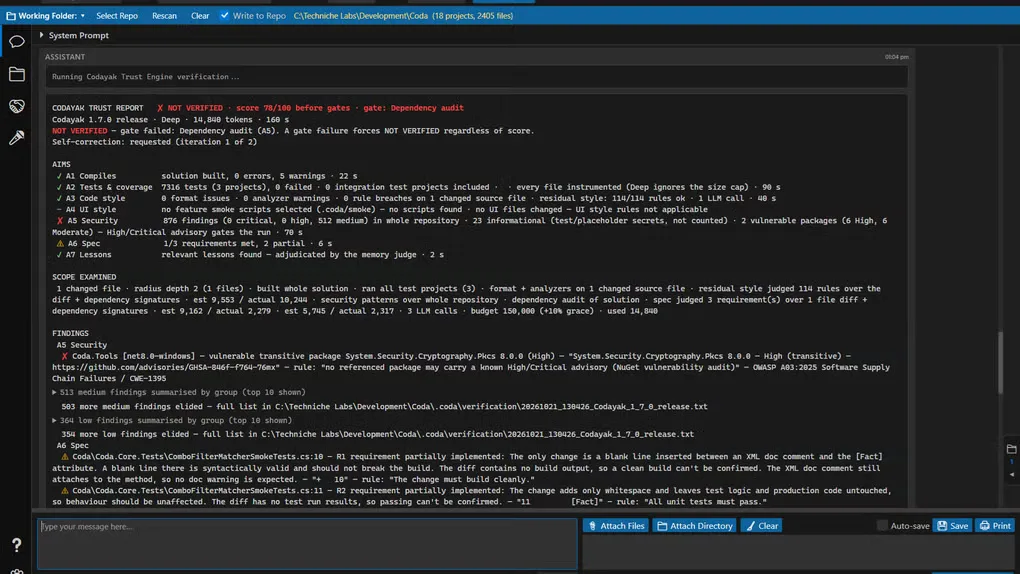
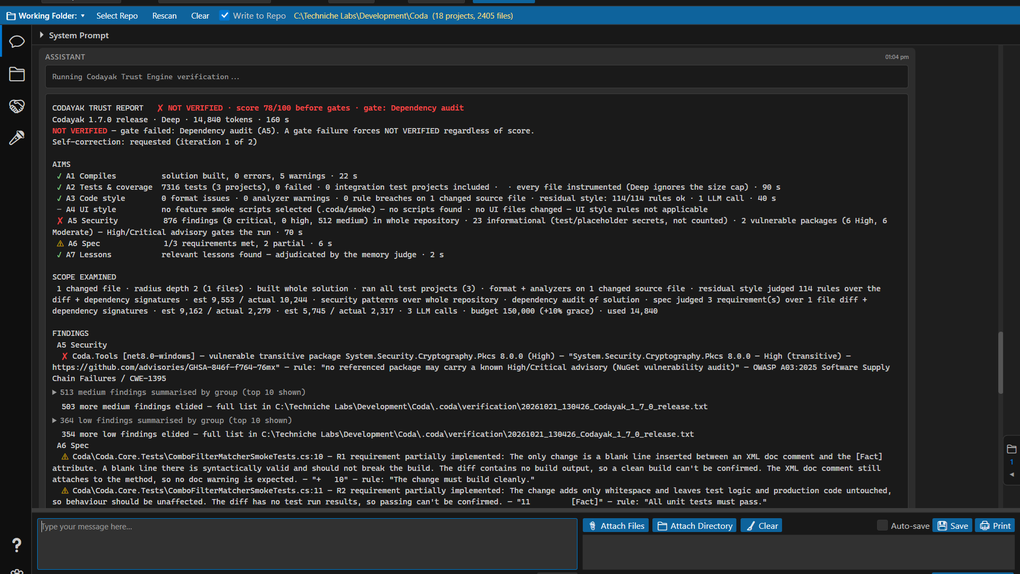
The publisher describes tools for patching files, running tests, querying databases and exercising browser or Windows desktop interfaces. Its Trust Engine assembles build, test, security and specification-check findings into a report. A report can identify failed checks or work it could not assess; it is not a guarantee that generated code is correct. File writes require enabling Write to Repo, with backups and diffs provided for review. Azure DevOps and GitHub integrations support work items and pull-request reviews.
The application is free for personal and commercial use but is proprietary, not open source. Cloud models use your own provider API keys and can incur separate usage charges. An OpenAI-compatible endpoint is another option, with results dependent on the model's tool-calling ability. Although Codayak can read and edit other languages, its build and test verification is tuned for .NET. Review and validate generated output before relying on it.
What it offers
- Map solution projects and dependencies to inspect the likely impact of a proposed change.
- Patch repository files with backups, side-by-side diffs and a Write to Repo control.
- Build with MSBuild or the dotnet CLI and run .NET tests, with verification findings collected in Trust Engine reports.
- Query supported SQL databases and automate browser or Windows desktop interfaces.
- Read work items and review pull requests through Azure DevOps or GitHub using your configured AI provider.
Good to know
- Cloud AI use requires your own provider API keys; provider usage charges are separate from the free application.
- Build and test verification is tuned for .NET, even though the application can read and edit other programming languages.
- AI-generated output can be wrong, incomplete or unsafe; the EULA makes you responsible for reviewing and validating it.
Product images
Sources
References used for this listing. Retrieval dates do not indicate hands-on testing.
More in development
View category ↗
010 Editor 17.0
Inspect and edit binary files on Mac with 010 Editor, a paid text and hex editor with Binary Templates, file comparison and a 30-day trial.
010 Editor 17.0
Inspect and edit binary files with 010 Editor for Windows, a text and hex editor with Binary Templates, file comparison and scripting. Includes a 30-day trial.
10x Editor
Edit and navigate C++ projects on Windows with a built-in parser, workspace search and Visual Studio project support. A paid license is required after the 30-day trial.