

Development Windows
Code::Blocks for Windows
Write, build and debug C, C++ and Fortran projects with Code::Blocks, a free IDE. This Windows 64-bit installer includes MinGW compilers and GDB.
- Operating system
- Windows; publisher lists Windows 10
- Architecture
- x64 (64-bit)
- Download package
- EXE installer with MinGW compilers and GDB
Code::Blocks 25.03mingw bundle, not the IDE-only installer. Separate 32-bit packages exist. Older systems may require older releases; the bundled tools' minimum Windows version is not specified here.
Link checked · Download guidance
What is Code::Blocks?
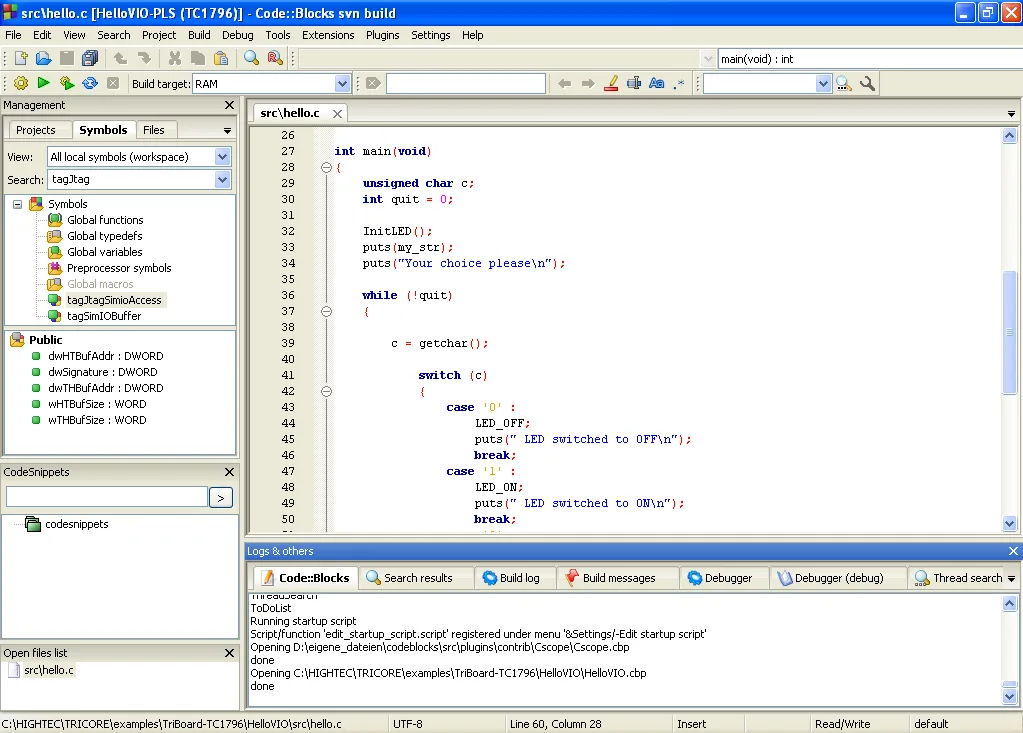
Code::Blocks brings source editing, project builds and debugging into one workspace for C, C++ and Fortran development. Its editor offers syntax highlighting, code completion and code folding, while workspaces group related projects and their dependencies. The build system supports multiple targets and parallel compilation; the GDB interface provides breakpoints, watches and a call stack. Plugins extend the IDE's tools.
The linked 25.03 Windows 64-bit EXE is the MinGW-bundled edition, not the IDE-only setup. The publisher lists GCC/G++, GFortran and Clang compilers plus GDB in this package, making the package choice important if you do not already have a toolchain. Code::Blocks also supports other compiler configurations, but importing an existing project has limits: its MSVC project importer does not support assembly code. The publisher advises using older releases for older operating systems; this entry does not establish a minimum Windows version for every bundled tool.
What it offers
- Edit source with syntax highlighting, code completion and code folding.
- Organize multiple projects, build targets and inter-project dependencies in workspaces.
- Build in parallel and configure supported compilers such as GCC, Clang and MSVC++.
- Debug through GDB with breakpoints, watches and a call stack; extend tools through plugins.
Good to know
- The MSVC project and workspace importer does not support assembly code.
- Older Windows systems may need an older release; the publisher does not give a precise minimum Windows version for this compiler-bundled package on its binary page.
Product images
Sources
References used for this listing. Retrieval dates do not indicate hands-on testing.
- Code::Blocks — official product overview and logo ↗Retrieved
- Code::Blocks — official binary releases ↗Retrieved
- Code::Blocks — official features ↗Retrieved
- Code::Blocks — official license ↗Retrieved
- Code::Blocks 25.03 is here! — release announcement ↗Retrieved
- Code::Blocks User Manual — Figure 1.1 and document license ↗Retrieved
More in development
View category ↗
010 Editor 17.0
Inspect and edit binary files on Mac with 010 Editor, a paid text and hex editor with Binary Templates, file comparison and a 30-day trial.
010 Editor 17.0
Inspect and edit binary files with 010 Editor for Windows, a text and hex editor with Binary Templates, file comparison and scripting. Includes a 30-day trial.
10x Editor
Edit and navigate C++ projects on Windows with a built-in parser, workspace search and Visual Studio project support. A paid license is required after the 30-day trial.