
Utilities Windows
Colasoft Ping Tool
Compare ping response times for multiple IP addresses or domains in one Windows chart, with packet-loss summaries and detailed replies. Free for personal use; commercial use requires a license.
- Operating system
- Windows 2000, XP, 2003, Vista, 7, 8, 10 and 11, as listed by the publisher
- Architecture
- Not specified by the publisher
- Download package
- ZIP download
Publisher-listed requirements, not independently tested compatibility. The ZIP contents and installer architecture were not inspected.
Link checked · Download guidance
What is Colasoft Ping Tool?
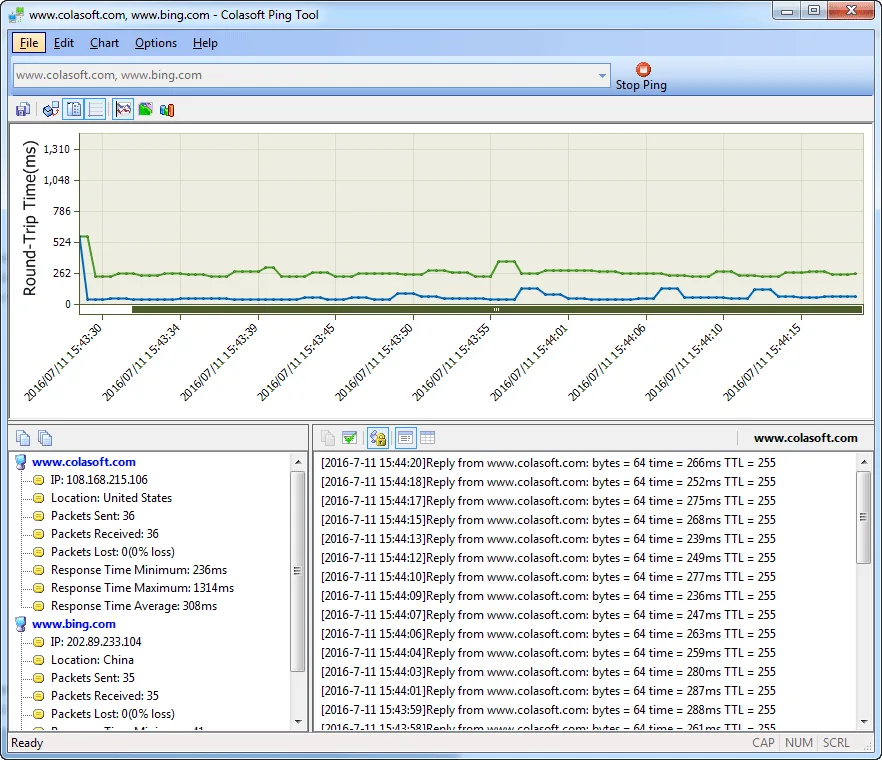
Colasoft Ping Tool puts several ping targets on the same response-time graph so you can compare their behavior over time. Enter IP addresses or domain names separated by spaces, commas or semicolons, then use the chart to follow each target's round-trip times. A summary pane shows sent, received and lost packets alongside response-time statistics, while a details pane displays individual replies.
The tool can save historical charts as BMP images. Its details view offers a classic Windows-ping layout or a table with timestamps, status, bytes, response time and TTL. The publisher also documents launching pings for source or destination addresses from captured packets in Colasoft Capsa.
The free edition is not a commercial-use license. Although the download page calls it freeware with no limitations, the product's linked license agreement restricts free use to personal users and requires a commercial license for business use. Free-version users are also not entitled to manufacturer support. The screenshot is the publisher's historical interface illustration, not evidence of a newly installed or tested copy.
What it offers
- Ping multiple IP addresses or domain names simultaneously and compare response times on a shared graph.
- Read per-target sent, received and lost packet counts plus response-time statistics.
- Inspect individual replies in classic or tabular form, including response time and TTL.
- Save historical charts as BMP images.
- Ping source or destination addresses from captured packets through Colasoft Capsa integration.
Good to know
- The linked product license permits free personal use only; commercial users must purchase a commercial license.
- The free-version license does not entitle users to manufacturer support.
Product images
Sources
References used for this listing. Retrieval dates do not indicate hands-on testing.
More in utilities
View category ↗
1.1.1.1 with WARP 2026.8.2115.0
Encrypt traffic from your Mac to Cloudflare’s network with WARP, or use DNS-only mode for encrypted DNS queries to the 1.1.1.1 resolver.
1.1.1.1 with WARP 2026.8.2115.0
Encrypt traffic between your Windows PC and Cloudflare, or use encrypted DNS only, with the free 1.1.1.1 with WARP app.

3uTools 9.12.005
Manage iPhone and iPad photos, music, apps and backups from Windows with 3uTools, a free utility that also includes device checks and firmware flashing tools.