
Utilities Windows
Color Cop
Pick on-screen colors and copy RGB or hex values with Color Cop, a free Windows utility with a magnifier, sampling options and color history.
- Operating system
- Windows; publisher download page discusses Windows 10 and 11
- Architecture
- Not confirmed for the selected installer
- Download package
- English EXE installer
No installer was downloaded or run. Exact minimum Windows build and runtime compatibility were not independently tested.
Link checked · Download guidance
What is Color Cop?
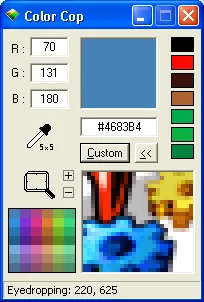
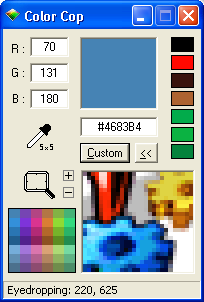
Color Cop turns a color visible on your Windows screen into a value you can use in a website, graphic or application. Drag its eyedropper to the target and release to select the color. A magnifier helps distinguish individual pixels; single-pixel, 3×3 and 5×5 sampling let you choose between one pixel and an averaged area. Enable auto-copy to send the selected value to the clipboard in your chosen format.
Output options include HTML Hex, RGB Int and RGB Float, along with formats for Delphi, Visual Basic, Visual C++, PowerBuilder and Clarion. The seven-color history lets you revisit recent picks. Right-click inside the window to change options, including WebSafe snapping and system-tray behavior.
For an exact sampled value, leave Snap to WebSafe off: that option replaces non-WebSafe colors with the nearest WebSafe value. The download linked here is the publisher's English EXE installer; its latest-release address resolved to version 5.5.16 during the HEAD check. The publisher also offers a separate stand-alone ZIP. The screenshot is a historical publisher-hosted interface image, not a capture of version 5.5.16 or evidence of a local installation.
What it offers
- Sample a single screen pixel or average a 3×3 or 5×5 area with the eyedropper.
- Magnify the screen and adjust zoom with the plus/minus controls or mouse wheel.
- Copy selected colors automatically in HTML Hex, RGB Int, RGB Float and other supported output formats.
- Reselect recent picks from a seven-color history.
- Hold Ctrl while dragging the eyedropper to measure relative pixel distances.
Good to know
- Snap to WebSafe changes non-WebSafe samples to the nearest WebSafe value; disable it when you need the sampled value unchanged.
- Color history retains the last seven sampled colors, not an unlimited record.
Product images
Sources
References used for this listing. Retrieval dates do not indicate hands-on testing.
- Color Cop — official product overview ↗Retrieved
- Color Cop — official features ↗Retrieved
- Color Cop — official FAQ and sampling behavior ↗Retrieved
- Color Cop — official Windows downloads ↗Retrieved
- ColorCop — official release v5.5.16 ↗Retrieved
- Color Cop — MIT License ↗Retrieved
- ColorCop — official website repository and historical screenshot asset ↗Retrieved
More in utilities
View category ↗
1.1.1.1 with WARP 2026.8.2115.0
Encrypt traffic from your Mac to Cloudflare’s network with WARP, or use DNS-only mode for encrypted DNS queries to the 1.1.1.1 resolver.
1.1.1.1 with WARP 2026.8.2115.0
Encrypt traffic between your Windows PC and Cloudflare, or use encrypted DNS only, with the free 1.1.1.1 with WARP app.

3uTools 9.12.005
Manage iPhone and iPad photos, music, apps and backups from Windows with 3uTools, a free utility that also includes device checks and firmware flashing tools.