
Utilities Windows
ColorPic
Pick screen colors, collect palettes of up to 16 chips and copy hexadecimal or decimal values with ColorPic for Windows. Advanced features require paid registration.
- Operating system
- Windows 10 and Windows 11, as listed in publisher metadata
- Architecture
- Not specified by the inspected publisher pages
- Download package
- Screen Measurement Pack ZIP containing ColorPic and three measurement tools
Archive contents are described by the publisher, not inspected locally. Exact ColorPic build and CPU architecture are unconfirmed; no installation or compatibility test was performed.
Link checked · Download guidance
What is ColorPic?
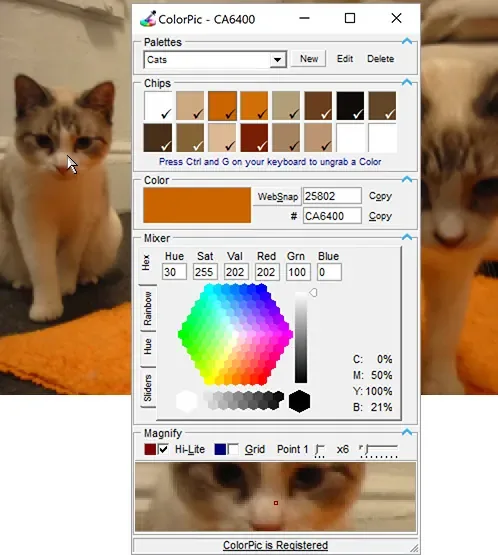
ColorPic is a floating Windows color picker for collecting colors from other applications. Its magnifier helps you locate a pixel, while saved palettes keep related colors together for a website, illustration or other design task. Four mixers let you adjust a captured color rather than resample it from scratch.
The documented workflow starts by selecting a chip in a palette. With the ColorPic window selected, point at the desired screen color and press Ctrl+G to grab it; the same shortcut releases it again. The Copy buttons transfer hexadecimal or decimal values to the clipboard, and the # control includes the prefix when copying a hexadecimal value. Single-pixel, 3×3 and 5×5 sampling provide a choice between an exact point and a smoother sample.
The linked download is Iconico's Screen Measurement Pack ZIP, not a standalone ColorPic installer. The publisher explicitly says this archive contains Calipers, Protractor, Compass and ColorPic. Its general license permits unregistered evaluation without a time limit but disables advanced features; the ColorPic page advertises a $14.50 registration license. Softonic labels its listing free and version 5.1, whereas the publisher's visible heading says 5.0 and its structured metadata says 4.0. An exact current ColorPic build is therefore not asserted here.
What it offers
- Collect up to 16 color chips in a palette and save multiple palettes.
- Grab or release a screen color with Ctrl+G while the ColorPic window is selected.
- Copy hexadecimal or decimal color values, with an optional # prefix for hexadecimal output.
- Adjust HSV and RGB components with four color mixers; view CMYK percentages.
- Use a configurable magnifier, grid overlay and single-pixel, 3×3 or 5×5 sampling.
Good to know
- Unregistered evaluation has disabled advanced features; the publisher lists a $14.50 ColorPic registration license.
- The download is a multi-application Screen Measurement Pack ZIP, not a standalone ColorPic installer.
- Version labels disagree across the publisher's visible text, structured metadata and Softonic listing; the exact build inside the archive is unconfirmed.
Product images
Sources
References used for this listing. Retrieval dates do not indicate hands-on testing.
More in utilities
View category ↗
1.1.1.1 with WARP 2026.8.2115.0
Encrypt traffic from your Mac to Cloudflare’s network with WARP, or use DNS-only mode for encrypted DNS queries to the 1.1.1.1 resolver.
1.1.1.1 with WARP 2026.8.2115.0
Encrypt traffic between your Windows PC and Cloudflare, or use encrypted DNS only, with the free 1.1.1.1 with WARP app.

3uTools 9.12.005
Manage iPhone and iPad photos, music, apps and backups from Windows with 3uTools, a free utility that also includes device checks and firmware flashing tools.