
Utilities Windows
CommView
Inspect Windows network traffic with CommView: decode captured packets, reconstruct TCP sessions and trace connections to applications. TamoSoft offers a 30-day evaluation.
- Operating system
- Windows 7, 8, 8.1, 10, 11; Windows Server 2019, 2022, 2025
- Architecture
- Not specified for this package in the consulted publisher catalog
- Download package
- ZIP evaluation package
Publisher lists Ethernet, Wi-Fi and many virtual adapters. This is CommView, not CommView for WiFi; adapter monitoring does not guarantee visibility of all LAN traffic.
Link checked · Download guidance
What is CommView?
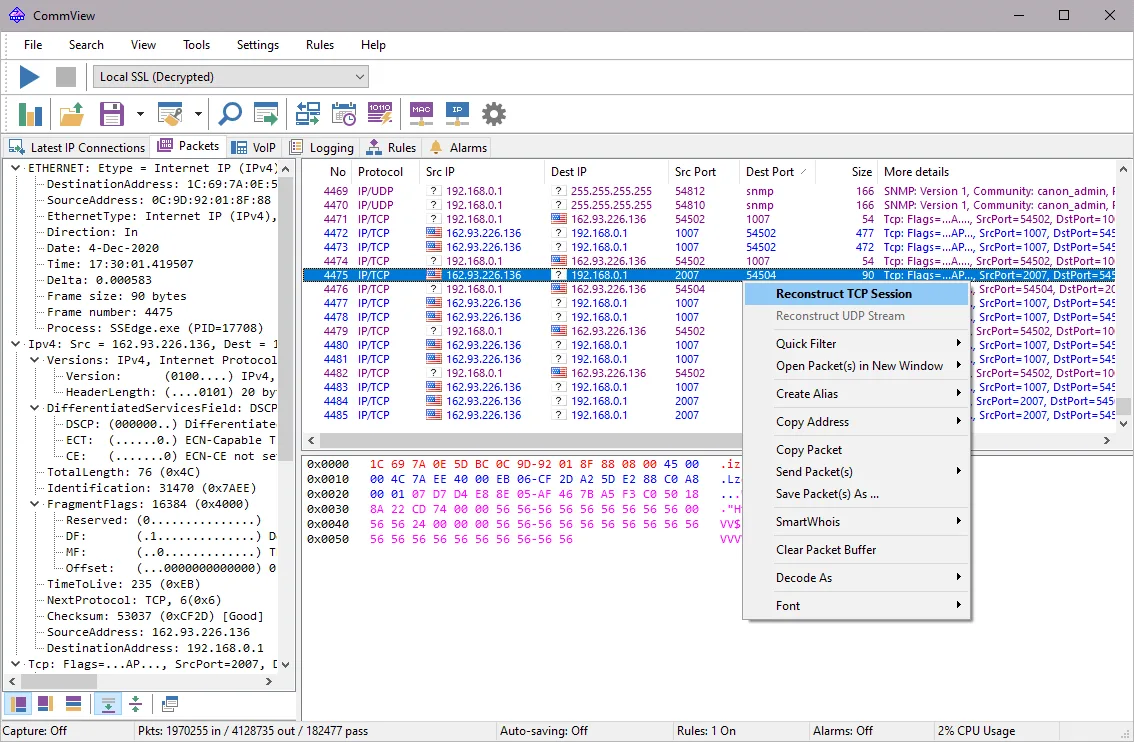
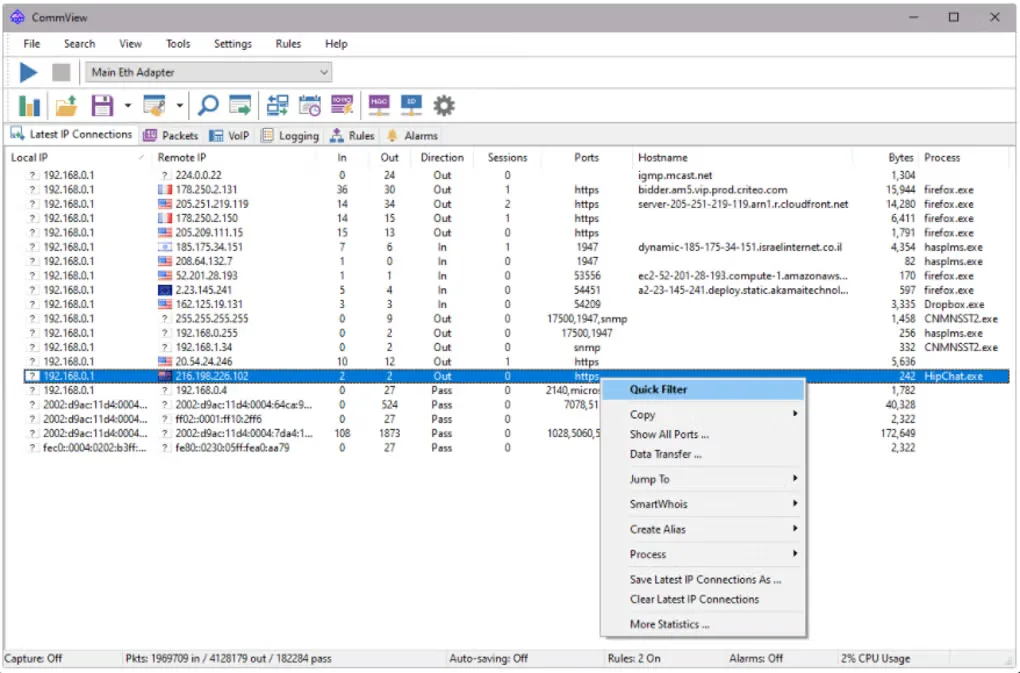
CommView is TamoSoft's Windows network monitor and packet analyzer for investigating traffic on a PC or LAN segment. Its connection list shows addresses, ports and sessions, while the packet view exposes protocol details for closer inspection. Use filtering, string or hexadecimal searches and TCP session reconstruction to narrow an investigation from a busy connection list to the packets involved.
Captured traffic can be saved or exchanged with other analysis tools through formats including Wireshark/Tcpdump and pcapng. Protocol-distribution charts, bandwidth statistics and configurable alarms provide other views of network activity. The included VoIP analyzer supports SIP and H.323 analysis; remote capture uses the separate optional CommView Remote Agent.
Capture visibility depends on where the monitoring computer sits in the network. Installing CommView on one switched-LAN computer does not by itself expose every other workstation's traffic: the publisher describes managed-switch port mirroring for directing selected traffic to a monitoring port. CommView is also a separate product from CommView for WiFi, despite its ability to monitor traffic through a Wi-Fi adapter.
The linked ZIP is the publisher's Windows evaluation package, listed as version 7.0 Build 798. The evaluation lasts 30 days; continued use requires a commercial license. The download check confirmed the file endpoint using HEAD only, not an installation or a functional test.
What it offers
- Inspect captured packets and protocol decodes, with support for over 100 protocols listed by the publisher.
- Reconstruct TCP sessions and search captured contents for text or hexadecimal data.
- Map packets to applications and inspect IP addresses, ports, sessions and connection statistics.
- Import and export capture formats including Wireshark/Tcpdump and pcapng.
- View protocol and bandwidth charts, configure event alarms and analyze SIP or H.323 VoIP traffic.
Good to know
- The evaluation is limited to 30 days; CommView is commercial software, not a permanently free analyzer.
- Visibility of other computers' traffic depends on network topology and capture placement; a switched LAN can require port mirroring.
- Remote capture through CommView Remote Agent requires a separate optional add-on. CommView for WiFi is a different product.
Product images
Sources
References used for this listing. Retrieval dates do not indicate hands-on testing.
More in utilities
View category ↗
1.1.1.1 with WARP 2026.8.2115.0
Encrypt traffic from your Mac to Cloudflare’s network with WARP, or use DNS-only mode for encrypted DNS queries to the 1.1.1.1 resolver.
1.1.1.1 with WARP 2026.8.2115.0
Encrypt traffic between your Windows PC and Cloudflare, or use encrypted DNS only, with the free 1.1.1.1 with WARP app.

3uTools 9.12.005
Manage iPhone and iPad photos, music, apps and backups from Windows with 3uTools, a free utility that also includes device checks and firmware flashing tools.