
Development Windows
Compare It!
Compare and merge two files side by side with colored differences, in-pane editing and HTML reports using Compare It! for Windows, a commercial file comparison tool.
- Operating system
- Windows; exact supported releases not confirmed
- Architecture
- Not specified in the inspected publisher catalog
- Download package
- EXE self-installer
Publisher catalog labels this download 4.2. Older overview and screenshot show 4.0. No Windows 10/11 compatibility or installation test was performed.
Link checked · Download guidance
What is Compare It!?
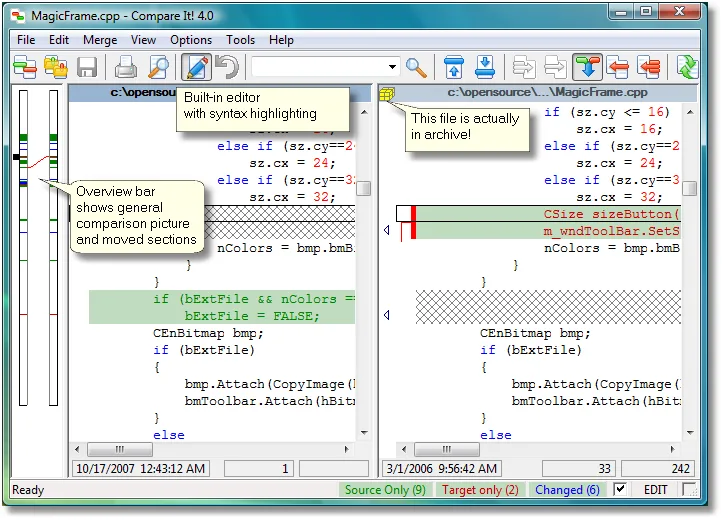
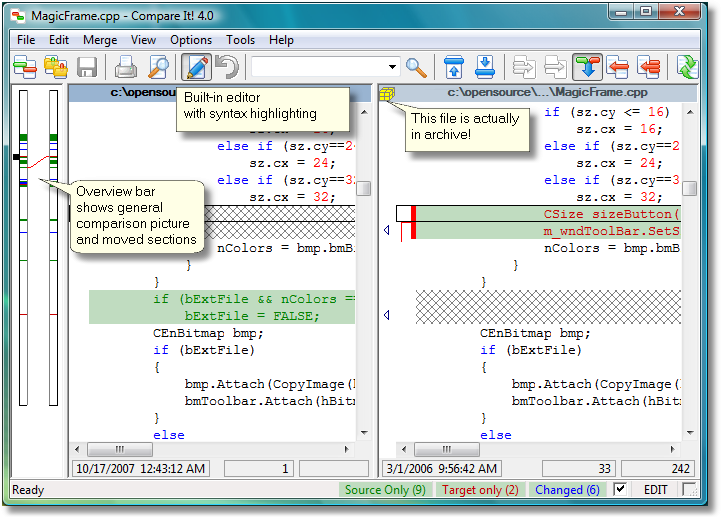
Compare It! helps you inspect differences between two files and move selected changes from one to the other. Its side-by-side view combines colored change blocks with an overview bar, so you can locate differences before editing or merging. The publisher documents direct editing inside either comparison pane, syntax highlighting and word wrapping for long lines.
For source-code reviews or revisions to text documents, it offers a focused file-to-file workflow rather than a folder synchronization interface. You can copy changes across the comparison, edit the result and generate an HTML report or colored printout. The publisher also lists detection of moved sections, comparisons with ZIP-contained files, and separate binary and image viewers. These are documented capabilities, not results of an installation or hands-on test.
Check the legacy documentation before choosing it for a current Windows system. The download catalog labels the package 4.2, while the overview and screenshot gallery describe 4.0; the image here therefore illustrates the older documented interface. Exact Windows 10/11 support and processor architecture were not established by the sources inspected. Compare It! is commercially licensed, not freeware.
What it offers
- Compare two files in a side-by-side view with colored differences and an overview bar.
- Merge selected changes and edit text directly inside the comparison panes.
- Use syntax highlighting and word wrapping when reviewing source code or long lines.
- Detect moved sections and compare a file with its ZIP-contained counterpart.
- Create HTML comparison reports or colored printouts; binary and image viewers are also listed by the publisher.
Good to know
- The publisher FAQ directs folder comparison to its separate Synchronize It! product; Compare It! is a file comparison tool.
- Exact Windows 10/11 compatibility and processor architecture are unconfirmed; the inspected documentation is legacy material.
- The catalog lists version 4.2, but the product overview and supplied screenshot describe 4.0. The linked installer was not installed or inspected internally.
Product images
Sources
References used for this listing. Retrieval dates do not indicate hands-on testing.
- Compare It! 4.0 — official file comparison overview ↗Retrieved
- Downloads — Grig Software ↗Retrieved
- Registration information — Grig Software ↗Retrieved
- Licensing information — Grig Software ↗Retrieved
- Compare It! 3 Frequently Asked Questions — legacy publisher FAQ ↗Retrieved
- Compare It! 4.0 in pictures — official screenshot gallery ↗Retrieved
More in development
View category ↗
010 Editor 17.0
Inspect and edit binary files on Mac with 010 Editor, a paid text and hex editor with Binary Templates, file comparison and a 30-day trial.
010 Editor 17.0
Inspect and edit binary files with 010 Editor for Windows, a text and hex editor with Binary Templates, file comparison and scripting. Includes a 30-day trial.
10x Editor
Edit and navigate C++ projects on Windows with a built-in parser, workspace search and Visual Studio project support. A paid license is required after the 30-day trial.