
Utilities Windows
ControlPad
Launch Windows applications with numeric codes or keywords using ControlPad, a keypad command launcher with a laptop mode for keyboards without a numpad.
- Operating system
- Windows; supported versions are not specified on the current publisher page.
- Architecture
- Not specified by publisher
- Download package
- ZIP archive
The publisher categorizes ControlPad as a legacy Windows tool. Current Windows compatibility has not been established; the software was not installed or run.
Link checked · Download guidance
What is ControlPad?
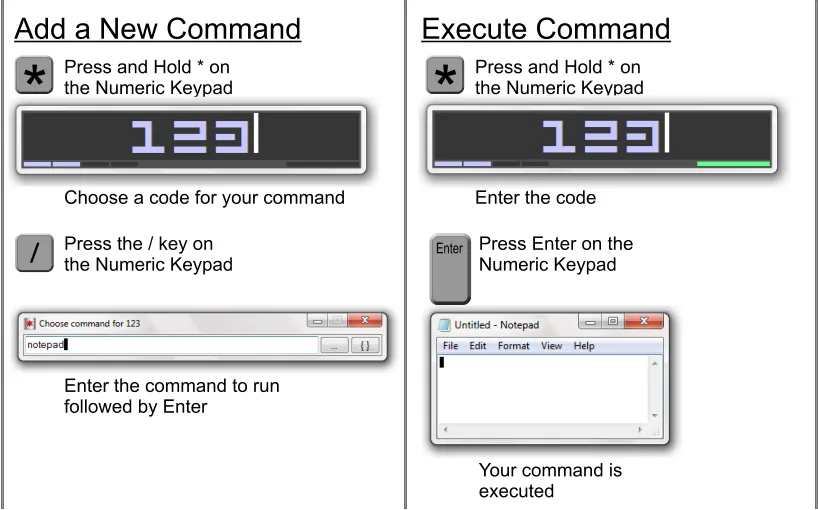
ControlPad maps numeric codes or keywords to commands so you can launch Windows applications from the keyboard. Hold the numeric keypad's * key for about one second, enter your code or keyword and press Enter to run the assigned command. Commands are managed from the same interface. A laptop mode accommodates keyboards without a dedicated numeric keypad.
The publisher lists ControlPad among its legacy Windows tools and gives version 0.72 a last-release date of December 18, 2010. Its current product page does not specify supported Windows versions or processor architectures, so compatibility with a current Windows installation is not established by that page. The linked publisher package is a ZIP archive.
What it offers
- Launch mapped commands with numeric codes or keywords.
- Open the launcher by holding the numeric keypad's * key for about one second.
- Manage commands from the launcher's interface.
- Use laptop mode when a dedicated numeric keypad is unavailable.
Good to know
- Legacy release: the publisher dates version 0.72 to December 18, 2010 and does not specify current Windows-version or processor-architecture compatibility.
Product images
Sources
References used for this listing. Retrieval dates do not indicate hands-on testing.
More in utilities
View category ↗
1.1.1.1 with WARP 2026.8.2115.0
Encrypt traffic from your Mac to Cloudflare’s network with WARP, or use DNS-only mode for encrypted DNS queries to the 1.1.1.1 resolver.
1.1.1.1 with WARP 2026.8.2115.0
Encrypt traffic between your Windows PC and Cloudflare, or use encrypted DNS only, with the free 1.1.1.1 with WARP app.

3uTools 9.12.005
Manage iPhone and iPad photos, music, apps and backups from Windows with 3uTools, a free utility that also includes device checks and firmware flashing tools.