
Utilities Windows
COPASI
Build biochemical reaction-network models, simulate their dynamics and fit parameters to experimental data with COPASI for Windows.
Version 4.48 (Build 311) · Direct publisher file
Link checked · Download guidance
What is COPASI?
COPASI is a stand-alone biochemical network simulator for exploring how reactions, species and compartments behave over time. You can define a reaction network in its graphical editor or exchange models through SBML, then choose differential-equation or stochastic simulation methods. It also supports steady-state analysis, parameter scans, optimization and parameter estimation across multiple experiments.
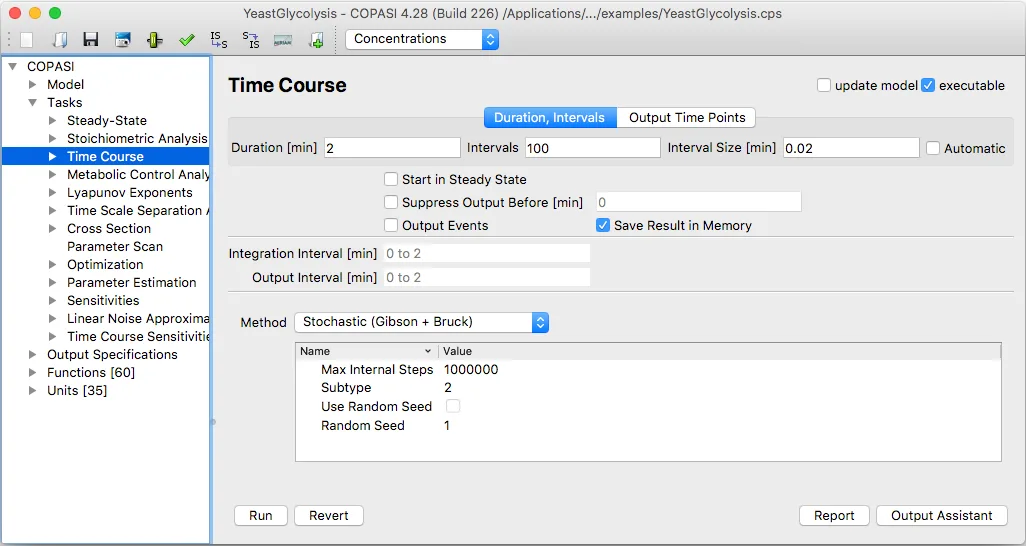
The workflow separates the model from the calculation and its output. Select a task in the object tree, configure its method and settings, and choose plots or report files for the results. For a time course, the manual describes setting a duration and output intervals before running the calculation. Keeping every result in memory can become costly for large models or many steps; if you turn that option off, define a report to preserve the results.
This entry links to the publisher's COPASI 4.48 Build 311 Windows EXE. The release notes describe a bug-fix release with no new features. The screenshot is an older official manual illustration of COPASI 4.28 on macOS, included to explain the Time Course interface rather than represent the current Windows appearance. Exact Windows version and processor requirements for the linked installer were not established by the consulted sources.
What it offers
- Create reaction networks from species, reactions and compartments, with predefined or user-defined kinetic functions.
- Import and export SBML models, including levels 1 through 3.
- Run differential-equation, stochastic and hybrid simulations, with time-course and steady-state tasks.
- Explore parameter scans, estimate parameters across experiments and perform sensitivity or metabolic control analysis.
- Visualize results with network diagrams and plots, or write selected data to report files.
Good to know
- Saving a large time-course result in memory can consume significant RAM. When disabling Save Result in Memory, define a report to save the results.
- The consulted release and installation pages do not establish minimum Windows versions or the processor architecture of this Windows EXE; the installation guide still uses older WIN32 package-name examples.
- The publisher's manual screenshot shows macOS COPASI 4.28 Build 226, not the appearance of the linked Windows 4.48 release.
Product images
Sources
References used for this listing. Retrieval dates do not indicate hands-on testing.
- COPASI — Biochemical System Simulator ↗Retrieved
- Release COPASI 4.48 (Build 311) — copasi/COPASI ↗Retrieved
- COPASI Build 311 — release asset catalog ↗Retrieved
- COPASI — Features ↗Retrieved
- COPASI — Windows Installation ↗Retrieved
- COPASI — Time Course Simulation ↗Retrieved
- COPASI — Terms of Use ↗Retrieved
More in utilities
View category ↗
1.1.1.1 with WARP 2026.8.2115.0
Encrypt traffic from your Mac to Cloudflare’s network with WARP, or use DNS-only mode for encrypted DNS queries to the 1.1.1.1 resolver.
1.1.1.1 with WARP 2026.8.2115.0
Encrypt traffic between your Windows PC and Cloudflare, or use encrypted DNS only, with the free 1.1.1.1 with WARP app.

3uTools 9.12.005
Manage iPhone and iPad photos, music, apps and backups from Windows with 3uTools, a free utility that also includes device checks and firmware flashing tools.