
Utilities Windows
Copy Handler
Queue, pause and resume Windows file-copy and move jobs with Copy Handler, a free, open-source utility with detailed transfer statistics and Explorer integration.
- Operating system
- Windows XP and later, as listed by the publisher for 1.46
- Architecture
- 32-bit or 64-bit; selected automatically by the installer
- Download package
- EXE installer (chsetup-1.46.exe)
The portable ZIP and 1.50beta1 are separate downloads. No compatibility test on specific current Windows builds was performed.
Link checked · Download guidance
What is Copy Handler?
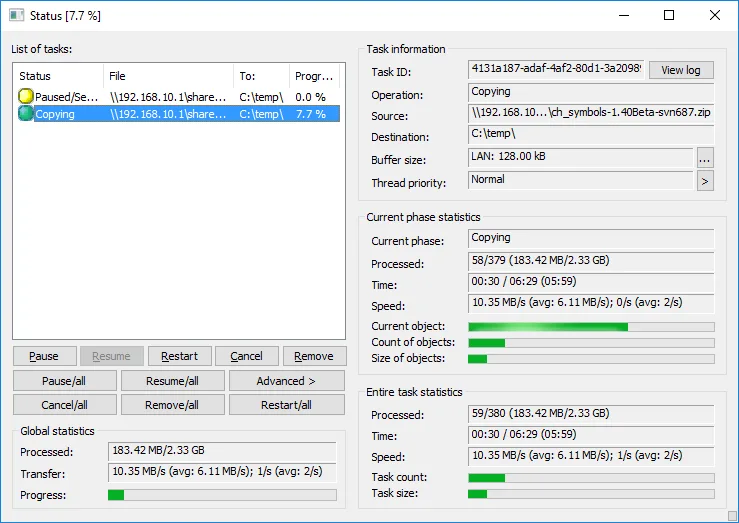
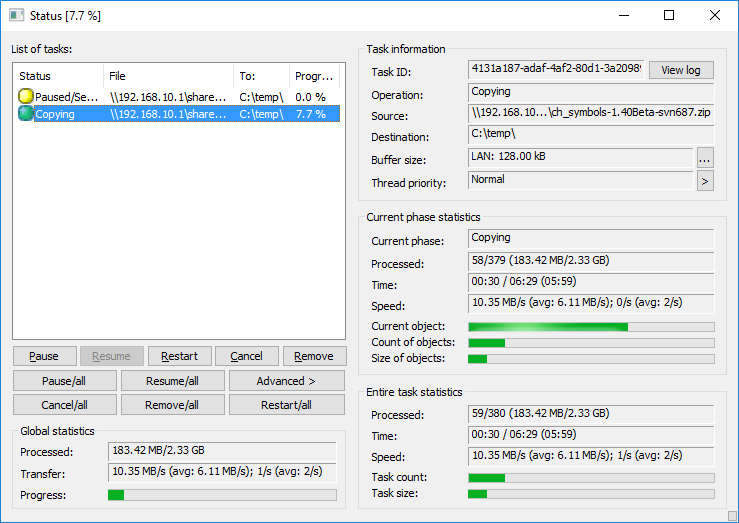
Copy Handler gives you a task list for file-copy and move operations in Windows. You can pause a job, resume it, restart it or cancel it, while the status window shows the current file, progress, transfer speed and time information. Queue support lets you control the order of jobs and run one or more operations at a time.
It suits transfers where you want more control than a single progress dialog: unfinished operations can resume after a system restart, and settings cover error handling, buffer sizes, thread priority and an optional shutdown after copying finishes. Windows Explorer context-menu and drag-and-drop commands provide another way to start transfers.
This entry links to the publisher-listed 1.46 installer through its SourceForge mirror. The installer selects the appropriate 32-bit or 64-bit version and sets up Windows integration. A separate portable edition is available, but the publisher warns that Explorer integration can be harder to configure with it.
Version 1.46 was released on December 24, 2020. The official download page still separates it from 1.50beta1; the beta is not the stable release. The screenshot is an older publisher example of the status window, not a capture from a newly installed copy. No current-Windows compatibility test or speed comparison was performed for this entry.
What it offers
- Pause, resume, restart or cancel individual copy and move operations.
- Queue transfers and run one or more jobs simultaneously in a chosen order.
- View the current file, transfer speed, progress, buffer size and elapsed or estimated time.
- Automatically resume unfinished operations after a system restart.
- Configure error handling, buffer sizes, thread priority and shutdown after copying.
- Add copy and move commands to Windows Explorer context menus and drag-and-drop menus.
Good to know
- The publisher-listed stable release is 1.46 from December 24, 2020; the separately listed 1.50beta1 is a beta, not a stable upgrade.
- The portable edition may require extra setup for Windows Explorer integration; this download is the installer instead.
- The publisher lists Windows XP and later for 1.46, but the cited page does not establish tested compatibility with specific current Windows builds.
Product images
Sources
References used for this listing. Retrieval dates do not indicate hands-on testing.
- Copy Handler - Download ↗Retrieved
- Home Page | Copy Handler ↗Retrieved
- Features | Copy Handler ↗Retrieved
- Download | Copy Handler ↗Retrieved
- Status window | Copy Handler ↗Retrieved
More in utilities
View category ↗
1.1.1.1 with WARP 2026.8.2115.0
Encrypt traffic from your Mac to Cloudflare’s network with WARP, or use DNS-only mode for encrypted DNS queries to the 1.1.1.1 resolver.
1.1.1.1 with WARP 2026.8.2115.0
Encrypt traffic between your Windows PC and Cloudflare, or use encrypted DNS only, with the free 1.1.1.1 with WARP app.

3uTools 9.12.005
Manage iPhone and iPad photos, music, apps and backups from Windows with 3uTools, a free utility that also includes device checks and firmware flashing tools.