

Utilities macOS
CopyQ for macOS
Keep a searchable clipboard history on your Mac with CopyQ, a free, open-source manager for text, images and reusable snippets. This download is the M1 build for macOS 13 or later.
- Operating system
- macOS 13 or later
- Architecture
- Apple silicon (publisher's M1 build)
- Download package
- DMG disk image
Selected asset: CopyQ-17.0.0-macos-13-m1.dmg. A separate macos-13.dmg build is published for Intel Macs. The application was not installed or run.
Link checked · Download guidance
What is CopyQ?
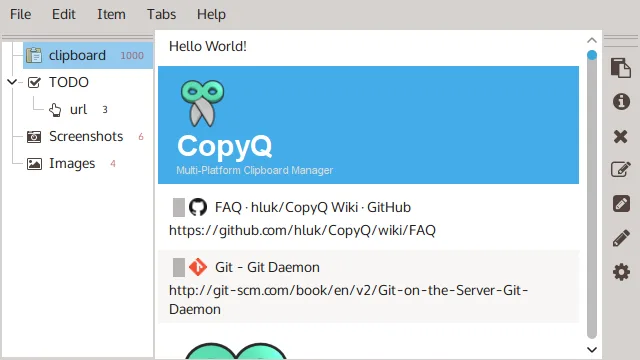
CopyQ saves clipboard entries so you can find and reuse something you copied earlier. Organize text, HTML, images and other clipboard formats in tabs, filter the history, edit entries, and add notes or tags to distinguish similar snippets. Saved items are restored when CopyQ next starts.
Customizable shortcuts and commands support repeated copying and pasting tasks. For more involved workflows, CopyQ also provides a command-line interface and scripting; the main application must be running for command-line operations.
This entry links to the publisher's CopyQ 17.0.0 M1 disk image for macOS 13 or later. An Intel Mac disk image is listed separately on the publisher's release page. The screenshot illustrates the publisher's desktop interface, not a verified macOS 17.0.0 capture.
Clipboard history needs care with sensitive content: saved tab data is unencrypted unless encryption is enabled. The publisher also warns that version 17 moves its data and state files; older versions will not see those moved items if you downgrade.
What it offers
- Save text, HTML, images and custom clipboard formats in organized tabs.
- Browse and filter clipboard history to find earlier entries.
- Edit, sort and rearrange saved items, with notes and tags for organization.
- Reuse items through customizable shortcuts, commands and scripting.
- Restore saved clipboard items when the application starts again.
Good to know
- Saved tab data is unencrypted unless encryption is enabled; clipboard history can retain sensitive content.
- Version 17 moves data and state files, so older versions will not see those items after a downgrade.
- Command-line operations require the main CopyQ application to be running.
Product images
Sources
References used for this listing. Retrieval dates do not indicate hands-on testing.
- CopyQ for Mac - Download — normal browser observation ↗Retrieved
- CopyQ 17.0.0 — publisher README ↗Retrieved
- CopyQ 17.0.0 — publisher release and assets ↗Retrieved
- CopyQ 17.0.0 — macOS publisher build matrix ↗Retrieved
- CopyQ 17.0.0 — publisher security documentation ↗Retrieved
- CopyQ 17.0.0 — GNU GPL version 3 license ↗Retrieved
- CopyQ — publisher screenshot gallery ↗Retrieved
More in utilities
View category ↗
1.1.1.1 with WARP 2026.8.2115.0
Encrypt traffic from your Mac to Cloudflare’s network with WARP, or use DNS-only mode for encrypted DNS queries to the 1.1.1.1 resolver.
1.1.1.1 with WARP 2026.8.2115.0
Encrypt traffic between your Windows PC and Cloudflare, or use encrypted DNS only, with the free 1.1.1.1 with WARP app.

3uTools 9.12.005
Manage iPhone and iPad photos, music, apps and backups from Windows with 3uTools, a free utility that also includes device checks and firmware flashing tools.