

Utilities Windows
Core Temp for Windows
Monitor CPU temperatures on Windows with Core Temp, which reads processor sensors and shows temperature changes as workloads vary.
- Operating system
- Windows 11, 10, 8/8.1, 7 and XP; publisher also lists Windows Server editions from 2003 through 2025
- Architecture
- Intel, AMD or VIA x86-family processor; setup installer bitness not specified on the page
- Download package
- EXE setup installer
Publisher separately offers 32-bit and 64-bit standalone ZIP packages. Version 1.21 drops Windows 2000 support; check the publisher's supported-processor list for hardware coverage.
Link checked · Download guidance
What is Core Temp?
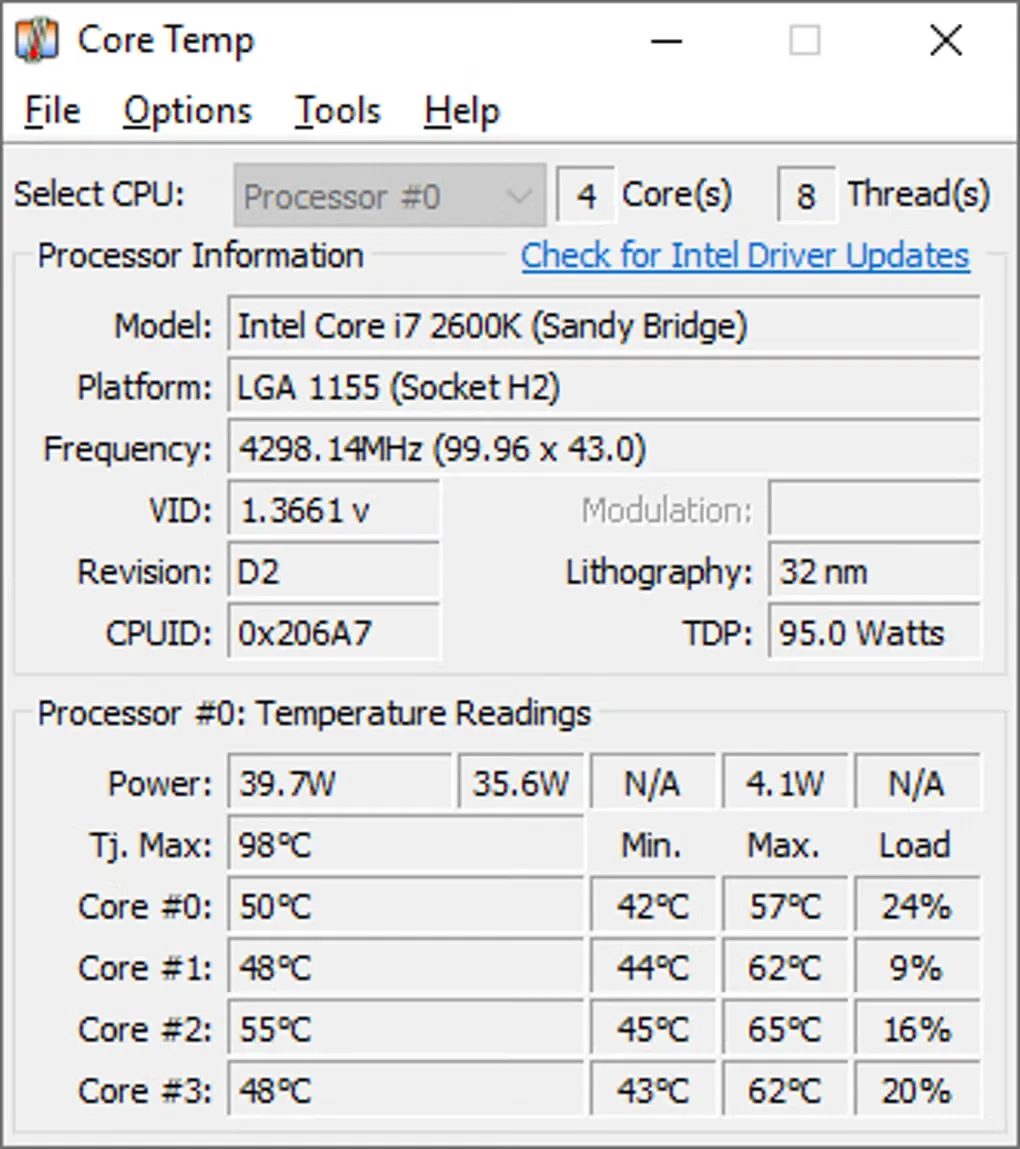
Core Temp monitors processor temperatures on Windows. It reads the CPU's digital thermal sensors rather than relying on external motherboard sensors, and displays temperature changes in real time. Its main window brings processor information and temperature readings together; on supported hardware, it shows individual core temperatures alongside minimum, maximum and load values.
Use it to observe how CPU temperatures change during your normal workloads. The publisher supports Intel, AMD and VIA processor families and provides a plug-in interface for extending the utility. The linked EXE is the publisher's Core Temp 1.21 setup download; separate 32-bit and 64-bit standalone ZIP packages are also listed on its website.
The available readings depend on the processor's sensors. The publisher notes that AMD Phenom and Opteron K10 processors have one sensor per package, so they provide one temperature reading per processor rather than independent readings for each core. Some 45 nm Intel Core 2 processors also do not report temperatures below roughly 30–40°C. Business users should check the publisher's commercial licensing, which is offered per physical machine.
What it offers
- Read CPU digital thermal sensors and watch temperatures change in real time.
- View individual core temperatures where the processor provides them.
- See processor details with minimum, maximum and load columns in the monitoring window.
- Extend functionality through the publisher's plug-in interface.
Good to know
- Sensor layout limits detail: AMD Phenom and Opteron K10 processors report one temperature per processor package, not separate temperatures for every core.
- Some 45 nm Intel Core 2 processors do not report low temperatures below roughly 30–40°C.
- Business use has separate commercial licensing, offered per physical machine.
Product images
Sources
References used for this listing. Retrieval dates do not indicate hands-on testing.
More in utilities
View category ↗
1.1.1.1 with WARP 2026.8.2115.0
Encrypt traffic from your Mac to Cloudflare’s network with WARP, or use DNS-only mode for encrypted DNS queries to the 1.1.1.1 resolver.
1.1.1.1 with WARP 2026.8.2115.0
Encrypt traffic between your Windows PC and Cloudflare, or use encrypted DNS only, with the free 1.1.1.1 with WARP app.

3uTools 9.12.005
Manage iPhone and iPad photos, music, apps and backups from Windows with 3uTools, a free utility that also includes device checks and firmware flashing tools.