

Utilities Windows
Cryptomator for Windows
Encrypt files and filenames in password-protected vaults before syncing them to cloud storage with Cryptomator, a free, open-source Windows application.
- Operating system
- Windows 10, version 1803 or later
- Architecture
- x64
- Download package
- EXE installer
Official EXE includes WinFsp. A separate MSI omits dependencies. The community portable build is not maintained by Skymatic.
Link checked · Download guidance
What is Cryptomator?
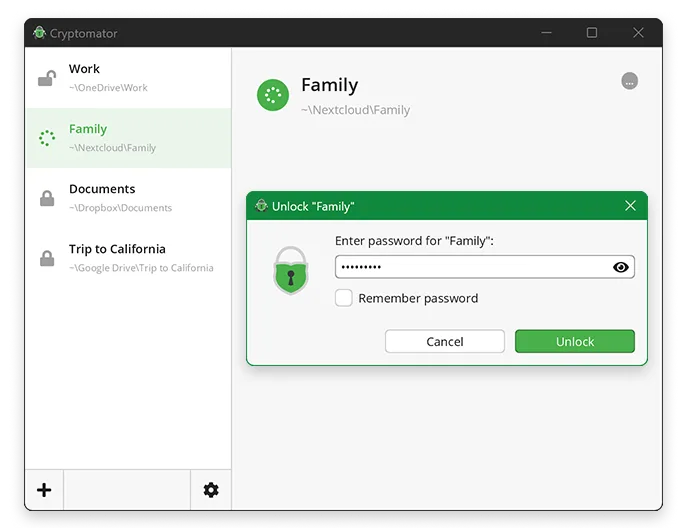
Cryptomator adds client-side encryption to files you store in cloud-synced folders. Create a vault, choose a password and unlock it as a virtual drive. Files saved through that drive are encrypted automatically in the underlying vault, including their names. This lets you work with documents through a drive while keeping encrypted files in storage such as Dropbox, Google Drive or OneDrive.
The Windows desktop application's functional and encryption features are free. The publisher offers an optional supporter certificate for dark mode. This entry links to the official Windows x64 EXE installer, which includes the WinFsp driver; the separate MSI omits dependencies. The portable package linked by the publisher is a community effort, not an officially maintained Skymatic package.
Cryptomator is not complete protection for the local computer. Malware on the computer can read passwords or files in an unlocked vault, and other applications may leave unencrypted working or backup copies outside it. File sizes, timestamps and file counts also remain visible: encrypting contents and names does not hide every piece of metadata.
What it offers
- Create password-protected vaults and open them as virtual drives.
- Automatically encrypt files saved through an unlocked vault drive.
- Encrypt file contents and file and folder names; obfuscate the directory structure.
- Use vaults in cloud-synced folders, including Dropbox, Google Drive and OneDrive.
Good to know
- Does not protect an unlocked vault from malware on the local computer or detect unencrypted copies created elsewhere by other applications.
- Does not encrypt file sizes, timestamps or the number of files and folders.
- The desktop dark mode requires an optional supporter certificate; functional and encryption features are free.
Product images
Sources
References used for this listing. Retrieval dates do not indicate hands-on testing.
- Cryptomator - Download — Windows discovery and gallery ↗Retrieved
- Cryptomator - Free & Open-Source Cloud Storage Encryption ↗Retrieved
- Cryptomator Downloads — Windows packages and desktop terms ↗Retrieved
- Official Cryptomator 1.19.4 release metadata ↗Retrieved
- Security Target | Cryptomator Documentation ↗Retrieved
- Cryptomator Impressum — publisher identity ↗Retrieved
More in utilities
View category ↗
1.1.1.1 with WARP 2026.8.2115.0
Encrypt traffic from your Mac to Cloudflare’s network with WARP, or use DNS-only mode for encrypted DNS queries to the 1.1.1.1 resolver.
1.1.1.1 with WARP 2026.8.2115.0
Encrypt traffic between your Windows PC and Cloudflare, or use encrypted DNS only, with the free 1.1.1.1 with WARP app.

3uTools 9.12.005
Manage iPhone and iPad photos, music, apps and backups from Windows with 3uTools, a free utility that also includes device checks and firmware flashing tools.