

Utilities Windows
CSV Editor Pro for Windows
Edit, filter and clean CSV tables on Windows with CSV Editor Pro. Work across tabbed files, find duplicate rows and use regular-expression search in a paid application with a 21-day trial.
- Operating system
- Windows Vista or later
- Architecture
- 64-bit
- Download package
- EXE installer
Publisher requirements for version 34.0; the linked package is a 21-day trial.
Link checked · Download guidance
What is CSV Editor Pro?
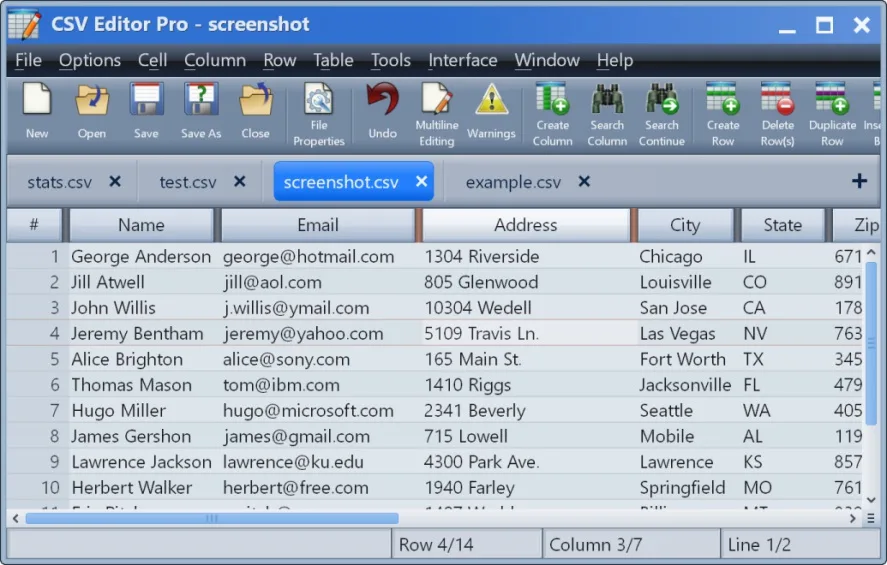
CSV Editor Pro is a Windows desktop editor for working with CSV data in a table. It is suited to cleaning lists, rearranging columns and correcting records without treating the file as plain text. A tabbed interface keeps multiple files open, while multiline editing lets a cell contain more than one line of text.
Use filters to focus on matching rows, search and replace across a table or one column, and remove duplicate rows. The publisher also lists tools for splitting and combining columns, importing Excel spreadsheets and databases, and exporting tables to HTML. UTF-8 and UTF-16 support helps when files contain Unicode text, and an automatic backup is created before an existing file is overwritten.
The linked EXE is the publisher's 64-bit Windows installer for version 34.0, released October 1, 2026. This is not a free license: the fully functional trial lasts 21 days, after which the publisher requires a purchased license. The current release requires Windows Vista or later and does not support 32-bit Windows.
What it offers
- Open multiple CSV files in tabs and edit multiline cell contents.
- Insert, delete, duplicate and rearrange rows and columns; split or combine columns.
- Filter rows and search or replace text across a table or a single column, including regular expressions.
- Remove duplicate rows and receive warnings about records with too many or too few fields.
- Read UTF-8 and UTF-16 files, import Excel spreadsheets and databases, and export to HTML.
- Create graphs, histograms or pie charts from CSV data and automatically back up files before overwriting them.
Good to know
- The fully functional trial is limited to 21 days; continued use requires purchasing a license.
- The current Windows release is 64-bit only; it is not a 32-bit Windows package.
Product images
Sources
References used for this listing. Retrieval dates do not indicate hands-on testing.
More in utilities
View category ↗
1.1.1.1 with WARP 2026.8.2115.0
Encrypt traffic from your Mac to Cloudflare’s network with WARP, or use DNS-only mode for encrypted DNS queries to the 1.1.1.1 resolver.
1.1.1.1 with WARP 2026.8.2115.0
Encrypt traffic between your Windows PC and Cloudflare, or use encrypted DNS only, with the free 1.1.1.1 with WARP app.


3uTools 9.12.005
Manage iPhone and iPad photos, music, apps and backups from Windows with 3uTools, a free utility that also includes device checks and firmware flashing tools.