
Utilities Windows
CubicSDR
Explore radio signals with spectrum and waterfall displays, tune multiple channels and listen through a supported SDR receiver. This download is the older Windows x64 0.2.5 build.
- Operating system
- Windows 7 or later, as listed by the publisher for 0.2.5
- Architecture
- x64 (64-bit)
- Download package
- EXE installer
Separate win32 build available. Publisher recommends a multi-core CPU, 1 GB RAM and graphics with 128 MB video memory and OpenGL 3.x or ES 2.0. Current Windows compatibility is unverified; RF reception needs supported SDR hardware.
Link checked · Download guidance
What is CubicSDR?
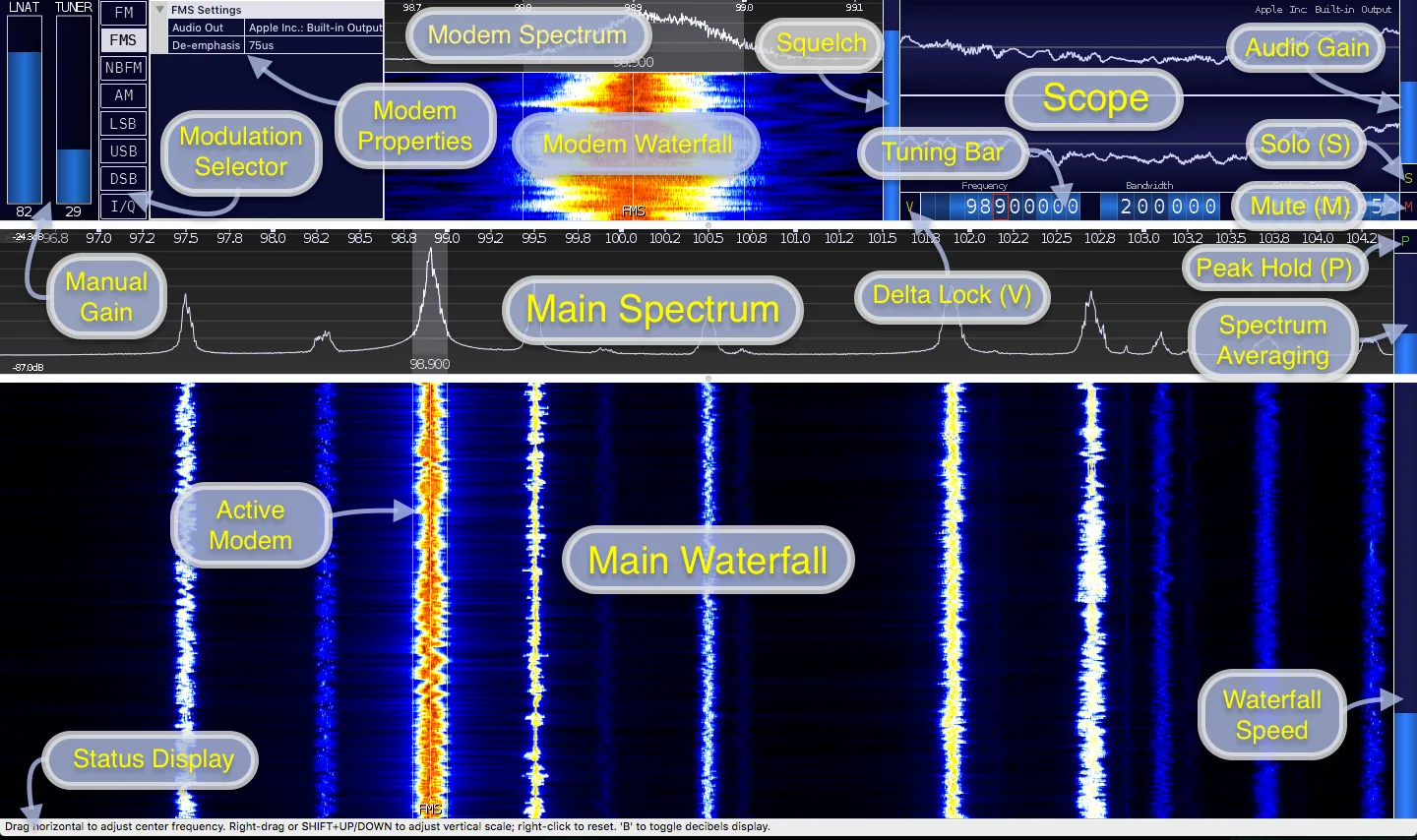
CubicSDR turns input from a supported software-defined radio receiver into a visual tuning workspace. Its spectrum and waterfall views help you locate signals, while individual demodulators let you tune channels within the receiver’s active frequency range. AM, FM, stereo FM, narrow-band FM and sideband modes cover several common listening tasks.
You can adjust each channel’s bandwidth, squelch and audio gain, or send different channels to separate audio outputs. Hardware support comes through SoapySDR modules; the 0.2.5 release lists devices including RTL-SDR, Airspy and HackRF. A compatible receiver and its required drivers are needed for RF reception.
The linked EXE is the publisher’s 64-bit Windows 0.2.5 release from August 2018, not the newer source-only 0.2.7 release. The publisher lists Windows 7 or later, but this entry does not establish compatibility with current Windows releases. SDRplay users must follow the 0.2.5-specific API v2.x instructions rather than assume newer vendor APIs work. The illustrated interface comes from the publisher’s older cross-platform manual and shows macOS audio-device labels; it is not a capture of the Windows installer.
What it offers
- Inspect the active radio input through zoomable spectrum and waterfall displays.
- Tune multiple demodulators within the receiver’s active frequency range.
- Select AM, FM, stereo FM, narrow-band FM, LSB, USB, DSB or raw I/Q modes.
- Adjust channel bandwidth, squelch and audio gain, with per-channel audio-output selection.
- Use supported SDR hardware through the release’s included SoapySDR modules.
Good to know
- RF reception requires a compatible SDR receiver and its required drivers; hardware support depends on the matching SoapySDR module.
- This Windows download is version 0.2.5 from 2018. Compatibility with current Windows releases has not been verified here.
- For SDRplay hardware, the 0.2.5 notes require API v2.x and the matching DLL; they explicitly do not support API v3.x yet.
Product images
Sources
References used for this listing. Retrieval dates do not indicate hands-on testing.
More in utilities
View category ↗
1.1.1.1 with WARP 2026.8.2115.0
Encrypt traffic from your Mac to Cloudflare’s network with WARP, or use DNS-only mode for encrypted DNS queries to the 1.1.1.1 resolver.
1.1.1.1 with WARP 2026.8.2115.0
Encrypt traffic between your Windows PC and Cloudflare, or use encrypted DNS only, with the free 1.1.1.1 with WARP app.

3uTools 9.12.005
Manage iPhone and iPad photos, music, apps and backups from Windows with 3uTools, a free utility that also includes device checks and firmware flashing tools.