

Utilities Windows
CurrPorts for Windows
Identify which Windows processes have open TCP and UDP ports with CurrPorts, a free portable utility for viewing connections, filtering results and exporting port information.
- Operating system
- Windows 10, 8, 7 and older Windows versions listed by the publisher
- Architecture
- x64 (selected download); separate 32-bit package available
- Download package
- ZIP archive containing a standalone executable
No installer required according to NirSoft. Windows 11 is not explicitly listed on the publisher page; compatibility was not tested.
Link checked · Download guidance
What is CurrPorts?
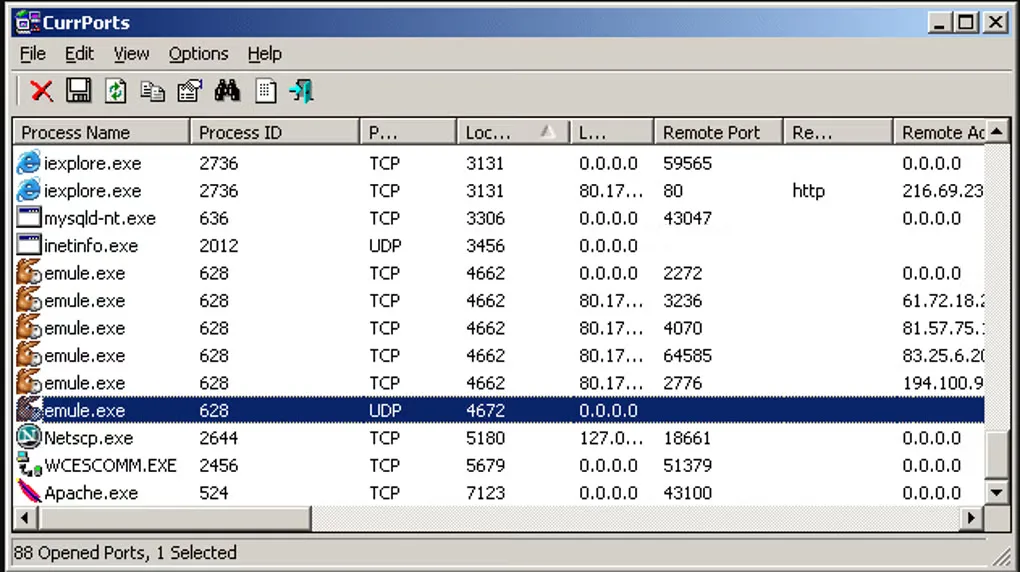
CurrPorts links open TCP and UDP ports on your local Windows computer to the processes using them. Its table shows process names and IDs alongside local and remote addresses and ports, with additional process details where available. It helps when you need to identify the application behind a connection rather than inspect packet contents.
Filter the list by process, address, port or connection state, refresh it automatically, and export results to text, CSV, HTML or XML. You can also close selected TCP connections or terminate their owning processes; these actions can interrupt the affected applications. The publisher distributes a standalone executable in a ZIP archive, with a separate x64 package linked here.
Some information requires elevated access. Version 2.80 adds a process command-line column, but reading command lines for all processes requires Administrator access and the 64-bit build on 64-bit Windows. The publisher also warns of a memory leak when DNS-cache hostname lookup is enabled during repeated refreshes. The screenshot illustrates an older Windows-style interface; it is not proof of the appearance of version 2.80.
What it offers
- View local TCP and UDP ports with owning process names, IDs and available executable details.
- Filter connections by process, address, port range and TCP state.
- Refresh the connection list automatically and log added or removed connections.
- Export port information to text, CSV, HTML or XML, including through command-line options.
- Close selected TCP connections or terminate their owning processes.
Good to know
- Viewing command lines for all processes requires Administrator access; on 64-bit Windows it also requires the 64-bit build.
- The publisher warns that enabling 'Use DNS Cache For Host Names' can leak memory on each refresh and recommends disabling it for long automatic-refresh sessions.
- Pink highlighting marks applications without icons or version information; it is not a malware verdict, and legitimate applications can be marked.
Product images
Sources
References used for this listing. Retrieval dates do not indicate hands-on testing.
More in utilities
View category ↗
1.1.1.1 with WARP 2026.8.2115.0
Encrypt traffic from your Mac to Cloudflare’s network with WARP, or use DNS-only mode for encrypted DNS queries to the 1.1.1.1 resolver.
1.1.1.1 with WARP 2026.8.2115.0
Encrypt traffic between your Windows PC and Cloudflare, or use encrypted DNS only, with the free 1.1.1.1 with WARP app.

3uTools 9.12.005
Manage iPhone and iPad photos, music, apps and backups from Windows with 3uTools, a free utility that also includes device checks and firmware flashing tools.