
Utilities macOS
CursorSense
Adjust mouse acceleration and sensitivity on Mac with per-device settings, or move the cursor automatically to dialog buttons. CursorSense is paid software with a 20-day trial.
Version 2.5.1 · Direct publisher file
Link checked · Download guidance
What is CursorSense?
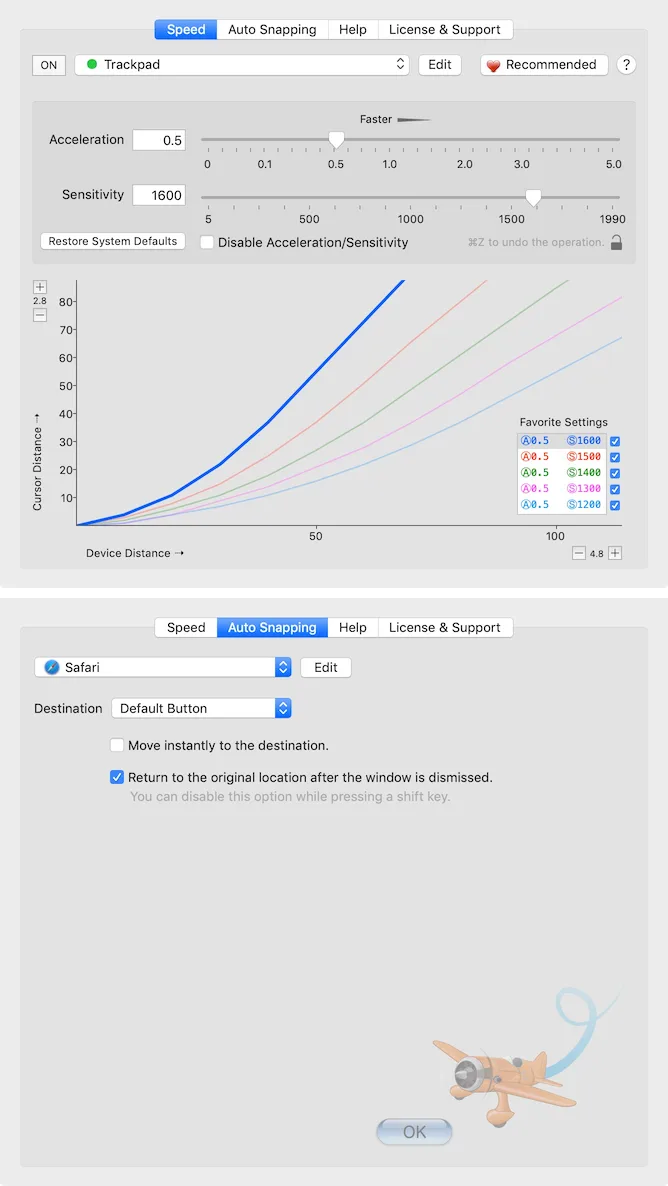
CursorSense adjusts how the pointer responds to mouse movement on a Mac. It separates acceleration from sensitivity, letting you tune both values for individual mice instead of relying only on the tracking-speed control in System Settings. It suits users who want a different pointer response for drawing, high-DPI mice or switching between pointing devices.
Its Auto Snapping feature can move the cursor to a dialog destination such as an OK or Cancel button. You can choose destinations per application and optionally return the pointer to its original position when the window closes. Recommended Settings provides a ranking of settings used by other users as a starting point for adjustments.
Sensitivity adjustment is not available for every device. The publisher excludes built-in trackpads, Magic Mouse and Magic Trackpad on its introduction page; its FAQ specifically notes Magic Trackpad restrictions on macOS Sequoia or later and Magic Mouse restrictions on macOS Tahoe or later. Check those limits before choosing it for an Apple pointing device.
The publisher offers a 20-day unrestricted trial, followed by a paid license. CursorSense 2 licenses are lifetime purchases, but major-version upgrades are charged separately. The linked download is the publisher-hosted CursorSense 2.5.1 DMG identified in Homebrew's catalog; Homebrew lists macOS 12 or later as its requirement. The package has not been installed or tested for this entry.
What it offers
- Adjust cursor acceleration and mouse sensitivity separately.
- Keep acceleration and sensitivity settings for individual mice.
- Set automatic cursor destinations per application, with an option to return to the original location after a window closes.
- Consult the publisher's Recommended Settings ranking when tuning pointer movement.
Good to know
- Sensitivity changes are not supported for built-in trackpads, Magic Mouse or Magic Trackpad according to the publisher's introduction; its FAQ highlights Magic Trackpad on macOS Sequoia or later and Magic Mouse on macOS Tahoe or later.
- The unrestricted trial lasts 20 days; continued use requires a paid license.
- A lifetime CursorSense 2 license does not include free major-version upgrades.
Product images
Sources
References used for this listing. Retrieval dates do not indicate hands-on testing.
More in utilities
View category ↗
1.1.1.1 with WARP 2026.8.2115.0
Encrypt traffic from your Mac to Cloudflare’s network with WARP, or use DNS-only mode for encrypted DNS queries to the 1.1.1.1 resolver.
1.1.1.1 with WARP 2026.8.2115.0
Encrypt traffic between your Windows PC and Cloudflare, or use encrypted DNS only, with the free 1.1.1.1 with WARP app.


3uTools 9.12.005
Manage iPhone and iPad photos, music, apps and backups from Windows with 3uTools, a free utility that also includes device checks and firmware flashing tools.