
Development Windows
DBCopier
Copy tables or query results between databases with DBCopier for Windows. Preview a transfer in its wizard, save copy sessions or automate repeat jobs from the command line.
- Operating system
- Windows; Softonic lists Windows 10
- Architecture
- x64 (64-bit)
- Download package
- EXE installer
Publisher supplies separate Windows 32-bit and 64-bit installers. Exact minimum Windows version is not established by the publisher pages consulted.
Link checked · Download guidance
What is DBCopier?
DBCopier transfers data between database systems, including Access, MySQL, Oracle, PostgreSQL, SQL Server and SQLite. It is aimed at developers and database administrators moving tables to another database or repeating a data-copy task without rebuilding the configuration each time.
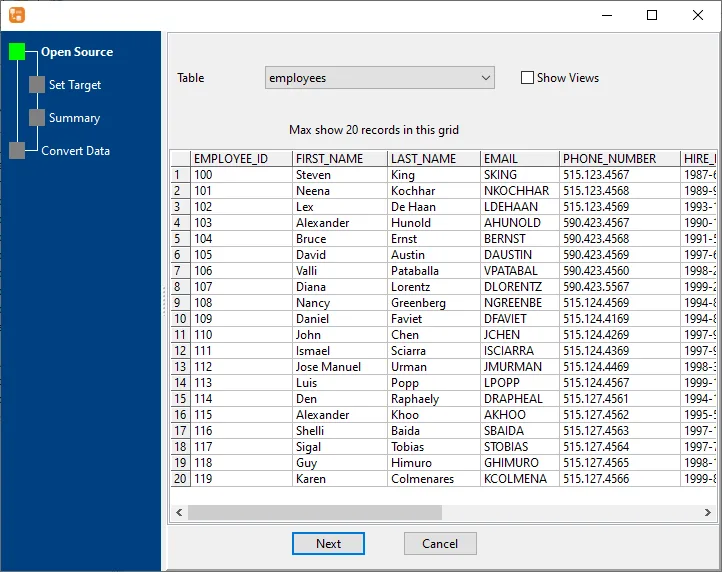
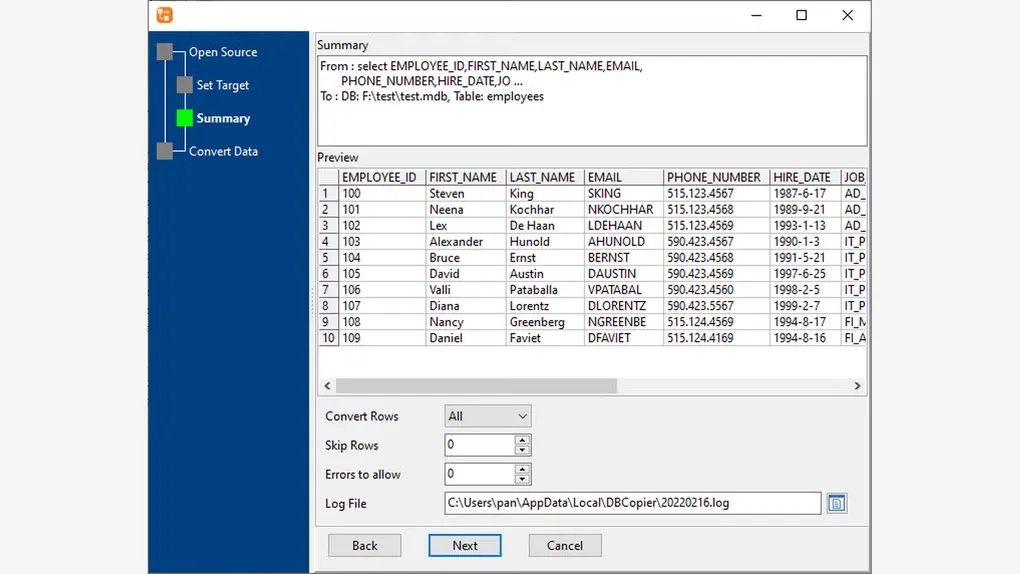
The table-copy wizard separates source selection, target selection, a summary and conversion. Publisher documentation shows a source-table preview before the copy runs. You can also copy query results, copy multiple tables and save sessions for reuse. Command-line operation and scheduled tasks provide options for repeated transfers.
This download is the Windows 64-bit EXE installer for version 3.0.2; the publisher provides a separate 32-bit installer. DBCopier is commercial software with a 30-day evaluation, not an indefinitely free database utility. A paid license is required to continue beyond the evaluation period.
What it offers
- Copy data between supported database engines, including Access, MySQL, Oracle, PostgreSQL, SQL Server and SQLite.
- Choose a source table and target table in a wizard with a preview and summary before conversion.
- Copy multiple tables or the result of a SQL query into a target table.
- Save and reload copy sessions for repeated jobs.
- Run copy tasks from the command line or schedule repeated transfers.
Good to know
- The evaluation lasts 30 days; continued use requires a paid license.
- The linked installer is for 64-bit Windows; 32-bit Windows requires the publisher's separate package.
Product images
Sources
References used for this listing. Retrieval dates do not indicate hands-on testing.
- Copy and Migrate Data Between Databases | DBCopier ↗Retrieved
- Download DBCopier ↗Retrieved
- Purchase DBCopier ↗Retrieved
- Copy data between databases | From table to table ↗Retrieved
- DBCopier - Download ↗Retrieved
More in development
View category ↗
010 Editor 17.0
Inspect and edit binary files on Mac with 010 Editor, a paid text and hex editor with Binary Templates, file comparison and a 30-day trial.
010 Editor 17.0
Inspect and edit binary files with 010 Editor for Windows, a text and hex editor with Binary Templates, file comparison and scripting. Includes a 30-day trial.
10x Editor
Edit and navigate C++ projects on Windows with a built-in parser, workspace search and Visual Studio project support. A paid license is required after the 30-day trial.