
Utilities Windows
Default Programs Editor
Edit Windows file-type context menus, icons, descriptions and AutoPlay handlers with Default Programs Editor, a free standalone utility.
- Operating system
- Windows; publisher changelog discusses Windows 10
- Architecture
- Not specified in the inspected publisher sources
- Download package
- ZIP archive containing a standalone application
Publisher says no installation is required. Changelog identifies .NET 4.6.2; current Windows build compatibility is unconfirmed.
Link checked · Download guidance
What is Default Programs Editor?
Default Programs Editor brings several Windows file-association settings into one interface. Use it to change a file type's icon or description, adjust its right-click commands, edit the Open with list or manage AutoPlay handler programs instead of editing those registry settings by hand. The publisher distributes it as a standalone application with no installation required.
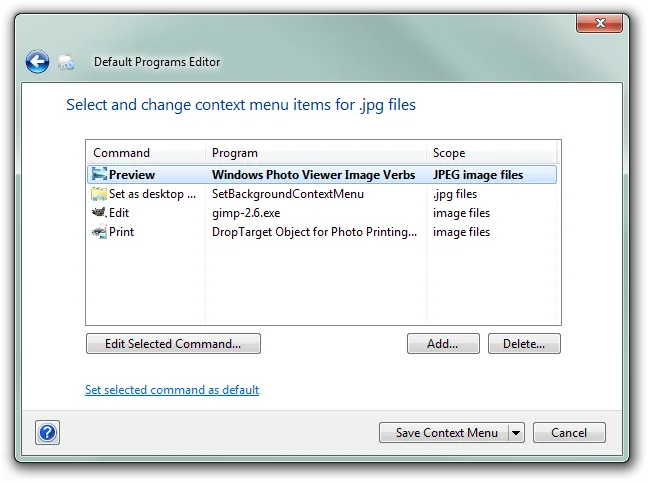
The context-menu editor works on commands associated with a file type. In the publisher's example for .jpg files, the interface lists commands alongside their program and scope, with controls to edit, add or delete entries and save the context menu. This is a file-association utility, not a general-purpose text editor. Its changelog also documents exporting changes to .reg files and backing up file-type registry information.
Treat it as a legacy utility rather than a confirmed solution for current Windows defaults. The homepage advertises version 2.7.2676 from 2018; its changelog says the corresponding build was recompiled for .NET 4.6.2 to make running on Windows 10 easier. Those statements do not establish Windows 11 support or compatibility with a particular current Windows 10 build. The linked download is the publisher's ZIP archive; the application has not been run for this entry.
What it offers
- Add, edit and remove file-type context-menu commands.
- Change file-type icons, descriptions and an extension's associated file type.
- Edit the Open with programs list.
- Add, edit and remove AutoPlay handler programs.
- Export changes to .reg files and back up file-type registry information, as documented in the changelog.
Good to know
- The advertised release is from 2018. Windows 11 support and compatibility with current Windows builds are not established by the inspected publisher sources.
- The 2018 changelog identifies .NET 4.6.2 as the build target; standalone distribution does not establish that every Windows system has the required runtime.
Product images
Sources
References used for this listing. Retrieval dates do not indicate hands-on testing.
More in utilities
View category ↗
1.1.1.1 with WARP 2026.8.2115.0
Encrypt traffic from your Mac to Cloudflare’s network with WARP, or use DNS-only mode for encrypted DNS queries to the 1.1.1.1 resolver.
1.1.1.1 with WARP 2026.8.2115.0
Encrypt traffic between your Windows PC and Cloudflare, or use encrypted DNS only, with the free 1.1.1.1 with WARP app.


3uTools 9.12.005
Manage iPhone and iPad photos, music, apps and backups from Windows with 3uTools, a free utility that also includes device checks and firmware flashing tools.