
Utilities Windows
DeleteOnClick
Delete files through the Windows Explorer right-click menu with DeleteOnClick, a freeware shell extension with free-space wiping options. Not suitable for secure SSD erasure.
- Operating system
- Windows 10; publisher also confirms 64-bit Windows support
- Architecture
- 64-bit Windows supported; exact installer architecture not specified
- Download package
- EXE installer (DeleteOnClick_Setup.exe)
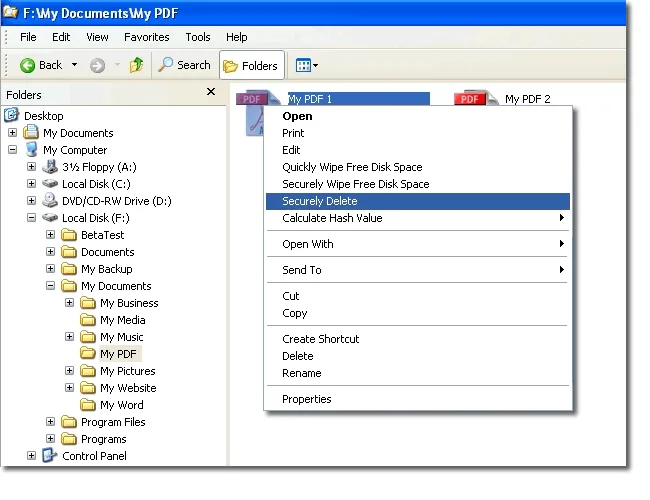
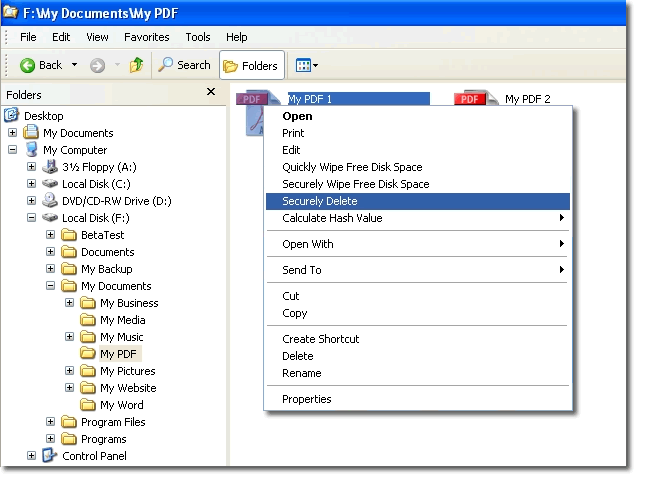
Windows shell extension, not a standalone program. Screenshot shows an older Explorer interface; Windows 11 and ARM64 support not established.
Link checked · Download guidance
What is DeleteOnClick?
DeleteOnClick adds file-wiping commands to Windows Explorer rather than opening as a separate application. It is intended for removing selected files and wiping free disk space on conventional hard drives. The publisher provides it as freeware.
To use the documented workflow, right-click a file or folder in Explorer, choose Securely Delete and confirm the selection. Files deleted this way bypass the Recycle Bin, so check the selection before confirming. The publisher also lists Recycle Bin emptying and two free-space wiping modes: Quickly Wipe Free Disk Space and Securely Wipe Free Disk Space. The quicker mode trades thoroughness for speed; either can take considerable time depending on the drive and available free space.
The storage type matters more than the deletion menu. 2BrightSparks explicitly warns that DeleteOnClick cannot securely erase files or free space on SSDs because of how those drives work internally; for an entire SSD, it recommends the drive manufacturer’s secure-erase utility instead. Files open in another program cannot be deleted until that program releases them, and insufficient access rights can also prevent deletion.
The publisher documentation confirms Windows 10 compatibility and support for 64-bit Windows. The supplied screenshot illustrates its older Explorer integration, not a demonstrated Windows 11 interface. No version number or release date is asserted here.
What it offers
- Add Securely Delete to the Windows Explorer context menu for selected files and folders.
- Choose between quick and more thorough free-space wiping modes.
- Empty the Recycle Bin using the publisher’s documented wiping functionality.
- Rename files to random filenames before deletion, and wipe file dates and attributes.
Good to know
- Not suitable for secure file or free-space erasure on SSDs; the publisher recommends a drive-manufacturer utility for wiping an entire SSD.
- Deleted files bypass the Recycle Bin; do not use this workflow for files you may need to restore.
- Files in use cannot be deleted, and insufficient access rights can prevent the operation.
- Free-space wiping can take considerable time. Windows 11 and ARM64 support are not established by the cited documentation.
Product images
Sources
References used for this listing. Retrieval dates do not indicate hands-on testing.
- DeleteOnClick ↗Retrieved
- DeleteOnClick > Using DeleteOnClick ↗Retrieved
- DeleteOnClick > DeleteOnClick FAQs ↗Retrieved
More in utilities
View category ↗
1.1.1.1 with WARP 2026.8.2115.0
Encrypt traffic from your Mac to Cloudflare’s network with WARP, or use DNS-only mode for encrypted DNS queries to the 1.1.1.1 resolver.
1.1.1.1 with WARP 2026.8.2115.0
Encrypt traffic between your Windows PC and Cloudflare, or use encrypted DNS only, with the free 1.1.1.1 with WARP app.

3uTools 9.12.005
Manage iPhone and iPad photos, music, apps and backups from Windows with 3uTools, a free utility that also includes device checks and firmware flashing tools.