

Development Windows
Dependency Walker for Windows
Inspect Windows EXE and DLL dependencies, imported functions and module-loading problems with Dependency Walker, a free diagnostic utility with graphical and console modes.
- Operating system
- Publisher lists Windows 95, 98, Me, NT, 2000, XP, 2003, Vista, 7 and 8
- Architecture
- x64 download; separate x86 and IA64 builds
- Download package
- ZIP archive; no setup program
This link is the x64 build. Match the tool to the target module architecture. Windows 10/11 support is not established by the publisher’s list.
Link checked · Download guidance
What is Dependency Walker?
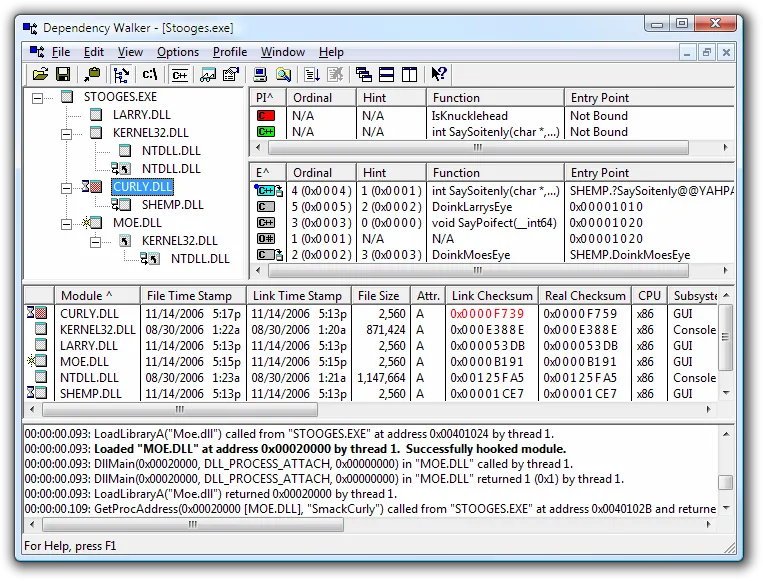
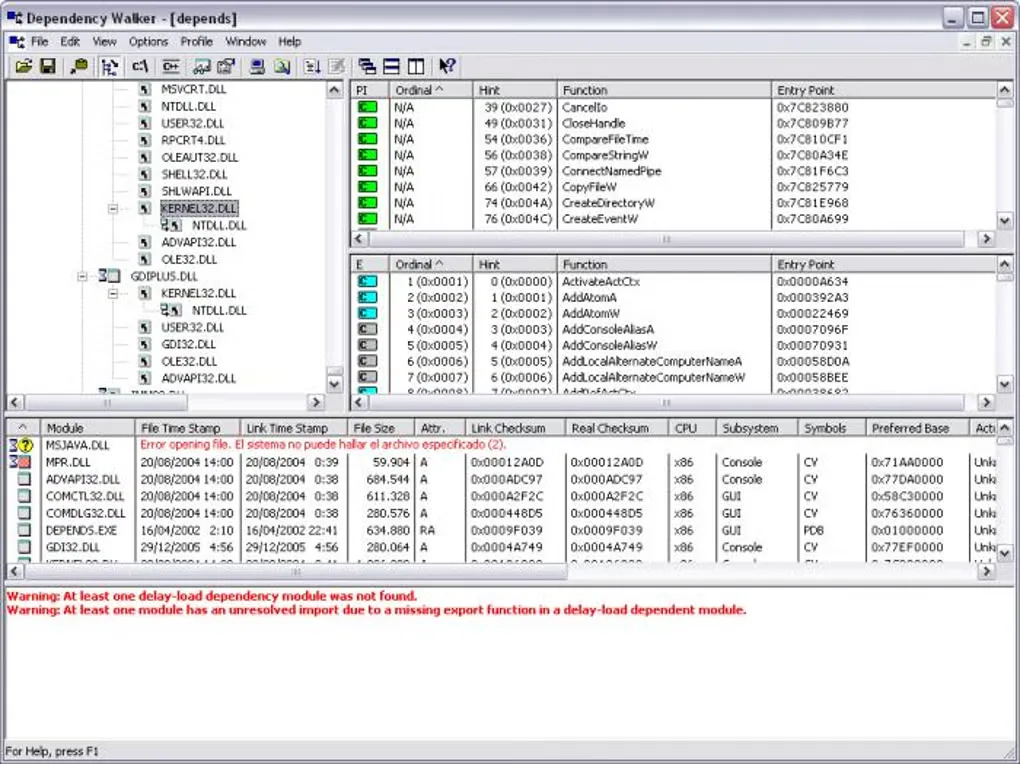
Dependency Walker maps the modules a Windows executable or library depends on. Open an EXE, DLL or another supported Windows module to explore its dependency tree, compare imported and exported functions, and inspect file paths, versions and machine types. It is aimed at developers and technical users investigating missing DLLs, unresolved imports or module-loading failures.
The initial scan covers implicit, forwarded and delay-load dependencies. Application profiling can reveal modules loaded dynamically at runtime, but it actually executes the program being investigated. Results can be saved as text, CSV or a Dependency Walker Image session for later inspection.
This entry links to the publisher’s x64 ZIP package for version 2.2.6000. Separate x86 and IA64 builds are listed by the publisher; matching the tool architecture to the target module matters for accurate access to Windows system folders and registry views. The publisher’s compatibility list ends at Windows 8, so support for Windows 10 and 11 is not established here. Treat warnings as diagnostic clues: a missing optional delay-load dependency does not necessarily prevent an application from running.
What it offers
- Explore a hierarchical dependency tree for 32-bit and 64-bit Windows modules.
- Compare imported and exported functions alongside paths, versions, machine types and other module details.
- Identify potential missing modules, import/export mismatches, circular dependencies and initialization failures.
- Profile executable programs to observe dynamically loaded modules and function lookups.
- Use graphical or console mode and save text, CSV or DWI session reports.
Good to know
- Publisher-listed Windows compatibility ends at Windows 8; Windows 10 and 11 support is not established by these sources.
- Static inspection does not reveal every dynamically loaded dependency; profiling runs the target executable and requires a matching CPU architecture.
- Warnings can include optional delay-load modules or functions that the application is designed to handle as missing.
- 16-bit Windows modules are not supported.
Product images
Sources
References used for this listing. Retrieval dates do not indicate hands-on testing.
More in development
View category ↗
010 Editor 17.0
Inspect and edit binary files on Mac with 010 Editor, a paid text and hex editor with Binary Templates, file comparison and a 30-day trial.
010 Editor 17.0
Inspect and edit binary files with 010 Editor for Windows, a text and hex editor with Binary Templates, file comparison and scripting. Includes a 30-day trial.
10x Editor
Edit and navigate C++ projects on Windows with a built-in parser, workspace search and Visual Studio project support. A paid license is required after the 30-day trial.