

Utilities Windows
Desktop Goose for Windows
A deliberately disruptive desktop pet by samperson that steals the pointer, leaves muddy tracks and brings notes and memes onto your Windows screen.
- Operating system
- Windows; minimum version and individual Windows release support are not specified by the creator
- Architecture
- Not specified on the official product page
- Download package
- Windows v0.31 file offered through creator’s itch.io page
Separate Mac download; no local installation, execution or Windows 11 compatibility test was performed.
This opens the official acquisition page, not a verified installer file.
Publisher page reviewed · Download guidance
What is Desktop Goose?
Desktop Goose is a playful desktop companion whose defining feature is interference, not organization. The goose walks across the screen, grabs the mouse pointer, tracks mud and brings messages or memes into separate windows. It is suited to intentional desktop play, not to a quiet workspace where surprise cursor movement or extra windows would be a problem.
The original itch.io page belongs to samperson and lists a Windows v0.31 download separately from the Mac package. The Windows update adds an official leaf-pile mod, following earlier support for a modding API, custom note text and configurable behavior. Users can add their own meme assets and edit config.goos in Notepad; configuration includes audio-related toggles.
Use the creator’s page rather than a program with a similar goose name. The creator explicitly says this project is not affiliated with House House or Panic, and a search can also surface unrelated AI software called goose. The official listing identifies Windows but does not publish a minimum Windows version or a full Windows 11 compatibility matrix. This entry preserves that uncertainty rather than turning a third-party download-site label into an official system requirement.
What it offers
- A roaming desktop goose can grab the pointer, leave muddy tracks and open notes or memes.
- Custom meme images can be placed in the assets folder; GIF support is documented.
- User-defined note phrases are supported from the 0.3 update.
- Edit config.goos in Notepad to adjust behavior; later configuration toggles include silencing audio.
- Official modding API documented from version 0.3.
- Windows 0.31 includes an optional official leaf-pile mod described in autumn.txt.
Good to know
- The goose intentionally interrupts pointer use and fills the desktop with windows; it is not a productivity or focus tool.
- The official page does not specify minimum Windows version, processor architecture or a Windows 11 support guarantee.
- The official page lists Windows and Mac separately; the leaf-pile and modding notes are not interchangeable across platforms.
- Name-your-own-price distribution does not establish an open-source licence or permission to redistribute the package or screenshot.
A desktop pet that is meant to interrupt
Desktop Goose is not a wallpaper or a passive ornament. The creator describes a character that takes the mouse, leaves muddy tracks and delivers notes and memes. Clicking or poking it can make it attack the pointer. The extra windows and cursor interference are part of the design, not evidence that this entry has diagnosed an unexpected malfunction.
That makes the decision straightforward: choose it for a session in which you want those interruptions. It is a poor fit for a presentation, precise pointer work or an activity where an unexpected window would be disruptive. This is an editorial fit assessment based on the described behavior, not a performance or installation test.
Identify the creator and the Windows file
The original page is Desktop Goose by samperson on itch.io. Its file list shows Desktop Goose v0.31 (Windows) alongside a separate v0.22 Mac download. The creator’s page is the distribution link used here; the entry does not resolve a payment/download selector or pretend to have a verified direct archive URL.
The creator explicitly disclaims affiliation with House House or Panic. It is also distinct from AI developer tools named goose that appear in Windows searches. Check both the product title and creator before using a download page, rather than trusting the bird name alone.
Get the Windows edition without confusing the download types
The link on this entry opens the creator’s itch.io product and acquisition page, not a checked binary. The retained page labels distribution “Name your own price” and lists the Windows v0.31 file at 4.1 MB. Choose the Windows listing rather than the separately listed Mac v0.22 package. Payment choices and any account requirements beyond that product page were not inspected; no checkout or package transfer was performed for this entry.
SnapFiles describes Desktop Goose as standalone and portable, but the official product page does not provide a step-by-step Windows installation procedure. This guide therefore does not invent an installer wizard, archive format, administrator requirement or startup-registration step. Use the instructions accompanying the creator’s package for its actual launch procedure.
For a first session, finish pointer-sensitive work before starting the pet: taking the cursor and opening note windows are documented behavior. For stopping it, SnapFiles specifically identifies Task Manager. That supports an attributed way to end a running session, not a tested uninstall recipe or a guarantee that ending the process removes its files. No package-removal or startup-cleanup procedure was established.
Customize what the goose brings onto the desktop
The creator documents user-supplied memes in the assets folder and GIF support from the 0.2 update. From 0.3 onward, custom note phrases are also supported. Those are different customization inputs: images affect delivered memes, while phrases affect the note windows.
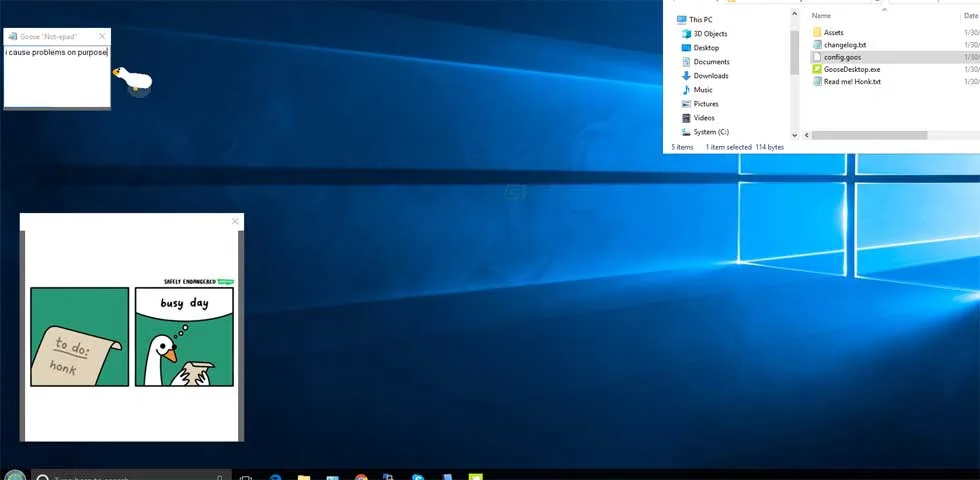
The screenshot shows the kind of desktop result: the goose beside a small note window and a larger meme window. It is a historical demonstration, not a newly executed copy of version 0.31. The image does not establish the contents of the current Windows package or show the optional leaf-pile mod.
What config.goos is for
The official page names config.goos and says to open it in Notepad to adjust properties such as aggression. The 0.3 notes add further toggles, including silencing audio. This is a file-oriented configuration workflow, not evidence for a complete settings dashboard.
No configuration keys, numeric ranges or undocumented command-line switches are invented here. Use the files and instructions bundled with the creator’s current Windows package for exact field names. A mod API is an extension mechanism, not proof that every third-party mod is compatible or approved by the creator.
What the Windows 0.31 autumn update adds
The 0.31 update introduces an official mod that lets Desktop Goose play in leaf piles. The product page directs users to autumn.txt in the files for details; it does not document an exact enable-mods setting on the page. The corresponding development-log headline is dated 7 October 2022; this does not imply a new 2026 release simply because the page was read in 2026.
The page separately notes that the Mac build did not support mods at the time of those notes. Because this entry concerns Windows, it links the Windows file context and does not borrow Mac version numbers or treat the two packages as feature-identical.
Stopping the pet and understanding the evidence limits
SnapFiles describes the application as standalone and portable and says it can be terminated through Task Manager. That is attributed secondary exit guidance, not a creator-authored emergency recovery procedure or a removal test performed by SoftGalaxy. No persistence-cleanup, startup-registration or registry-removal procedure was established from the creator page.
The official listing does not specify a minimum Windows version or CPU architecture. Third-party pages list broad Windows versions, but this entry does not elevate those labels to a creator guarantee. No software body was downloaded or run, no malware verdict is offered, and no claim is made that every Windows 11 build is supported.
Product images
Sources
References used for this listing. Retrieval dates do not indicate hands-on testing.
More in utilities
View category ↗
1.1.1.1 with WARP 2026.8.2115.0
Encrypt traffic from your Mac to Cloudflare’s network with WARP, or use DNS-only mode for encrypted DNS queries to the 1.1.1.1 resolver.
1.1.1.1 with WARP 2026.8.2115.0
Encrypt traffic between your Windows PC and Cloudflare, or use encrypted DNS only, with the free 1.1.1.1 with WARP app.


3uTools 9.12.005
Manage iPhone and iPad photos, music, apps and backups from Windows with 3uTools, a free utility that also includes device checks and firmware flashing tools.