
Utilities Windows
Desktop-Reminder
Plan recurring tasks, track birthdays and set timed alarms with Desktop-Reminder, a freeware Windows task planner with iCalendar import.
- Operating system
- Windows 7, Windows 8.x, Windows 10 and Windows 11, as listed by the publisher
- Architecture
- 32-bit and 64-bit; one hybrid installer
- Download package
- EXE installer
Requires .NET Framework 4.8. The publisher lists it as a standard component of Windows 10 and above; older Windows versions may need it installed separately.
Link checked · Download guidance
What is Desktop-Reminder?
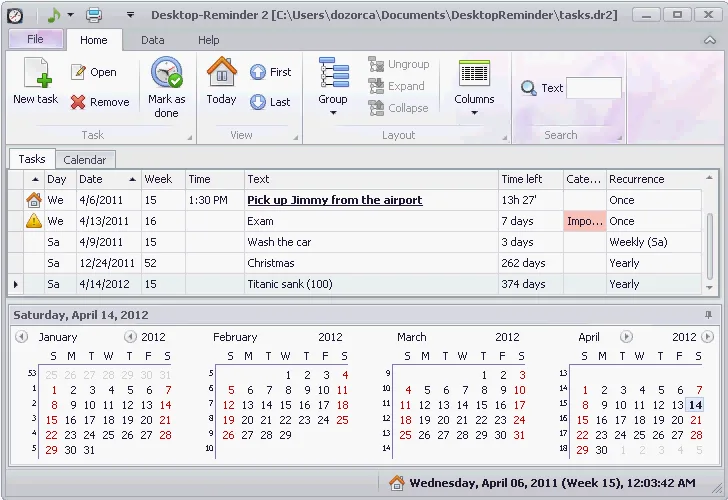
Desktop-Reminder keeps dated tasks and recurring events in a Windows task list. Use it for birthdays, weekly chores or deadlines that need an advance reminder. A task can have a date without a time or duration; adding a time enables an alarm message with sound. Status indicators distinguish missed, urgent, today and future tasks, while a calendar and text filter help locate entries.
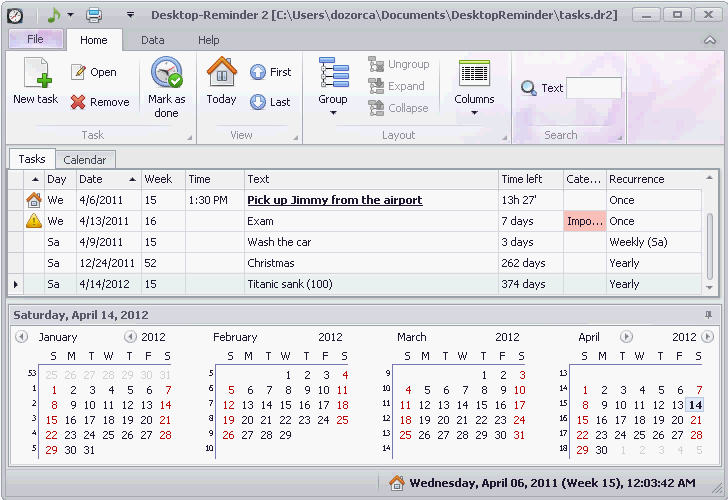
The free edition supports recurring tasks and imports events from iCalendar files. Calendar scheduling views, task printing, custom alarm sounds and custom task categories require the paid PRO edition. The linked version 3.5 installer supports 32-bit and 64-bit Windows and requires .NET Framework 4.8. The publisher's screenshot below illustrates the older Desktop-Reminder 2 interface, not a verified view of version 3.5.
What it offers
- Create date-only tasks or add a time for an alarm message with sound.
- Repeat tasks daily, weekly, monthly or yearly, including relative dates such as the second Saturday of a month.
- See missed, urgent, today and future tasks in a status-marked list with a text filter.
- Browse a 12-month calendar and a date navigator that marks dates with tasks.
- Import holidays and other events from iCalendar (.ics) files.
Good to know
- Calendar scheduler views, task printing, custom alarm sounds and custom task categories require Desktop-Reminder PRO.
- Version 3.5 requires .NET Framework 4.8; older Windows installations may need that dependency installed separately.
Product images
Sources
References used for this listing. Retrieval dates do not indicate hands-on testing.
More in utilities
View category ↗
1.1.1.1 with WARP 2026.8.2115.0
Encrypt traffic from your Mac to Cloudflare’s network with WARP, or use DNS-only mode for encrypted DNS queries to the 1.1.1.1 resolver.
1.1.1.1 with WARP 2026.8.2115.0
Encrypt traffic between your Windows PC and Cloudflare, or use encrypted DNS only, with the free 1.1.1.1 with WARP app.

3uTools 9.12.005
Manage iPhone and iPad photos, music, apps and backups from Windows with 3uTools, a free utility that also includes device checks and firmware flashing tools.