
Utilities Windows
DesktopClock3D for Windows
Show local time and date on your Windows desktop with DesktopClock3D, a free clock with analog, digital and 3D text styles, adjustable size and transparency.
- Operating system
- Windows 11, 10, 8.1 and 7; Windows Server also listed by publisher
- Architecture
- x64 (selected download)
- Download package
- Non-installer ZIP archive
Publisher compatibility statements, not runtime-tested here. Separate installer and other Windows packages are available; portable use requires adding _p to the executable name.
Link checked · Download guidance
What is DesktopClock3D?
DesktopClock3D puts a customizable clock on the Windows desktop. Choose an analog, digital or 3D text display, select a theme and font, and adjust the size and transparency to fit your workspace. The clock shows local time and date; its position can be moved or fixed on the screen. Settings remain accessible from its system tray icon.
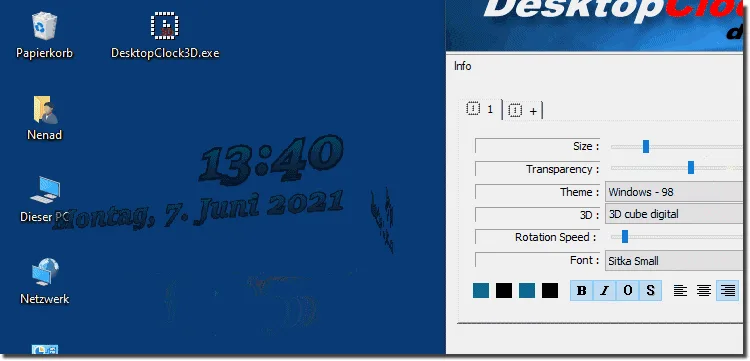
The publisher offers both installer and non-installer ZIP packages. The download here is the non-installer x64 ZIP for 64-bit Windows, not the separate installer package. For portable use, the publisher instructs users to add _p to the executable name. Version 2.51 is dated 18 April 2026 in the publisher's history. The screenshot is an older publisher illustration of the clock and its settings, not evidence of a test of this release.
What it offers
- Choose analog, digital or 3D text clock styles and multiple themes.
- Adjust clock size, transparency and font; optionally show seconds.
- Move the clock around the desktop or keep its position fixed.
- Change settings through the system tray icon.
- Use the non-installer package with the publisher's portable-mode naming option.
Good to know
- This download is the x64 ZIP for 64-bit Windows; the publisher lists other packages separately.
- Portable mode requires the publisher's executable-name adjustment: add _p to the executable name.
Product images
Sources
References used for this listing. Retrieval dates do not indicate hands-on testing.
- DesktopClock3D 2.51 — publisher features, compatibility and history ↗Retrieved
- DesktopClock3D 2.51 Download — official package choices ↗Retrieved
- DesktopClock3D_x64.zip — publisher direct-link landing page ↗Retrieved
- DesktopClock3D — License Agreement ↗Retrieved
- DesktopClock3D - Download — ordinary browser product page and gallery ↗Retrieved
More in utilities
View category ↗
1.1.1.1 with WARP 2026.8.2115.0
Encrypt traffic from your Mac to Cloudflare’s network with WARP, or use DNS-only mode for encrypted DNS queries to the 1.1.1.1 resolver.
1.1.1.1 with WARP 2026.8.2115.0
Encrypt traffic between your Windows PC and Cloudflare, or use encrypted DNS only, with the free 1.1.1.1 with WARP app.

3uTools 9.12.005
Manage iPhone and iPad photos, music, apps and backups from Windows with 3uTools, a free utility that also includes device checks and firmware flashing tools.