
Utilities Windows
Dexpot
Organize Windows applications across virtual desktops with Dexpot. Includes desktop previews, window rules and a portable ZIP; free for private use only.
- Operating system
- Windows XP/Vista/7/8/8.1, including x64 and server versions (publisher listing)
- Architecture
- Publisher lists x64 Windows support; package executable architecture not inspected
- Download package
- Portable ZIP archive
Publisher acknowledges Windows 10 issues; Windows 11 support not established. Includes a Visual Basic 6.0 Common Controls installer.
Link checked · Download guidance
What is Dexpot?
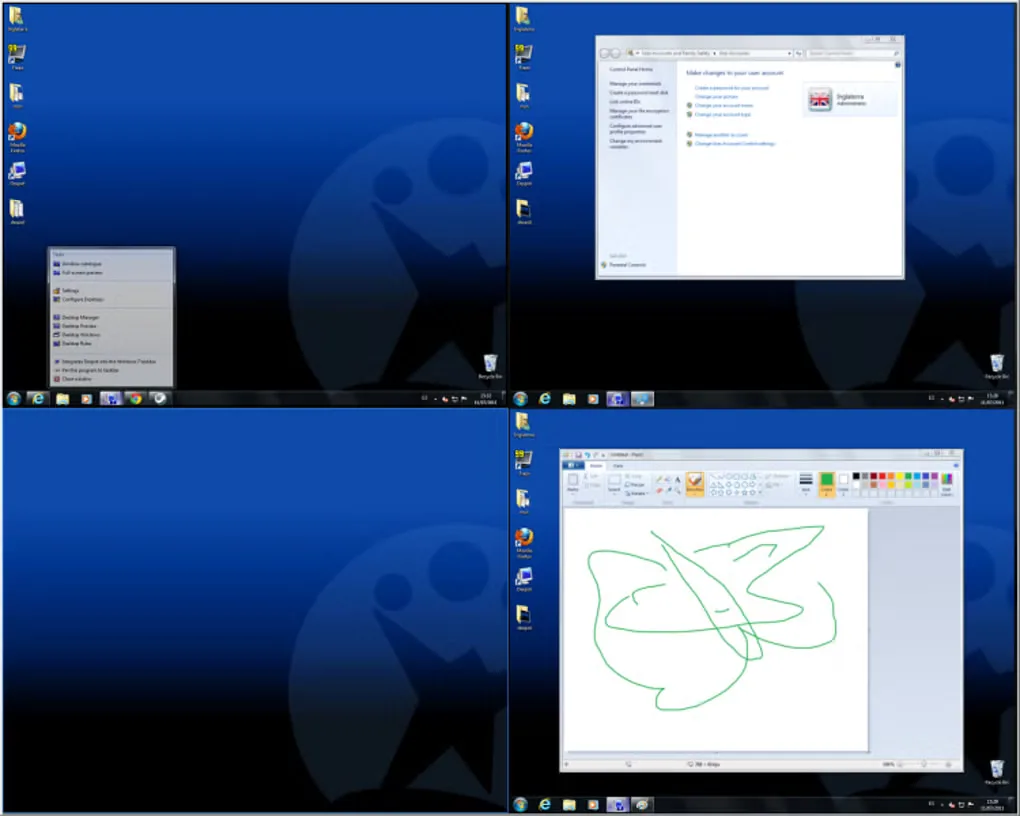
Dexpot separates open windows and desktop icons into virtual workspaces, so a browser, document editor and other applications can occupy different desktops instead of competing for the same view. Switch with the mouse or keyboard, use the full-screen overview to locate a window, or drag windows between desktops. Desktop Rules can apply actions to newly opened windows, while per-desktop backgrounds and shortcuts help distinguish work areas.
This entry links to the publisher’s portable ZIP for Dexpot 1.6.14 Build 2439, rather than the separate EXE installer. The publisher says the archive includes an installer for Visual Basic 6.0 Common Controls, so portable does not mean that every dependency is necessarily installation-free. Its listed operating systems stop at Windows 8.1, and a 2016 publisher notice acknowledges Windows 10 compatibility issues. Windows 10 or 11 compatibility is not established here. Private use is free; business, institutional and self-employed use requires a license.
What it offers
- Switch between virtual desktops using the mouse or keyboard; default shortcuts Alt+1 through Alt+4 select the first four desktops.
- View desktops together in a full-screen preview and drag windows from one desktop to another.
- Use Desktop Preview or the Desktop Manager toolbar for navigation and window organization.
- Assign applications to desktops and define rules for newly created windows.
- Give desktops different backgrounds, files and shortcuts; the publisher also describes multi-monitor support.
Good to know
- The publisher lists Windows XP, Vista, 7, 8 and 8.1, including x64 and server editions. It acknowledges Windows 10 compatibility problems; Windows 10 and 11 support is not verified.
- Free use is restricted to private use. Companies, institutions, non-profits, freelancers and self-employed users must purchase a license.
- The portable ZIP includes a Visual Basic 6.0 Common Controls installer; this package has not been downloaded, installed or tested in this session.
Product images
Sources
References used for this listing. Retrieval dates do not indicate hands-on testing.
More in utilities
View category ↗
1.1.1.1 with WARP 2026.8.2115.0
Encrypt traffic from your Mac to Cloudflare’s network with WARP, or use DNS-only mode for encrypted DNS queries to the 1.1.1.1 resolver.
1.1.1.1 with WARP 2026.8.2115.0
Encrypt traffic between your Windows PC and Cloudflare, or use encrypted DNS only, with the free 1.1.1.1 with WARP app.

3uTools 9.12.005
Manage iPhone and iPad photos, music, apps and backups from Windows with 3uTools, a free utility that also includes device checks and firmware flashing tools.