
Development Windows
DiffMerge
Compare files, review folder differences and merge three file versions with SourceGear DiffMerge for Windows. The linked package is the 64-bit MSI installer.
- Operating system
- Publisher documentation: Windows Vista or newer for the 64-bit package
- Architecture
- x64
- Download package
- MSI installer
20 MB available disk space documented. Separate x86 MSI and x86/x64 ZIP packages exist. Historical system requirements are not current Windows certification.
Link checked · Download guidance
What is DiffMerge?
DiffMerge helps you inspect changes between files before deciding what to keep. Its two-file view highlights differences within lines and lets you edit the text. When you have three versions to reconcile, the merge view can combine changes automatically where safe and leaves you control over the resulting file.
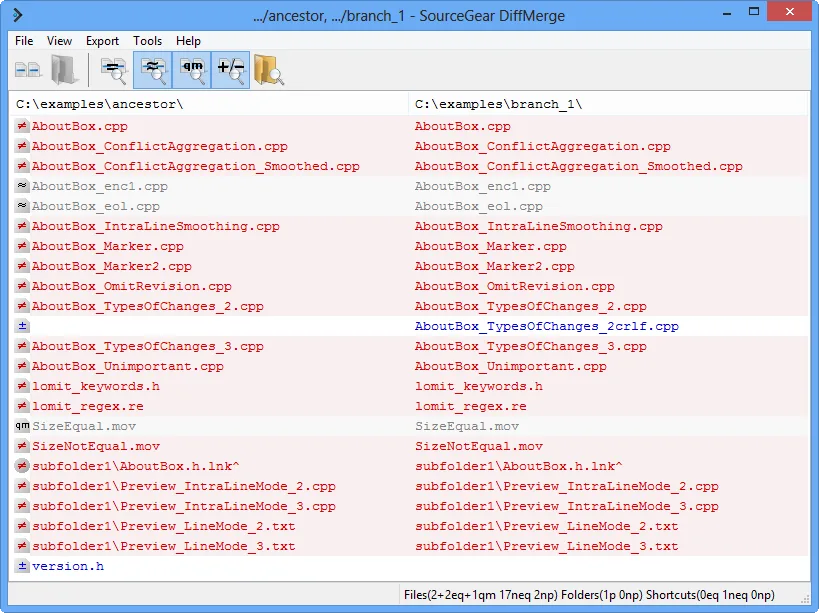
For directory-level review, the folder view compares two folders side by side and distinguishes matching files, changed pairs and files found on only one side. Windows Explorer integration provides a shortcut for comparing two selected files, while rulesets and display options let you adjust comparison behavior.
This entry links to SourceGear's Windows 4.2.0 build 697 x64 MSI. The publisher's installation guide lists Windows Vista or newer for the 64-bit package, but those historical requirements are not evidence of testing or certification on Windows 10 or 11. The 32-bit MSI is restricted to 32-bit Windows; a separate ZIP package is available when an MSI installation is unsuitable.
The MSI installs the application under Program Files, adds Explorer integration and creates Start Menu and desktop shortcuts. SourceGear documents removal through the MSI or Programs and Features. This is a publisher-documented overview, not a hands-on software test.
What it offers
- Compare two files with intra-line highlighting and editing.
- Merge three files with automatic merging where safe and manual control of the result.
- Compare two folders to find identical files, changed file pairs and one-sided entries.
- Start a two-file comparison from Windows Explorer integration.
- Customize appearance and comparison behavior through options and rulesets.
Good to know
- The historical 64-bit requirement is Windows Vista or newer; compatibility with current Windows releases has not been independently tested here.
- Automatic merging applies only where safe; the publisher does not promise that every three-way change can be merged automatically.
- The selected MSI requires 64-bit Windows. The separate 32-bit MSI can only be installed on 32-bit Windows.
Product images
Sources
References used for this listing. Retrieval dates do not indicate hands-on testing.
More in development
View category ↗
010 Editor 17.0
Inspect and edit binary files on Mac with 010 Editor, a paid text and hex editor with Binary Templates, file comparison and a 30-day trial.
010 Editor 17.0
Inspect and edit binary files with 010 Editor for Windows, a text and hex editor with Binary Templates, file comparison and scripting. Includes a 30-day trial.
10x Editor
Edit and navigate C++ projects on Windows with a built-in parser, workspace search and Visual Studio project support. A paid license is required after the 30-day trial.