
Utilities Windows
DigitizeIt
Extract numerical data from graph images with DigitizeIt for Windows. Trace line and scatter plots automatically or select points manually, then export to CSV or Excel.
Version 2.6 · Direct publisher file
Link checked · Download guidance
What is DigitizeIt?
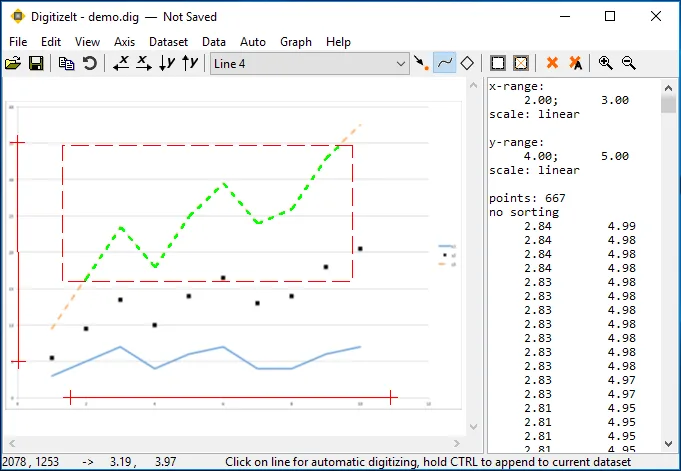
DigitizeIt turns a scanned graph or chart into numerical x,y data when the original values are unavailable. Import an image or paste a graph from the clipboard, define its axes, and extract points automatically or by clicking them yourself. It is aimed at recovering data from published plots for use in a spreadsheet or another analysis application.
The digitizer supports line and scatter plots, multiple data sets, and linear, logarithmic, reciprocal, date and time axes. It can work with tilted or distorted graphs whose axes are not perpendicular. Extracted values can be saved as CSV or Excel files or copied through the clipboard.
DigitizeIt is commercial try-before-you-buy software, not a permanently free utility. The unregistered version stops working after 21 days; continued use requires a purchased license key. The publisher labels the download series 2.6 and links the Windows package named DigitizeIt-2.6.7.msi. CPU architecture and a Windows-version support list were not established by the cited homepage.
What it offers
- Digitize line and scatter plots automatically or select individual points manually.
- Import common image formats including GIF, PNG, TIFF, JPEG and BMP, or paste a graph from the clipboard.
- Export numerical data to CSV or Excel files, or copy values to the clipboard.
- Define linear, logarithmic, reciprocal, date and time axes, including non-perpendicular axes in tilted graphs.
- Manage multiple data sets and zoom, mirror or rotate graph images.
Good to know
- The unregistered version is for evaluation only and stops working after 21 days; continued use requires a paid license key.
- The workflow requires defining the graph's axis system before digitizing the data.
Product images
Sources
References used for this listing. Retrieval dates do not indicate hands-on testing.
More in utilities
View category ↗
1.1.1.1 with WARP 2026.8.2115.0
Encrypt traffic from your Mac to Cloudflare’s network with WARP, or use DNS-only mode for encrypted DNS queries to the 1.1.1.1 resolver.
1.1.1.1 with WARP 2026.8.2115.0
Encrypt traffic between your Windows PC and Cloudflare, or use encrypted DNS only, with the free 1.1.1.1 with WARP app.

3uTools 9.12.005
Manage iPhone and iPad photos, music, apps and backups from Windows with 3uTools, a free utility that also includes device checks and firmware flashing tools.