
Utilities Windows
Directory Lister
Print folder contents or export file lists to HTML, text, Excel, CSV or a database with Directory Lister for Windows, available as a 30-day trial.
- Operating system
- Windows 7, 8, 10; Windows Server 2012, 2016, 2019
- Architecture
- Publisher lists support for 32-bit and 64-bit Windows; installer architecture not independently inspected
- Download package
- EXE installer (DirectoryLister2.exe)
Publisher requirements, not a local installation test. Windows 11 is not listed. The stable download filename does not itself identify a version.
Link checked · Download guidance
What is Directory Lister?
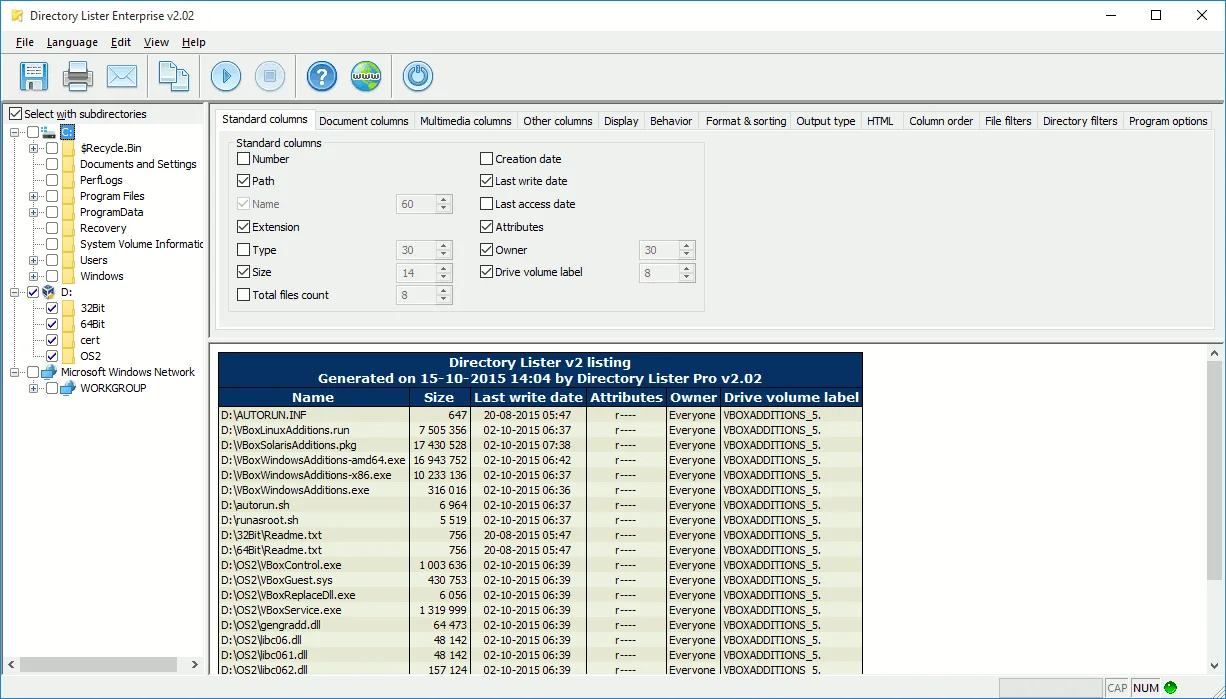
Directory Lister turns selected folders into file lists you can save, print or send by email. It works with local drives, removable storage and network shares, making it useful for documenting a shared folder or preparing a catalog of stored files. Output options include HTML, text, Microsoft Excel, CSV and database storage.
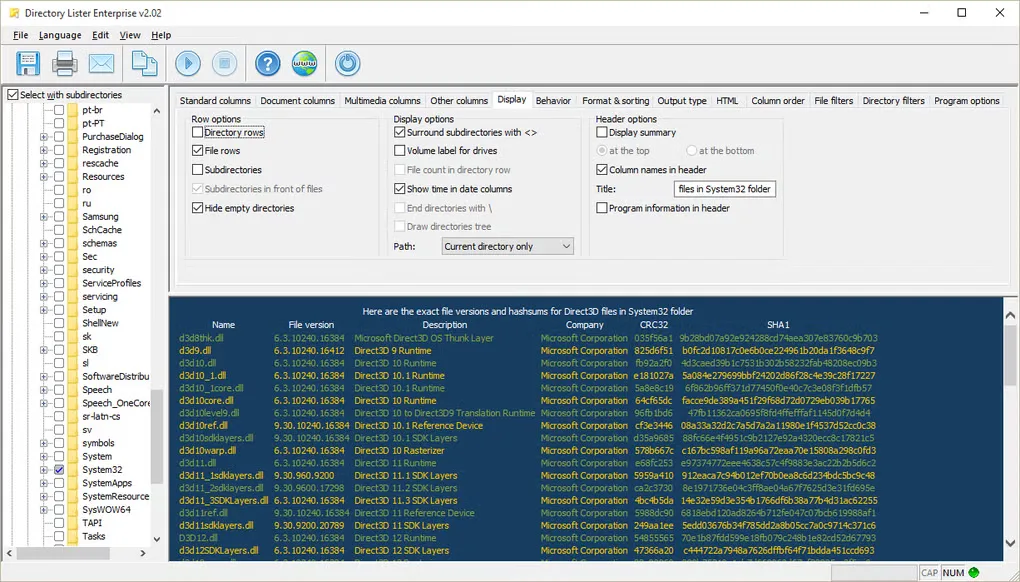
Choose the information to include, arrange the columns and filter files by name, date, size or attributes. Listings can show file sizes and dates alongside document or multimedia metadata. Hash columns include CRC32, MD5, SHA-1, SHA-256 and SHA-512. HTML output can link back to the listed files and folders.
Windows Explorer context-menu integration provides another way to generate a listing. A command-line interface supports automated jobs through Windows Task Scheduler. The publisher offers a 30-day trial rather than an unlimited free edition. Its published system requirements list Windows 7, 8 and 10 and Windows Server 2012, 2016 and 2019; Windows 11 support is not established by those requirements. The screenshots are publisher-era Directory Lister Enterprise v2.02 examples, not captures of version 2.48 running today.
What it offers
- Save, print or email folder listings, with HTML, text, Excel, CSV and database output options.
- Select file-information columns, change their order and customize HTML listing styles.
- Filter files by name, date, size or attributes and sort folders by size.
- Include document and multimedia metadata or file checksums in a listing.
- Generate listings through Windows Explorer integration or the command-line interface.
Good to know
- The publisher offers a 30-day trial; continued licensed use requires purchase.
- Windows 11 support is not confirmed by the publisher's listed system requirements.
Product images
Sources
References used for this listing. Retrieval dates do not indicate hands-on testing.
More in utilities
View category ↗
1.1.1.1 with WARP 2026.8.2115.0
Encrypt traffic from your Mac to Cloudflare’s network with WARP, or use DNS-only mode for encrypted DNS queries to the 1.1.1.1 resolver.
1.1.1.1 with WARP 2026.8.2115.0
Encrypt traffic between your Windows PC and Cloudflare, or use encrypted DNS only, with the free 1.1.1.1 with WARP app.

3uTools 9.12.005
Manage iPhone and iPad photos, music, apps and backups from Windows with 3uTools, a free utility that also includes device checks and firmware flashing tools.