

Utilities Windows
Directory Opus for Windows
Manage files in tabs and dual panes with Directory Opus for Windows. Queue copies, batch-rename files, find duplicates and synchronize folders in a configurable Explorer replacement.
- Operating system
- Windows 7, 8, 10 and 11 (publisher-listed)
- Architecture
- x64
- Download package
- EXE installer
ARM is not supported. The retained release-link HEAD receipt resolved to DOpusInstall-13.25.exe; the publisher's stable release URL may change its target.
Link checked · Download guidance
What is Directory Opus?
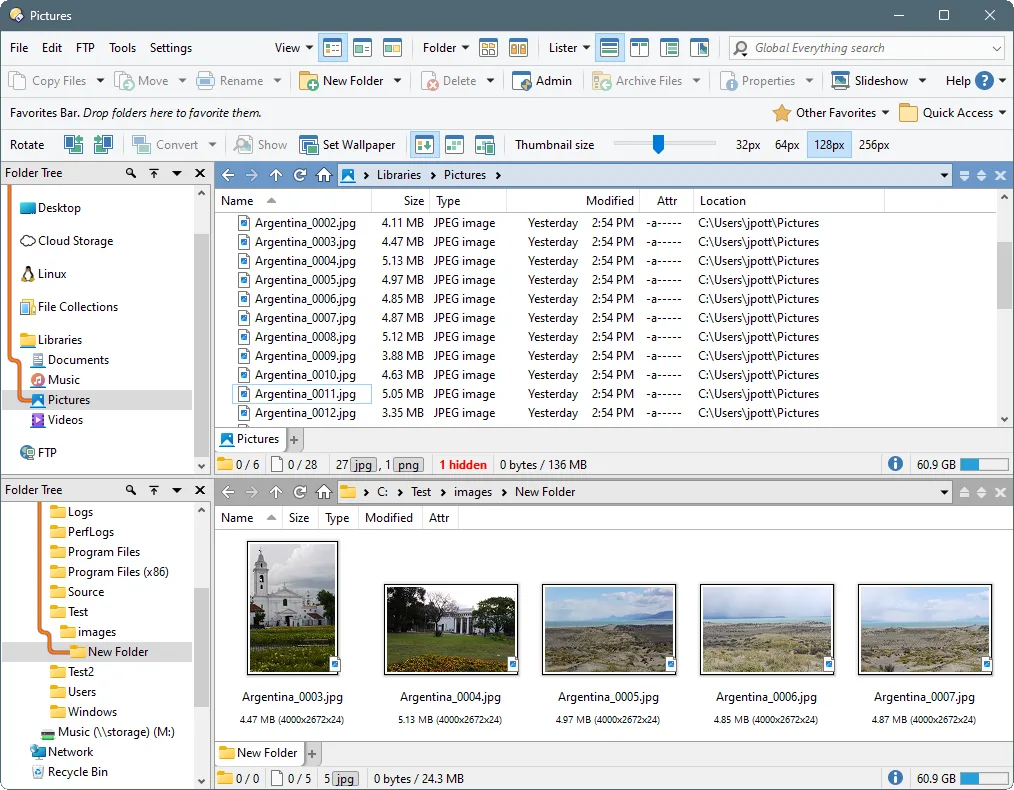
Directory Opus brings file browsing, copying and organization into a configurable Windows file manager. Single- or dual-pane layouts and folder tabs let you keep multiple locations open. Its Explorer replacement mode is an option for people who want those tools in their everyday folder workflow.
Beyond browsing, it includes queued file copies, batch renaming, duplicate-file search and folder synchronization. An integrated viewer and metadata editor help inspect files without switching to a separate utility for each task. You can change toolbars, menus, colors and hotkeys rather than use one fixed layout.
This is paid software with a 30-day evaluation; the publisher offers an extended 60-day trial after registration. The Windows download targets x64 systems, not ARM. A purchased licence is perpetual, but an expired upgrade subscription prevents installing further updates and accessing new features. The screenshot is supplied by the publisher's gallery; it illustrates the interface rather than proving the appearance of every release.
What it offers
- Browse folders in single or dual panes with folder trees and multiple tabs.
- Queue file copies and rename batches of files with keyboard-macro support.
- Find duplicate files and synchronize folders with built-in tools.
- Inspect files using the integrated viewer and metadata editor.
- Customize toolbars, menus, colors and hotkeys to suit your workflow.
Good to know
- The free evaluation lasts 30 days, or 60 days after registration; continued use requires a paid licence.
- The publisher supports x64 Windows and explicitly states that ARM is not supported.
- A perpetual licence lets you retain your version, but updates and new features require an active upgrade subscription once the included update period ends.
Product images
Sources
References used for this listing. Retrieval dates do not indicate hands-on testing.
- Directory Opus - GPSoftware (retained publisher capture) ↗Retrieved
- GPSoftware release metadata (retained response) ↗Retrieved
- Publisher stable release download (retained HEAD-only receipt) ↗Retrieved
- Directory Opus - Download (normal browser observation) ↗Retrieved
- GPSoftware official gallery — horizontal dual display ↗Retrieved
More in utilities
View category ↗
1.1.1.1 with WARP 2026.8.2115.0
Encrypt traffic from your Mac to Cloudflare’s network with WARP, or use DNS-only mode for encrypted DNS queries to the 1.1.1.1 resolver.
1.1.1.1 with WARP 2026.8.2115.0
Encrypt traffic between your Windows PC and Cloudflare, or use encrypted DNS only, with the free 1.1.1.1 with WARP app.


3uTools 9.12.005
Manage iPhone and iPad photos, music, apps and backups from Windows with 3uTools, a free utility that also includes device checks and firmware flashing tools.