
Utilities Windows
DirPrintOK
Print folder contents and directory trees, choose file-detail columns, or export lists to XLS, HTML, CSV and TXT with DirPrintOK for Windows.
- Operating system
- Windows 11, 10, 8.1 and 7; Windows Server versions also listed by publisher
- Architecture
- x64 (selected download)
- Download package
- ZIP archive containing the x64 installer
The publisher separately lists non-x64 installer and portable ZIP packages. No installer was downloaded, extracted or run.
Link checked · Download guidance
What is DirPrintOK?
DirPrintOK turns Windows folder contents into printable file lists and directory trees. Select a folder, choose the details to include, and use the print preview to fit the list to the page. It is useful for making a folder inventory or sharing a directory listing without sending the files themselves. Export options include XLS, HTML, CSV and TXT.
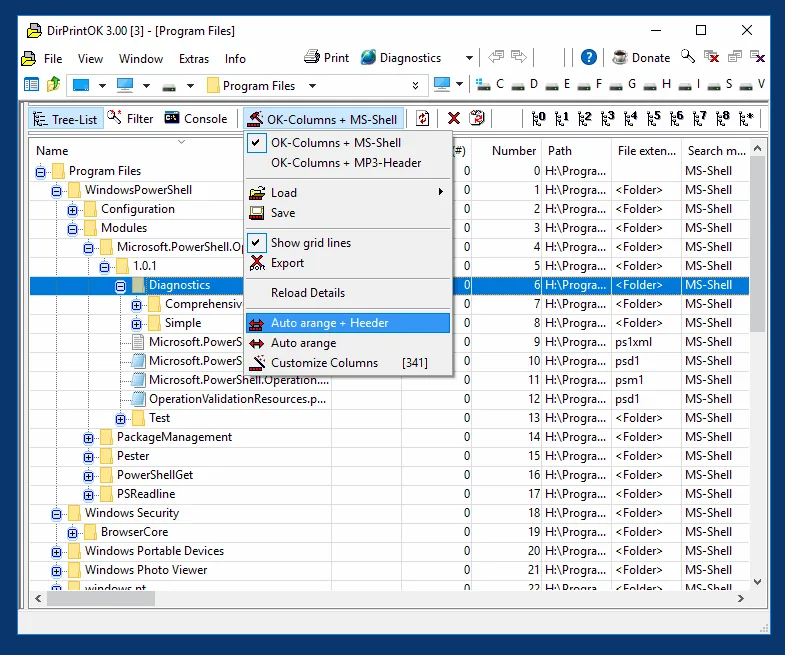
Tree-list, filter and console views provide different ways to prepare a listing. You can show or hide columns, filter files and subfolders, group entries, and open another folder in a separate tab. Printouts inherit the selected view's column order, widths and positions, so prepare the columns before printing. PDF output uses an installed PDF printer rather than one of the listed export formats.
The linked download is the publisher's ZIP archive for the x64 installer; portable packages are listed separately by the publisher. The screenshot is an older publisher example showing DirPrintOK 3.00, not a capture of the listed 7.69 release.
What it offers
- Print directory contents and folder structures with a print preview and adjustable aspect ratio.
- Export directory listings to XLS, HTML, CSV or TXT.
- Choose, sort, show and hide file-detail columns in tree-list views.
- Filter files and subfolders, and group entries by folder, extension, modification time or size.
- Open folders in separate tabs and use a console-style directory view.
Good to know
- Printouts inherit the displayed columns, widths and positions; adjust the listing before printing.
- PDF output requires an installed PDF printer; the publisher lists XLS, HTML, CSV and TXT as export formats.
Product images
Sources
References used for this listing. Retrieval dates do not indicate hands-on testing.
More in utilities
View category ↗
1.1.1.1 with WARP 2026.8.2115.0
Encrypt traffic from your Mac to Cloudflare’s network with WARP, or use DNS-only mode for encrypted DNS queries to the 1.1.1.1 resolver.
1.1.1.1 with WARP 2026.8.2115.0
Encrypt traffic between your Windows PC and Cloudflare, or use encrypted DNS only, with the free 1.1.1.1 with WARP app.

3uTools 9.12.005
Manage iPhone and iPad photos, music, apps and backups from Windows with 3uTools, a free utility that also includes device checks and firmware flashing tools.