
Utilities Windows
Discord History Tracker
Save Discord chat history to a local database and read it offline with Discord History Tracker, a free, open-source Windows desktop app.
- Operating system
- Windows; minimum Windows version not specified on the publisher product page
- Architecture
- x64 (64-bit)
- Download package
- ZIP archive containing the DiscordHistoryTracker executable
Extract the executable to launch. Message capture also requires the generated tracking script in Discord or a browser with Discord open.
Link checked · Download guidance
What is Discord History Tracker?
Discord History Tracker keeps a local archive of chat history from Discord servers, groups and private conversations. The desktop app creates or opens a SQLite database, while its tracking script sends messages from Discord to that database. It suits keeping a browsable copy of conversations for later reference.
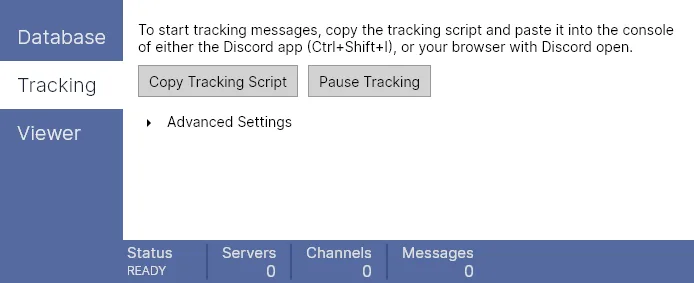
The Tracking tab provides the script and tracking controls. Automatic scrolling loads channel history, and tracking pauses by default when it reaches a previously saved message. The Viewer tab can open saved history in a browser, save a viewer file for later use and filter which messages are shown.
Installing the desktop app alone does not capture messages: tracking requires its generated script in the console of Discord or a browser with Discord open. This entry links to the publisher’s Windows 64-bit ZIP for version 47.4; extract the DiscordHistoryTracker executable to launch it. The publisher does not list a minimum Windows version on the product page.
What it offers
- Save tracked messages in a local SQLite database.
- Automatically scroll channel history and pause on previously saved messages by default.
- Open an offline history viewer in a browser or save it as a file.
- Filter the saved messages shown by the viewer.
Good to know
- The desktop app alone does not collect messages; the generated tracking script must run in Discord or a browser with Discord open.
- The linked Windows package is 64-bit; it is not the separate portable package intended for other systems.
Product images
Sources
References used for this listing. Retrieval dates do not indicate hands-on testing.
More in utilities
View category ↗
1.1.1.1 with WARP 2026.8.2115.0
Encrypt traffic from your Mac to Cloudflare’s network with WARP, or use DNS-only mode for encrypted DNS queries to the 1.1.1.1 resolver.
1.1.1.1 with WARP 2026.8.2115.0
Encrypt traffic between your Windows PC and Cloudflare, or use encrypted DNS only, with the free 1.1.1.1 with WARP app.

3uTools 9.12.005
Manage iPhone and iPad photos, music, apps and backups from Windows with 3uTools, a free utility that also includes device checks and firmware flashing tools.