

Utilities Windows
Disk Drill for Windows
Scan Windows drives, memory cards and USB storage for lost files with Disk Drill. Preview results before recovery; the free edition recovers up to 100 MB.
- Operating system
- Windows 10–11 (64-bit); Windows 11 (ARM)
- Architecture
- 64-bit; ARM on Windows 11, as listed by publisher
- Download package
- EXE installer
The publisher lists older releases separately for earlier Windows versions. Installer contents were not downloaded or inspected.
Link checked · Download guidance
What is Disk Drill?
Disk Drill for Windows searches storage devices for deleted or lost photos, documents, videos and other files. It supports internal disks, external drives, USB sticks and memory cards, including situations where files were removed from the Recycle Bin or a device was formatted. Recovery depends on whether the underlying data is still available, not just whether a scan finds a filename.
The workflow is to choose a device, scan it, filter the results and preview files before selecting what to recover. Disk Drill also offers byte-level disk backups so a disk image can be used as the recovery source instead of repeatedly scanning a failing drive. Save recovered files to a separate physical device to avoid overwriting data on the source.
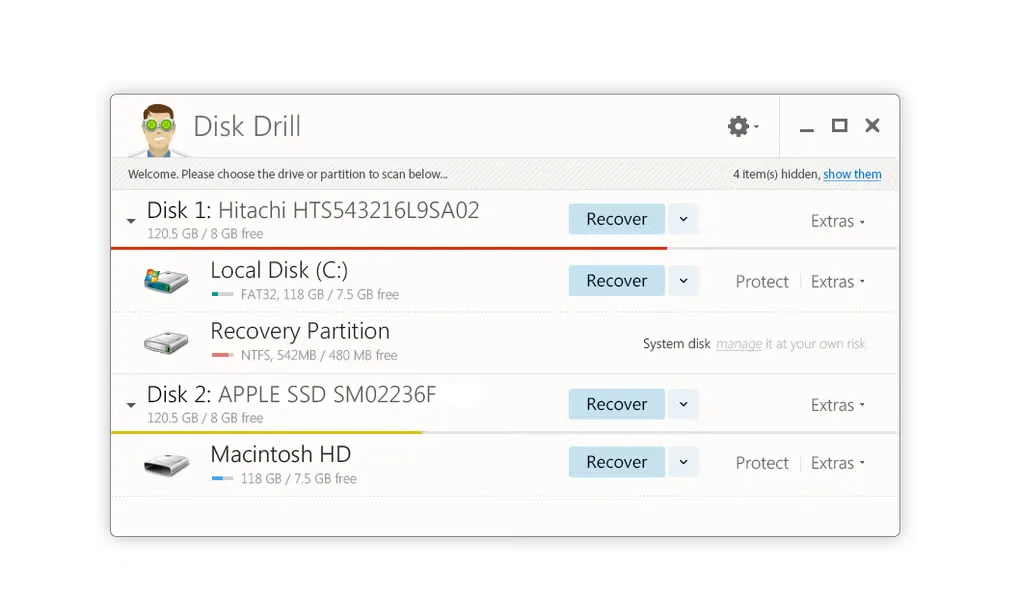
The publisher currently lists a 100 MB recovery allowance for the free Windows edition, with a paid PRO upgrade for more recovery. This differs from the 500 MB allowance in Softonic's older description. The linked publisher download is version 6.3.1398 for Windows 10–11 on 64-bit systems and Windows 11 on ARM. The gallery screenshot shows an older Windows interface, not a verified view of version 6.3.
What it offers
- Scan internal disks, external drives, USB sticks and memory cards for deleted or lost files.
- Filter scan results by file type and search for specific files.
- Preview found files and consult recovery-chance estimates before choosing what to recover.
- Create byte-level disk backups and use disk images as recovery sources.
Good to know
- The publisher lists recovery of up to 100 MB in the free Windows edition; additional recovery requires a paid upgrade.
- Overwritten data cannot be recovered by scanning the original storage location.
- Physically damaged devices that Windows cannot recognize need hardware repair before software recovery is possible.
- Recovered files should be saved to a separate physical storage device, not the source being recovered.
Product images
Sources
References used for this listing. Retrieval dates do not indicate hands-on testing.
More in utilities
View category ↗
1.1.1.1 with WARP 2026.8.2115.0
Encrypt traffic from your Mac to Cloudflare’s network with WARP, or use DNS-only mode for encrypted DNS queries to the 1.1.1.1 resolver.
1.1.1.1 with WARP 2026.8.2115.0
Encrypt traffic between your Windows PC and Cloudflare, or use encrypted DNS only, with the free 1.1.1.1 with WARP app.

3uTools 9.12.005
Manage iPhone and iPad photos, music, apps and backups from Windows with 3uTools, a free utility that also includes device checks and firmware flashing tools.