

Utilities Windows
DiskBoss for Windows
Analyze storage use, find duplicate files and schedule file-management jobs with DiskBoss for Windows. This download is the commercial Server edition for x64 systems.
- Operating system
- Windows 10 and 11; Windows Server 2016, 2019, 2022 and 2025; older Windows releases also listed by publisher
- Architecture
- x64
- Download package
- EXE installer (DiskBoss Server)
This link selects the 64-bit Server package. Separate 32-bit and Enterprise installers are listed by the publisher. Compatibility is publisher-reported; software was not installed or tested.
Link checked · Download guidance
What is DiskBoss?
DiskBoss combines disk-space analysis with file classification, duplicate-file searches and rule-based file management. It can work with local disks, directories and accessible network shares, including NAS storage. Administrators can use analysis reports to identify space-heavy folders before choosing which files to organize, synchronize or remove.
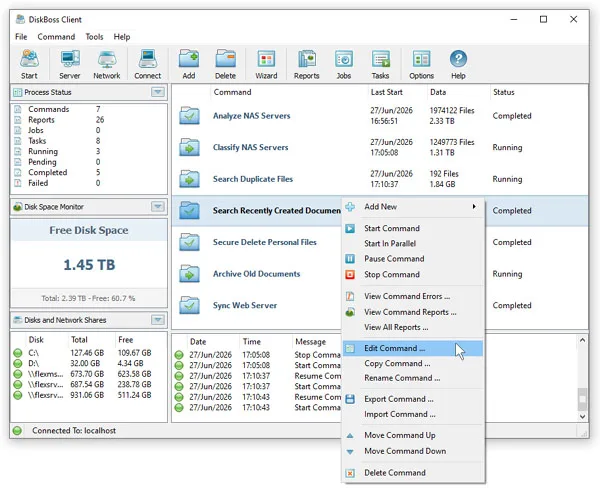
The download linked here is DiskBoss Server 17.2.16 for 64-bit Windows, not a freeware desktop edition. Server runs as a background service and can execute saved commands on a schedule, with a client GUI or command-line utility for management. Reports can be saved in formats such as HTML, PDF and CSV, or submitted to an SQL database.
Edition choice matters. The publisher limits Server to 100 million files, 100 TB of storage and 100 network shares. Its current comparison reserves secure file copy, secure file synchronization and the web-based management interface for Enterprise. Some general help pages still describe a broader feature set, so those Enterprise-only capabilities are not promised for this download.
What it offers
- Analyze disk-space use on local disks, network shares and NAS storage, with categorized results and charts.
- Classify files and search for duplicates to guide file-management decisions.
- Define rule-based file-management commands and schedule unattended execution through the Server service.
- Synchronize directories and run file-copy or data-migration operations.
- Export analysis reports and use the command-line utility or SQL database integration for administrative workflows.
Good to know
- The linked package is the commercial Server edition; a free-to-use desktop license is not established by the current publisher download and purchase pages.
- Server is limited to 100 million files, 100 TB of storage and 100 network shares according to the publisher's edition comparison.
- Secure file copy, secure file synchronization and the web-based management interface are listed for Enterprise, not Server, in the current edition comparison.
Product images
Sources
References used for this listing. Retrieval dates do not indicate hands-on testing.
- DiskBoss - File Management - Downloads ↗Retrieved
- DiskBoss - File Management - Product Versions and Features ↗Retrieved
- DiskBoss - File Management - Purchase - DiskBoss ↗Retrieved
- DiskBoss - File Management - Server-Based Product Version ↗Retrieved
- DiskBoss - File Management - Product Overview ↗Retrieved
- DiskBoss - File Management - Supported Operating Systems ↗Retrieved
- DiskBoss - File Management - About ↗Retrieved
- DiskBoss - File Management - DiskBoss GUI Screenshots ↗Retrieved
More in utilities
View category ↗
1.1.1.1 with WARP 2026.8.2115.0
Encrypt traffic from your Mac to Cloudflare’s network with WARP, or use DNS-only mode for encrypted DNS queries to the 1.1.1.1 resolver.
1.1.1.1 with WARP 2026.8.2115.0
Encrypt traffic between your Windows PC and Cloudflare, or use encrypted DNS only, with the free 1.1.1.1 with WARP app.


3uTools 9.12.005
Manage iPhone and iPad photos, music, apps and backups from Windows with 3uTools, a free utility that also includes device checks and firmware flashing tools.